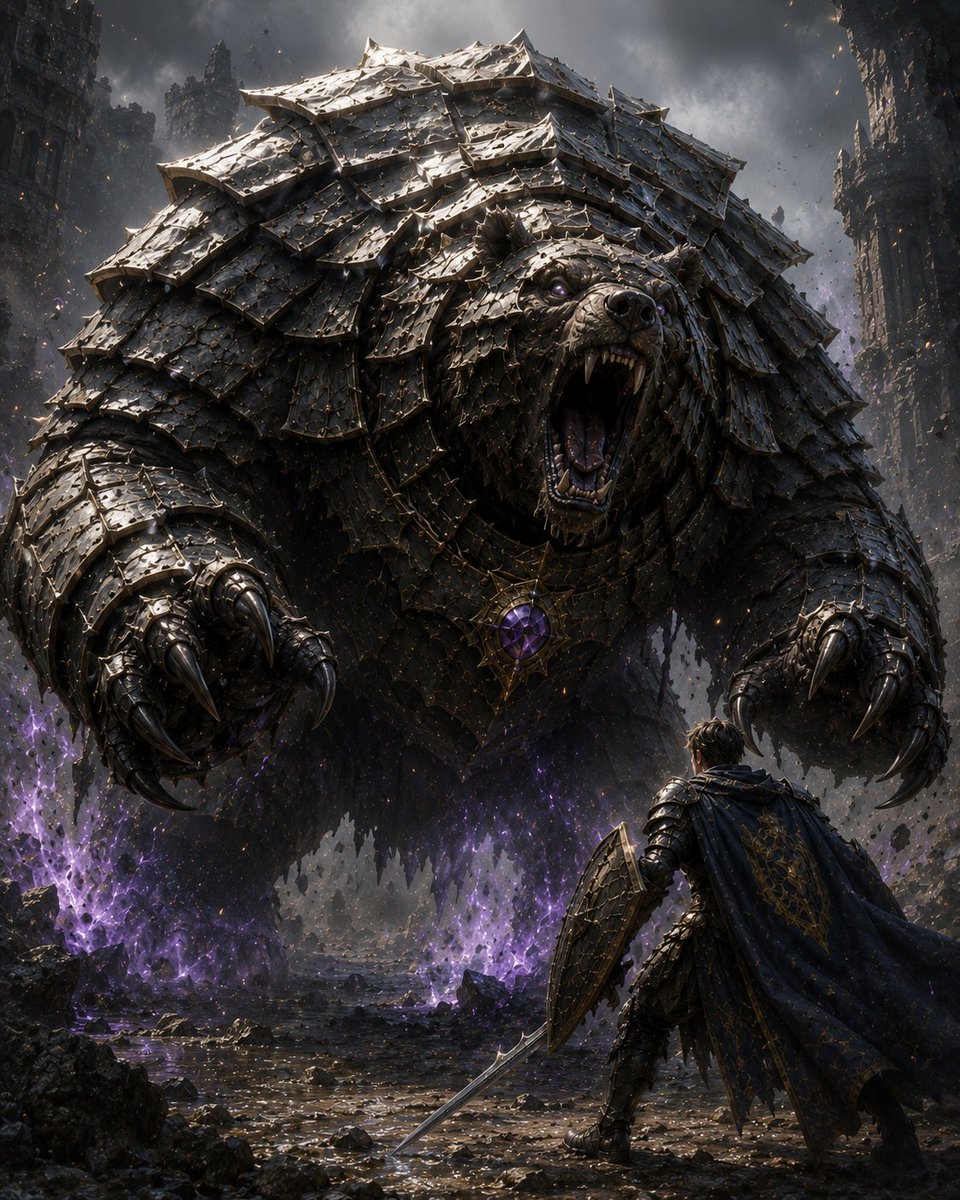
Armored Bear Encounter
A cinematic dark fantasy scene of a lone knight confronting a colossal armored bear in a ruined magical battlefield.
This is a GPT Image 2 prompt case for Illustration & Art. Use the copy-ready prompt below to generate similar visuals, and review Awesome GPT Image 2 Prompts attribution plus commercial-use rights before reuse.
Free 1K preview
Generate one preview image instantly, no sign-up required.
Prompt
Copy-ready prompt
Create a dark epic fantasy cinematic illustration of {argument name="encounter title" default="Encounter with an Armored Bear"}: a colossal bear-like monster dominates the frame, lunging forward and roaring with its mouth wide open, fangs exposed, purple-glowing eyes, and enormous metal claws reaching toward the viewer. The bear is covered head to toe in layered blackened steel armor plates like overlapping scales, battered, scratched, riveted, and jagged, with heavy shoulder plates and a large ornate amulet on its chest holding a glowing {argument name="gem color" default="purple"} crystal. In the lower right foreground, show exactly 1 lone human knight seen from behind, much smaller than the beast, wearing dark ornate armor and a tattered cloak, holding exactly 1 long sword angled downward and exactly 1 large kite shield raised defensively. Set the scene in a ruined gothic city or fortress canyon with exactly 2 tall broken stone tower walls framing the left and right sides, storm clouds overhead, drifting ash, sparks, flying debris, shattered rocks, wet reflective ground, and eerie purple magical flames or energy erupting from the ground around the monster. Use a low-angle heroic composition, the bear filling most of the image, the knight providing scale, high contrast chiaroscuro lighting, cold gray-black metal tones with violet magical highlights, ultra-detailed textures, realistic fantasy concept art, dramatic volumetric smoke, sharp focus, vertical 4:5 aspect ratio, no text, no watermark.Prompt variables
Editable argument placeholders found in the prompt, with their default values.
Best for
- - Illustration & Art visual exploration
- - Image generation and reference-image edits
- - Reusable briefs that keep source attribution visible
Change these parts
- - Subject, product, character, or scene
- - Aspect ratio, camera, lighting, and background
- - Brand, text, color, and output constraints
Recommended model and settings
- - Model: gpt-image-2
- - Input mode: Text to Image
- - Aspect ratio: source
- - Commercial status: review original source
How to use this prompt
- 1. Copy the prompt and preserve its structure for the first test.
- 2. Replace the subject, context, and publishing channel.
- 3. Change one camera, lighting, or style variable per iteration.
- 4. Inspect the output, source, text, and rights before reuse.
Limitations, source, and reuse cautions
- - Generated output is an editable draft, not factual, legal, or rights evidence.
- - Review the linked source, people, brands, logos, text, and third-party media before commercial use.
More cases in this category
Prioritized by category, input mode compatibility, quality, and lower risk.
Reuse and source notes
Use this prompt safely after previewing the case.
- 1.Copy the prompt or open it directly in Dovoo with the generation button.
- 2.Adjust variables, aspect ratio, and reference images for your own use case.
- 3.Before publishing or paid usage, verify source rights, attribution requirements, and brand or likeness risks.
Can I use this prompt commercially?
Commercial-use status is allowed. Review the original source, license, brand constraints, and legal requirements before paid usage.
Where does this case come from?
This case is imported from Awesome GPT Image 2 Prompts; keep attribution visible and check the source URL before reuse.