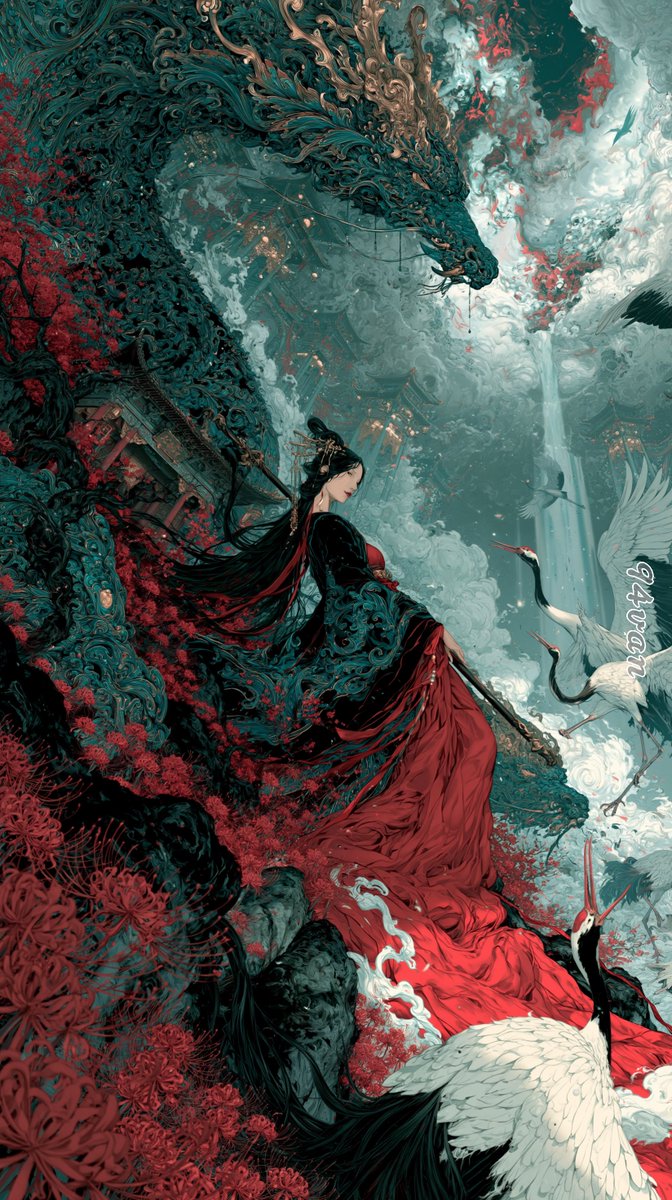
Dragon Empress in Crimson Robes
A vertical dark-fantasy xianxia illustration prompt for creating an ornate immortal empress, a protective dragon, cranes, mist, and red spider lilies.
This is a GPT Image 2 prompt case for Illustration & Art. Use the copy-ready prompt below to generate similar visuals, and review Awesome GPT Image 2 Prompts attribution plus commercial-use rights before reuse.
Free 1K preview
Generate one preview image instantly, no sign-up required.
Prompt
Copy-ready prompt
Create a tall vertical fantasy xianxia illustration in an ultra-detailed East Asian ink-painting and dark ornate Art Nouveau style. The scene shows {argument name="character name" default="a serene immortal empress"} seated in profile on a mossy cliff, wearing a flowing black outer robe embroidered with intricate teal filigree and a dramatic {argument name="dress color" default="deep crimson red"} gown cascading down the rocks like a river of silk. She has very long black hair streaming behind her, an elegant gold hair ornament, pale skin, and a calm downward gaze, holding a slender ceremonial staff or sword across her lap. Above and behind her, a colossal serpentine dragon coils through the sky, its body made of dark teal scales, swirling carved cloud patterns, and bronze-gold antler-like horns, lowering its head protectively toward her. Surround the cliff with dense {argument name="flower type" default="red spider lilies"}, twisted dark branches, ancient broken temple architecture, mist, and curling clouds. Include exactly four white cranes: one large crane in the bottom foreground with black neck feathers and red crown, two cranes flying or standing to the right of the woman, and one small crane silhouette high in the cloudy sky. The background is a vast celestial mountain-temple landscape with jade mist, pale waterfalls or shafts of light, stormy clouds, and small glowing lantern-like points in the distance. Use a limited palette of deep teal, black, jade gray, ivory white, muted gold, and saturated crimson red. Composition should be cinematic and diagonal, with the dragon forming a sweeping arch from upper left to center, the woman centered lower-middle, and the red gown leading the eye to the bottom edge. Render with extreme fine linework, dense ornamental detail, painterly smoke, layered depth, delicate textures, high contrast, ethereal atmosphere, and no modern objects.Prompt variables
Editable argument placeholders found in the prompt, with their default values.
Best for
- - Illustration & Art visual exploration
- - Image generation and reference-image edits
- - Reusable briefs that keep source attribution visible
Change these parts
- - Subject, product, character, or scene
- - Aspect ratio, camera, lighting, and background
- - Brand, text, color, and output constraints
Recommended model and settings
- - Model: gpt-image-2
- - Input mode: Text to Image
- - Aspect ratio: source
- - Commercial status: review original source
How to use this prompt
- 1. Copy the prompt and preserve its structure for the first test.
- 2. Replace the subject, context, and publishing channel.
- 3. Change one camera, lighting, or style variable per iteration.
- 4. Inspect the output, source, text, and rights before reuse.
Limitations, source, and reuse cautions
- - Generated output is an editable draft, not factual, legal, or rights evidence.
- - Review the linked source, people, brands, logos, text, and third-party media before commercial use.
More cases in this category
Prioritized by category, input mode compatibility, quality, and lower risk.
Reuse and source notes
Use this prompt safely after previewing the case.
- 1.Copy the prompt or open it directly in Dovoo with the generation button.
- 2.Adjust variables, aspect ratio, and reference images for your own use case.
- 3.Before publishing or paid usage, verify source rights, attribution requirements, and brand or likeness risks.
Can I use this prompt commercially?
Commercial-use status is allowed. Review the original source, license, brand constraints, and legal requirements before paid usage.
Where does this case come from?
This case is imported from Awesome GPT Image 2 Prompts; keep attribution visible and check the source URL before reuse.