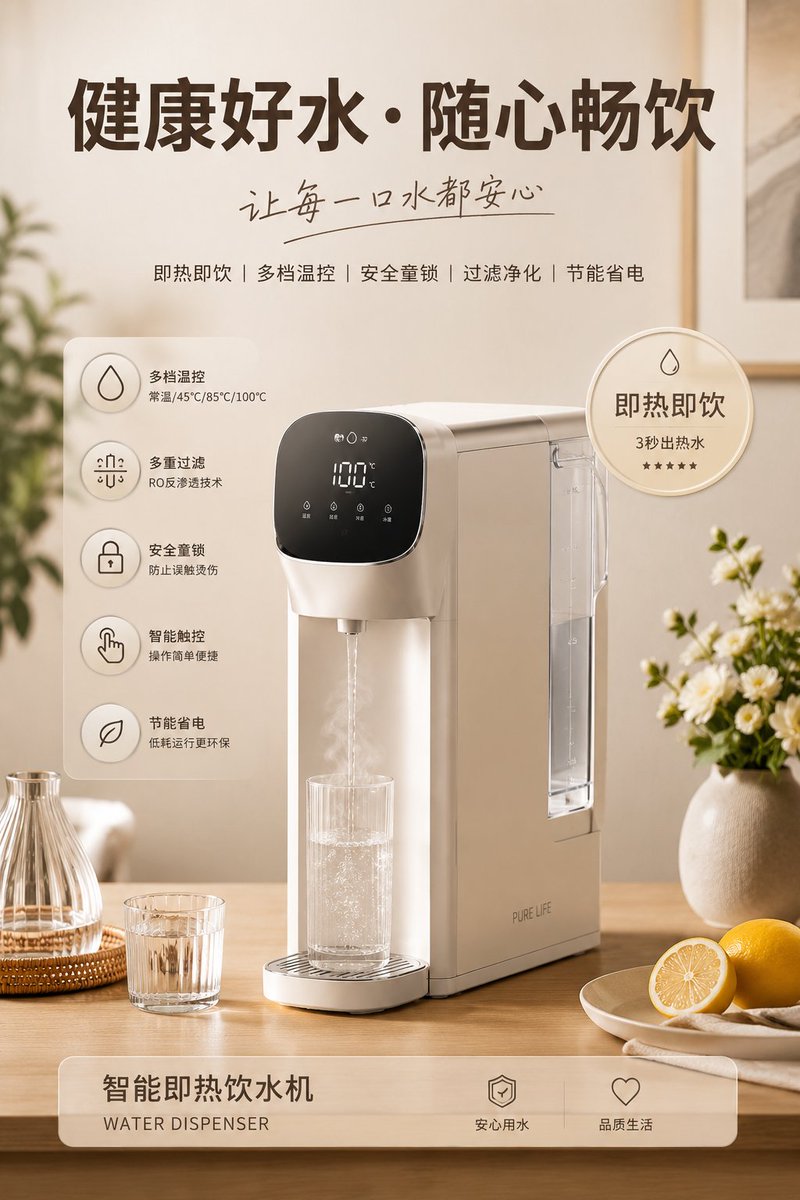
Home Appliance Commercial Poster
A professional advertising prompt for generating high-quality appliance posters with lifestyle backgrounds, feature icons, and clean commercial typography.
This is a GPT Image 2 prompt case for Product & Commercial. Use the copy-ready prompt below to generate similar visuals, and review Awesome GPT Image 2 Prompts attribution plus commercial-use rights before reuse.
Free 1K preview
Generate one preview image instantly, no sign-up required.
Prompt
Copy-ready prompt
Please generate a high-quality appliance product advertisement poster with the subject '{argument name="subject" default="coffee pot"}'. Use the subject as the visual core, automatically adapting to its corresponding lifestyle scene, auxiliary items, decorative elements, keywords, selling point badges, functional icon descriptions, and overall color style. The layout is: large main title at the top + handwritten sub-headline + keywords; the main product in the center placed in an exquisite lifestyle scene matching its usage logic; circular selling point badges and 4~5 functional icon descriptions added to the left and right; and the product name label displayed at the bottom. The overall style requires warmth and healing, soft warm light, realistic materials, modern clean typography, commercial advertising quality, low-saturation coordinated coloring, and 4K ultra-high definition, suitable for brand promotion, e-commerce posters, and social media visual displays. All elements are automatically generated around the subject and serve the subject, without overshadowing it, being cluttered, or low-quality.Prompt variables
Editable argument placeholders found in the prompt, with their default values.
Best for
- - Product & Commercial visual exploration
- - Image generation and reference-image edits
- - Reusable briefs that keep source attribution visible
Change these parts
- - Subject, product, character, or scene
- - Aspect ratio, camera, lighting, and background
- - Brand, text, color, and output constraints
Recommended model and settings
- - Model: gpt-image-2
- - Input mode: Text to Image
- - Aspect ratio: source
- - Commercial status: review original source
How to use this prompt
- 1. Copy the prompt and preserve its structure for the first test.
- 2. Replace the subject, context, and publishing channel.
- 3. Change one camera, lighting, or style variable per iteration.
- 4. Inspect the output, source, text, and rights before reuse.
Limitations, source, and reuse cautions
- - Generated output is an editable draft, not factual, legal, or rights evidence.
- - Review the linked source, people, brands, logos, text, and third-party media before commercial use.
More cases in this category
Prioritized by category, input mode compatibility, quality, and lower risk.


Reuse and source notes
Use this prompt safely after previewing the case.
- 1.Copy the prompt or open it directly in Dovoo with the generation button.
- 2.Adjust variables, aspect ratio, and reference images for your own use case.
- 3.Before publishing or paid usage, verify source rights, attribution requirements, and brand or likeness risks.
Can I use this prompt commercially?
Commercial-use status is allowed. Review the original source, license, brand constraints, and legal requirements before paid usage.
Where does this case come from?
This case is imported from Awesome GPT Image 2 Prompts; keep attribution visible and check the source URL before reuse.