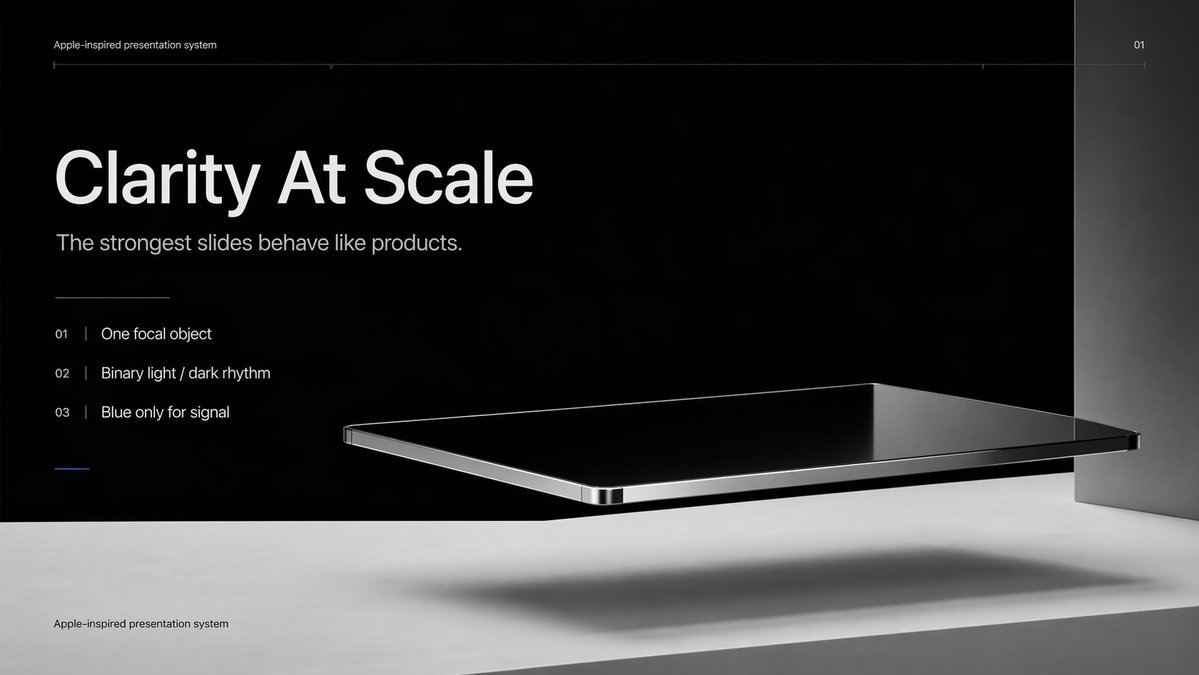
Apple-Style Minimal Presentation Cover
This prompt generates a sleek Apple-inspired presentation title slide with editorial typography and a floating black-glass product object, ideal for keynote covers, pitch decks, and design system presentations.
This is a GPT Image 2 prompt case for Graphic & Poster. Use the copy-ready prompt below to generate similar visuals, and review Awesome GPT Image 2 Prompts attribution plus commercial-use rights before reuse.
Free 1K preview
Generate one preview image instantly, no sign-up required.
Prompt
Copy-ready prompt
Create a premium minimalist keynote-style presentation cover slide in an Apple-inspired industrial design aesthetic. Use a wide 16:9 layout with a deep matte black upper background and a pale concrete-gray lower platform occupying the bottom quarter of the frame. Place a large photorealistic floating rectangular slab in the right-center foreground, resembling a thin black glass device or polished obsidian platform with mirror-like reflections, chamfered chrome-metal edges, and precise industrial finishing. The slab should hover above the light surface and cast a soft elongated shadow directly beneath it. Add a tall vertical gray metallic wall or pillar on the far right edge to frame the composition. Use extremely sparse, high-end art direction, lots of negative space, cinematic studio lighting, subtle gradients, and crisp contrast between black and silver materials. On the left side, set clean white sans-serif typography with a clear hierarchy: a tiny top caption reading "{argument name="system label" default="Apple-inspired presentation system"}", a very large bold headline reading "{argument name="headline text" default="Clarity At Scale"}", and a medium subtitle reading "{argument name="subtitle text" default="The strongest slides behave like products."}". Below that, include exactly 3 numbered principles in a vertical list with thin separators and refined spacing: "01 | {argument name="principle 1" default="One focal object"}", "02 | Binary light / dark rhythm", and "03 | Blue only for signal". Add a short thin horizontal rule above the list and a tiny blue accent line below the list. Draw a very fine horizontal guide line near the top spanning most of the slide, with the small page number "01" at the upper right. Repeat the small caption "Apple-inspired presentation system" once again at the bottom left on the light surface. Overall look: luxury tech presentation, editorial product-launch slide, ultra-clean Swiss grid, restrained monochrome palette with only one subtle blue accent, photorealistic rendering blended with presentation design.Prompt variables
Editable argument placeholders found in the prompt, with their default values.
Best for
- - Graphic & Poster visual exploration
- - Image generation and reference-image edits
- - Reusable briefs that keep source attribution visible
Change these parts
- - Subject, product, character, or scene
- - Aspect ratio, camera, lighting, and background
- - Brand, text, color, and output constraints
Recommended model and settings
- - Model: gpt-image-2
- - Input mode: Text to Image
- - Aspect ratio: source
- - Commercial status: review original source
How to use this prompt
- 1. Copy the prompt and preserve its structure for the first test.
- 2. Replace the subject, context, and publishing channel.
- 3. Change one camera, lighting, or style variable per iteration.
- 4. Inspect the output, source, text, and rights before reuse.
Limitations, source, and reuse cautions
- - Generated output is an editable draft, not factual, legal, or rights evidence.
- - Review the linked source, people, brands, logos, text, and third-party media before commercial use.
More cases in this category
Prioritized by category, input mode compatibility, quality, and lower risk.






Reuse and source notes
Use this prompt safely after previewing the case.
- 1.Copy the prompt or open it directly in Dovoo with the generation button.
- 2.Adjust variables, aspect ratio, and reference images for your own use case.
- 3.Before publishing or paid usage, verify source rights, attribution requirements, and brand or likeness risks.
Can I use this prompt commercially?
Commercial-use status is allowed. Review the original source, license, brand constraints, and legal requirements before paid usage.
Where does this case come from?
This case is imported from Awesome GPT Image 2 Prompts; keep attribution visible and check the source URL before reuse.