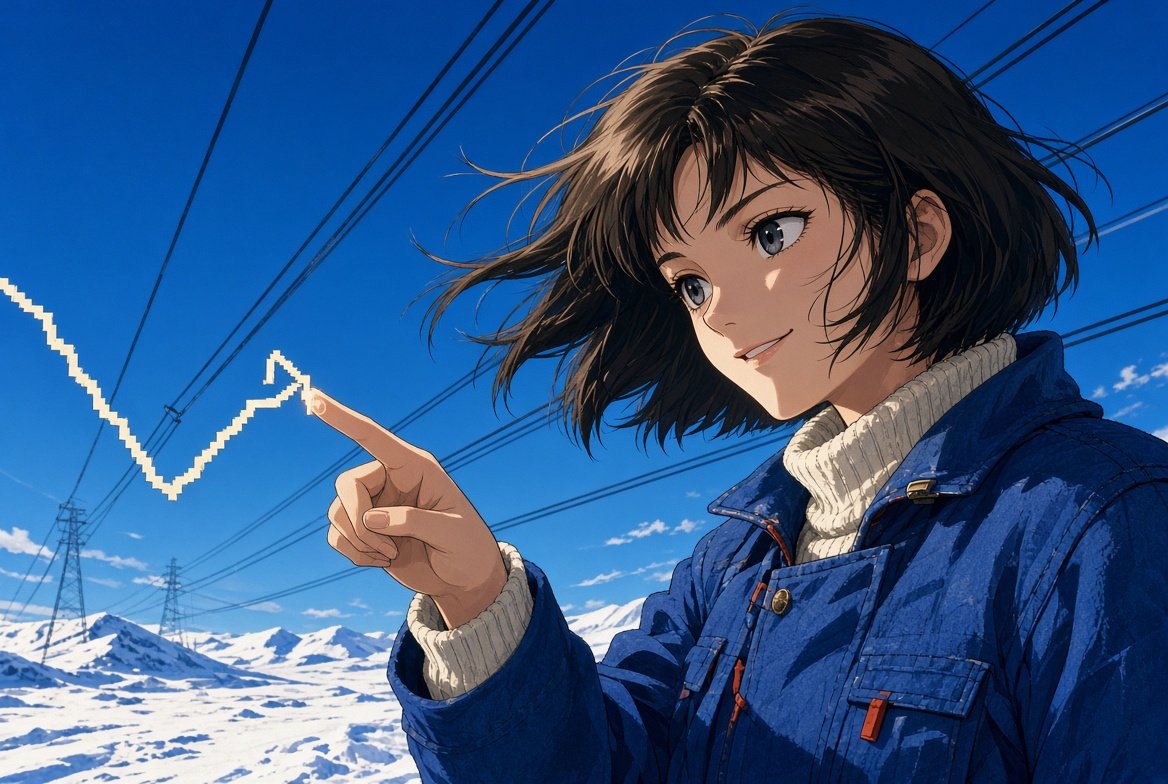
Anime Winter Power Line Portrait
Generates a cinematic anime portrait of a winter-clad girl touching a pixelated electric arrow in a snowy power-line landscape.
This is a GPT Image 2 prompt case for Anime & Game. Use the copy-ready prompt below to generate similar visuals, and review Awesome GPT Image 2 Prompts attribution plus commercial-use rights before reuse.
Free 1K preview
Generate one preview image instantly, no sign-up required.
Prompt
Copy-ready prompt
Create a cinematic anime-style illustration of {argument name="character name" default="a young woman"} standing outdoors in a snowy open landscape under a vivid deep blue winter sky. She is shown in a close-up three-quarter view from the waist up, positioned on the right side of the frame, smiling softly and looking toward her raised hand. She has {argument name="hair color" default="short tousled dark brown hair"} blown by the wind, large expressive gray-blue eyes, delicate facial features, and warm sunlight highlighting her face and hair. She wears a thick {argument name="jacket color" default="cobalt blue"} winter work jacket with visible seams, zipper pulls, pockets, metal snaps, and a cream ribbed turtleneck sweater underneath. Her left hand is extended toward the left side of the image, index finger pointing outward, and a bright white pixelated zigzag arrow or electric line appears to touch the fingertip, forming one angular rising graph-like shape. In the background, show a vast snow-covered field with low snowy hills, utility pylons, and multiple black power lines stretching diagonally across the sky, creating strong perspective lines. Use crisp detailed anime rendering, high contrast sunlight, subtle shadows, wind-swept hair strands, saturated blues and whites, clean linework, and a widescreen 3:2 composition. Avoid text, logos, watermarks, extra characters, or additional graphic elements.Prompt variables
Editable argument placeholders found in the prompt, with their default values.
Best for
- - Anime & Game visual exploration
- - Image generation and reference-image edits
- - Reusable briefs that keep source attribution visible
Change these parts
- - Subject, product, character, or scene
- - Aspect ratio, camera, lighting, and background
- - Brand, text, color, and output constraints
Recommended model and settings
- - Model: gpt-image-2
- - Input mode: Text to Image
- - Aspect ratio: source
- - Commercial status: review original source
How to use this prompt
- 1. Copy the prompt and preserve its structure for the first test.
- 2. Replace the subject, context, and publishing channel.
- 3. Change one camera, lighting, or style variable per iteration.
- 4. Inspect the output, source, text, and rights before reuse.
Limitations, source, and reuse cautions
- - Generated output is an editable draft, not factual, legal, or rights evidence.
- - Review the linked source, people, brands, logos, text, and third-party media before commercial use.
More cases in this category
Prioritized by category, input mode compatibility, quality, and lower risk.
Reuse and source notes
Use this prompt safely after previewing the case.
- 1.Copy the prompt or open it directly in Dovoo with the generation button.
- 2.Adjust variables, aspect ratio, and reference images for your own use case.
- 3.Before publishing or paid usage, verify source rights, attribution requirements, and brand or likeness risks.
Can I use this prompt commercially?
Commercial-use status is allowed. Review the original source, license, brand constraints, and legal requirements before paid usage.
Where does this case come from?
This case is imported from Awesome GPT Image 2 Prompts; keep attribution visible and check the source URL before reuse.