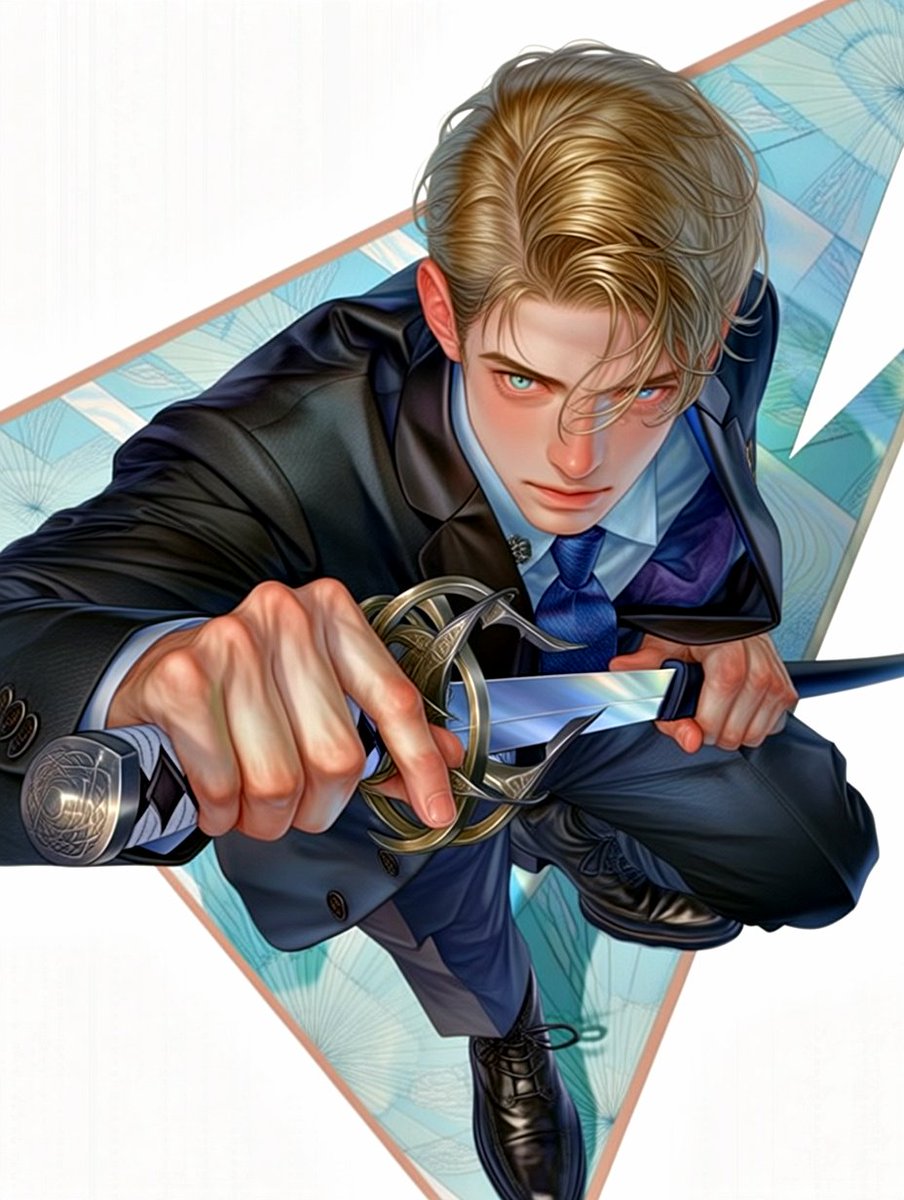
Anime Swordsman in Suit
This prompt generates a stylish high-angle anime action portrait of a blond man in a business suit drawing a rapier, ideal for character art, posters, or dramatic social media visuals.
This is a GPT Image 2 prompt case for Anime & Game. Use the copy-ready prompt below to generate similar visuals, and review Awesome GPT Image 2 Prompts attribution plus commercial-use rights before reuse.
Free 1K preview
Generate one preview image instantly, no sign-up required.
Prompt
Copy-ready prompt
A dynamic anime-style illustration of a sharply dressed young man in a dramatic foreshortened action pose, viewed from above as if he is lunging upward toward the camera while drawing a rapier straight at the viewer. He has {argument name="hair color" default="golden blond"} hair, neatly styled with a center part and soft swept-back volume, and fair skin. His face is mostly hidden by the camera angle and shadow, creating a mysterious, stylish look. He wears a tailored dark navy business suit with a subtle sheen, a light blue dress shirt, a vivid blue necktie, and polished black dress shoes. One hand dominates the foreground in extreme perspective, gripping the ornate rapier hilt; the other hand pulls the blade free, emphasizing motion and tension. The sword has 1 slender silver blade, 1 elaborate metallic guard with interlocking loops, and 1 engraved pommel. The composition is bold and graphic, with the character diagonally crossing the frame over 1 large inverted triangle backdrop filled with pale aqua and turquoise geometric fan-like patterns, outlined with a thin warm beige border, set against a clean light gray background. High-detail digital painting, glossy anime illustration, elegant action character art, crisp linework, rich fabric folds, dramatic perspective distortion, fashion-magazine polish, cool blue palette, white negative space, centered vertical composition.Prompt variables
Editable argument placeholders found in the prompt, with their default values.
Best for
- - Anime & Game visual exploration
- - Image generation and reference-image edits
- - Reusable briefs that keep source attribution visible
Change these parts
- - Subject, product, character, or scene
- - Aspect ratio, camera, lighting, and background
- - Brand, text, color, and output constraints
Recommended model and settings
- - Model: gpt-image-2
- - Input mode: Text to Image
- - Aspect ratio: source
- - Commercial status: review original source
How to use this prompt
- 1. Copy the prompt and preserve its structure for the first test.
- 2. Replace the subject, context, and publishing channel.
- 3. Change one camera, lighting, or style variable per iteration.
- 4. Inspect the output, source, text, and rights before reuse.
Limitations, source, and reuse cautions
- - Generated output is an editable draft, not factual, legal, or rights evidence.
- - Review the linked source, people, brands, logos, text, and third-party media before commercial use.
More cases in this category
Prioritized by category, input mode compatibility, quality, and lower risk.


Reuse and source notes
Use this prompt safely after previewing the case.
- 1.Copy the prompt or open it directly in Dovoo with the generation button.
- 2.Adjust variables, aspect ratio, and reference images for your own use case.
- 3.Before publishing or paid usage, verify source rights, attribution requirements, and brand or likeness risks.
Can I use this prompt commercially?
Commercial-use status is allowed. Review the original source, license, brand constraints, and legal requirements before paid usage.
Where does this case come from?
This case is imported from Awesome GPT Image 2 Prompts; keep attribution visible and check the source URL before reuse.