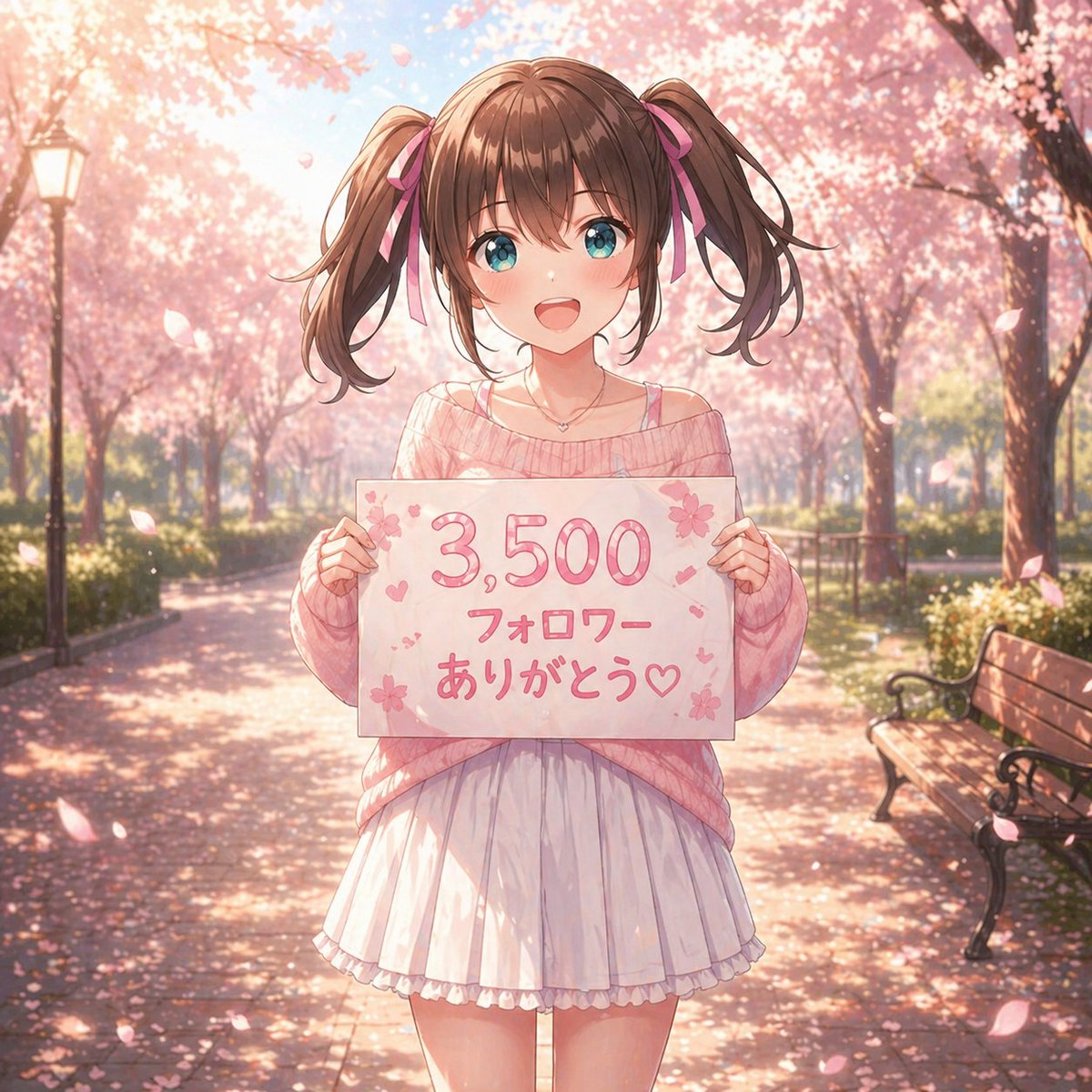
Anime Sakura Thank-You Portrait
This generates a pastel anime-style spring portrait of a twin-tailed girl holding a celebratory follower-thank-you sign, ideal for social posts or milestone announcements.
This is a GPT Image 2 prompt case for Anime & Game. Use the copy-ready prompt below to generate similar visuals, and review Awesome GPT Image 2 Prompts attribution plus commercial-use rights before reuse.
Free 1K preview
Generate one preview image instantly, no sign-up required.
Prompt
Copy-ready prompt
A soft, dreamy anime illustration of a cute teenage girl standing centered on a park path lined with blooming cherry blossom trees in full spring. She faces the viewer and holds a handmade white sign at chest height with the Japanese text {argument name="sign text" default="3,500 フォロワー ありがとう♡"} written in large rounded pink lettering, decorated with small sakura flowers, hearts, and tiny confetti-like marks. The girl has {argument name="hair color" default="medium brown"} hair styled in high twin ponytails tied with pink ribbons, straight-cut bangs, and loose curled ends. Her face is intentionally blank and featureless, a smooth shaded skin-toned oval with no eyes, nose, or mouth. She wears an oversized off-shoulder knit sweater in {argument name="sweater color" default="pastel pink"}, with a thin camisole strap visible on one shoulder, a short white pleated skirt with a soft ruffled hem, and a delicate small necklace. Her pose is gentle and symmetrical, both hands gripping the left and right edges of the sign. The setting is a sunlit sakura avenue with 2 visible benches on the right side and 1 vintage lamppost on the left, petals drifting through the air and scattered across the ground. Use warm backlighting, soft bloom, shallow depth of field, pastel pink and cream tones, romantic seasonal atmosphere, highly detailed anime rendering, polished linework, glossy hair highlights, subtle fabric folds, and a celebratory social-media thank-you mood.Prompt variables
Editable argument placeholders found in the prompt, with their default values.
Best for
- - Anime & Game visual exploration
- - Image generation and reference-image edits
- - Reusable briefs that keep source attribution visible
Change these parts
- - Subject, product, character, or scene
- - Aspect ratio, camera, lighting, and background
- - Brand, text, color, and output constraints
Recommended model and settings
- - Model: gpt-image-2
- - Input mode: Text to Image
- - Aspect ratio: source
- - Commercial status: review original source
How to use this prompt
- 1. Copy the prompt and preserve its structure for the first test.
- 2. Replace the subject, context, and publishing channel.
- 3. Change one camera, lighting, or style variable per iteration.
- 4. Inspect the output, source, text, and rights before reuse.
Limitations, source, and reuse cautions
- - Generated output is an editable draft, not factual, legal, or rights evidence.
- - Review the linked source, people, brands, logos, text, and third-party media before commercial use.
More cases in this category
Prioritized by category, input mode compatibility, quality, and lower risk.

Reuse and source notes
Use this prompt safely after previewing the case.
- 1.Copy the prompt or open it directly in Dovoo with the generation button.
- 2.Adjust variables, aspect ratio, and reference images for your own use case.
- 3.Before publishing or paid usage, verify source rights, attribution requirements, and brand or likeness risks.
Can I use this prompt commercially?
Commercial-use status is allowed. Review the original source, license, brand constraints, and legal requirements before paid usage.
Where does this case come from?
This case is imported from Awesome GPT Image 2 Prompts; keep attribution visible and check the source URL before reuse.