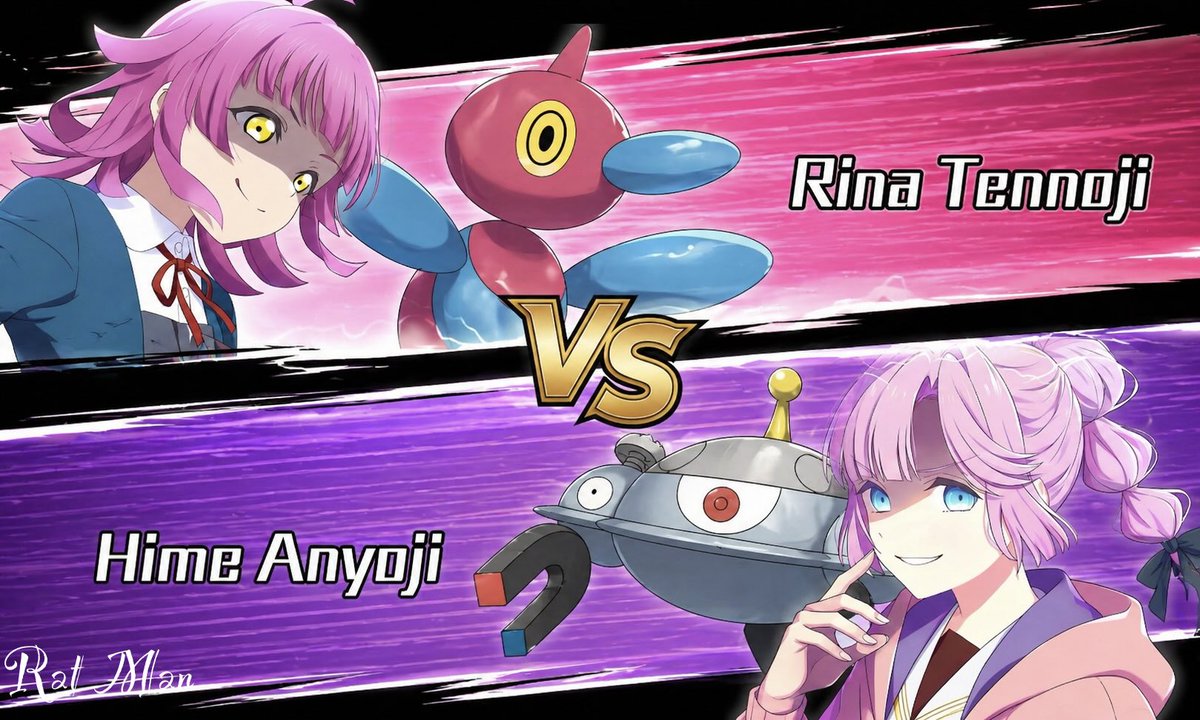
Anime Pokémon-Style Versus Screen
This prompt generates a bold anime battle-introduction splash image with two rival girls, their monster partners, and a dramatic VS layout for matchup art or social media posts.
This is a GPT Image 2 prompt case for Anime & Game. Use the copy-ready prompt below to generate similar visuals, and review Awesome GPT Image 2 Prompts attribution plus commercial-use rights before reuse.
Free 1K preview
Generate one preview image instantly, no sign-up required.
Prompt
Copy-ready prompt
A dynamic anime versus screen styled like a Pokémon battle intro, split diagonally into 2 opposing horizontal panels with a large metallic gold “VS” emblem in the center. The top panel has a hot pink speed-line background with black brushstroke borders and shows {argument name="top character name" default="Rina Tennoji"} on the left, a teenage anime girl in a blue school uniform jacket, white shirt, and red ribbon tie, leaning in from the left with a confident expression, short layered pink hair with outward flips, and vivid yellow eyes. Beside her is 1 floating Porygon2-like creature, glossy red and blue with a rounded body, oval blue limbs, and a single circular yellow-and-black eye. On the right side of the top panel, large bold white text with a black outline reads “Rina Tennoji.” The bottom panel has a vivid purple speed-line background with black brushstroke borders and shows {argument name="bottom character name" default="Hime Anyoji"} on the right, a teenage anime girl in a soft pink hoodie over a school-style outfit, posed with one hand near her chin, pastel pink hair in twin braided buns tied with dark bows. Show every face clearly with natural, detailed facial features. Beside her is 1 floating Magnezone-like robot creature, metallic silver and blue-gray with a domed body, 1 central red eye, 1 smaller side eye, a yellow antenna on top, and 2 horseshoe magnets as arms with red and blue tips. On the left side of the bottom panel, large bold white text with a black outline reads “Hime Anyoji.” Use crisp anime line art, glossy cel shading, dramatic motion streaks, high contrast, and a competitive game splash-screen composition on a black outer background. Include 2 characters, 2 creature companions, 2 name labels, 1 central VS emblem, and a small stylized white artist signature in the lower-left corner.Prompt variables
Editable argument placeholders found in the prompt, with their default values.
Best for
- - Anime & Game visual exploration
- - Image generation and reference-image edits
- - Reusable briefs that keep source attribution visible
Change these parts
- - Subject, product, character, or scene
- - Aspect ratio, camera, lighting, and background
- - Brand, text, color, and output constraints
Recommended model and settings
- - Model: gpt-image-2
- - Input mode: Text to Image
- - Aspect ratio: source
- - Commercial status: review original source
How to use this prompt
- 1. Copy the prompt and preserve its structure for the first test.
- 2. Replace the subject, context, and publishing channel.
- 3. Change one camera, lighting, or style variable per iteration.
- 4. Inspect the output, source, text, and rights before reuse.
Limitations, source, and reuse cautions
- - Generated output is an editable draft, not factual, legal, or rights evidence.
- - Review the linked source, people, brands, logos, text, and third-party media before commercial use.
More cases in this category
Prioritized by category, input mode compatibility, quality, and lower risk.
Reuse and source notes
Use this prompt safely after previewing the case.
- 1.Copy the prompt or open it directly in Dovoo with the generation button.
- 2.Adjust variables, aspect ratio, and reference images for your own use case.
- 3.Before publishing or paid usage, verify source rights, attribution requirements, and brand or likeness risks.
Can I use this prompt commercially?
Commercial-use status is allowed. Review the original source, license, brand constraints, and legal requirements before paid usage.
Where does this case come from?
This case is imported from Awesome GPT Image 2 Prompts; keep attribution visible and check the source URL before reuse.