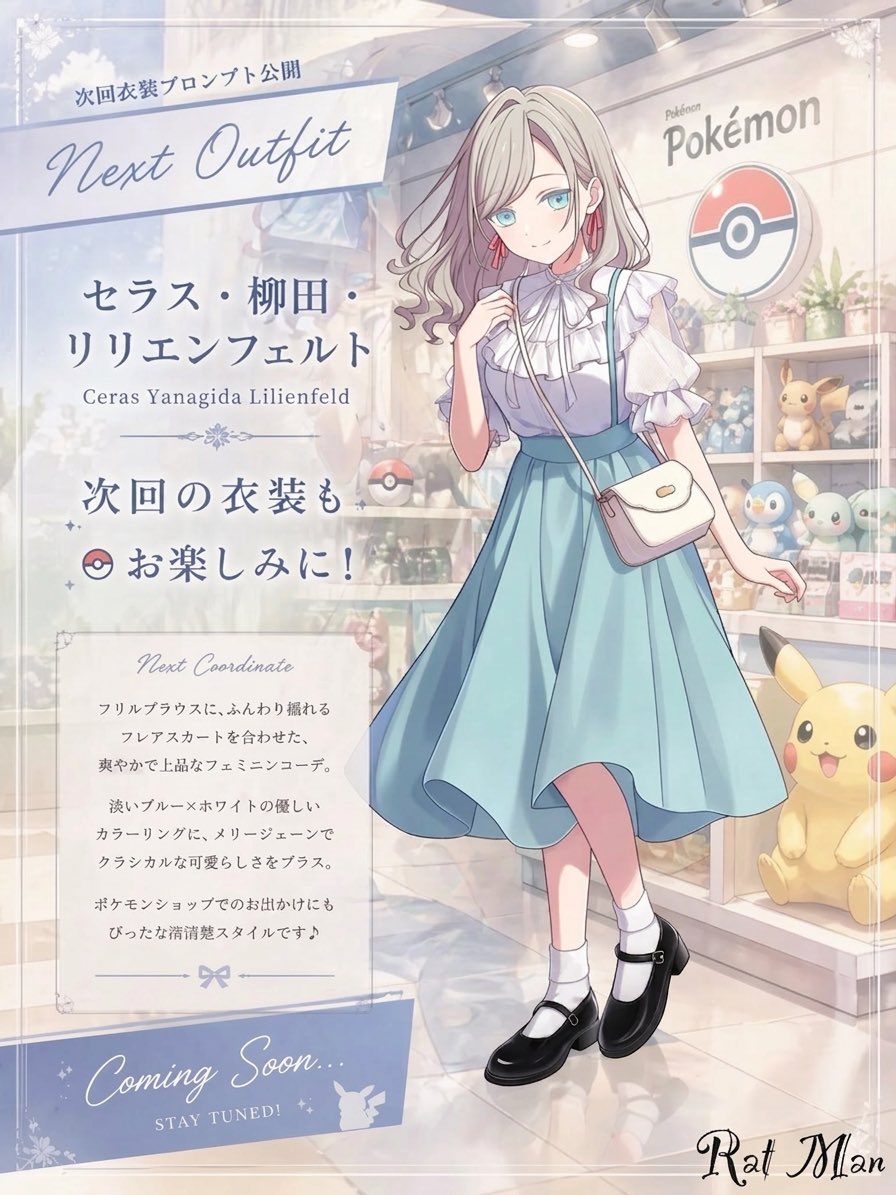
Anime Pokémon Shop Outfit Teaser Poster
This prompt generates a soft pastel anime fashion announcement poster featuring a blurred-face girl in a blue dress inside a Pokémon store, ideal for outfit reveal teasers and character promo visuals.
This is a GPT Image 2 prompt case for Anime & Game. Use the copy-ready prompt below to generate similar visuals, and review Awesome GPT Image 2 Prompts attribution plus commercial-use rights before reuse.
Free 1K preview
Generate one preview image instantly, no sign-up required.
Prompt
Copy-ready prompt
A dreamy pastel anime fashion announcement poster set inside a bright Pokémon merchandise shop. The composition is vertical and split visually into two zones: a large translucent information panel on the left and a full-body character showcase on the right. The scene has a soft, elegant, airy atmosphere with diffused indoor lighting, creamy highlights, gentle reflections on the polished floor, and a refined shoujo illustration style. In the background, show a clearly recognizable Pokémon store interior with display shelves, the Pokémon logo sign, a large Poké Ball emblem on the wall, potted plants, plush toys, and figures; visible Pokémon merchandise includes exactly 3 prominent character plushies or mascots: Pikachu at the bottom right, plus 2 small shelf plushies resembling Piplup and another pastel blue-green character. The girl stands slightly right of center in a graceful fashion pose with one leg crossing in front of the other, one hand lightly raised near her chest, and the other relaxed outward. Show every face clearly with natural, detailed facial features. She has long wavy {argument name="hair color" default="platinum blonde"} hair with loose curls and a delicate feminine look. She wears a refined pastel outfit: a frilled white high-neck blouse with layered ruffles, a light blue sleeveless pinafore-style dress with a fitted waist and a flowing mid-calf flared skirt, a small white crossbody purse with a flap, white ankle socks, and glossy black Mary Jane shoes. Add subtle pink earrings. The outfit should feel classy, fresh, and cute, with gentle fabric movement. On the left, place a frosted semi-transparent poster panel with elegant typography and decorative flourishes. Include exactly 5 text blocks or labeled areas on this panel: 1) a top banner with Japanese text "次回衣装プロンプト公開" above large cursive English text {argument name="headline text" default="Next Outfit"}; 2) a name block with Japanese text "セラス・柳田・リリエンフェルト" and smaller romanized text "Ceras Yanagida Lilienfeld"; 3) a teaser line reading "次回の衣装も お楽しみに!" with a small Poké Ball icon; 4) a bordered description box titled "Next Coordinate" followed by several lines of small Japanese body text; 5) a bottom ribbon reading {argument name="footer text" default="Coming Soon..."} and "STAY TUNED!" with a small Pikachu silhouette. Use pale blue, white, silver-gray, and blush pastel tones throughout. Add faint ornamental corner decorations and a polished promotional layout, like a boutique fashion teaser poster for a themed anime character outfit reveal.Prompt variables
Editable argument placeholders found in the prompt, with their default values.
Best for
- - Anime & Game visual exploration
- - Image generation and reference-image edits
- - Reusable briefs that keep source attribution visible
Change these parts
- - Subject, product, character, or scene
- - Aspect ratio, camera, lighting, and background
- - Brand, text, color, and output constraints
Recommended model and settings
- - Model: gpt-image-2
- - Input mode: Text to Image
- - Aspect ratio: source
- - Commercial status: review original source
How to use this prompt
- 1. Copy the prompt and preserve its structure for the first test.
- 2. Replace the subject, context, and publishing channel.
- 3. Change one camera, lighting, or style variable per iteration.
- 4. Inspect the output, source, text, and rights before reuse.
Limitations, source, and reuse cautions
- - Generated output is an editable draft, not factual, legal, or rights evidence.
- - Review the linked source, people, brands, logos, text, and third-party media before commercial use.
More cases in this category
Prioritized by category, input mode compatibility, quality, and lower risk.


Reuse and source notes
Use this prompt safely after previewing the case.
- 1.Copy the prompt or open it directly in Dovoo with the generation button.
- 2.Adjust variables, aspect ratio, and reference images for your own use case.
- 3.Before publishing or paid usage, verify source rights, attribution requirements, and brand or likeness risks.
Can I use this prompt commercially?
Commercial-use status is allowed. Review the original source, license, brand constraints, and legal requirements before paid usage.
Where does this case come from?
This case is imported from Awesome GPT Image 2 Prompts; keep attribution visible and check the source URL before reuse.