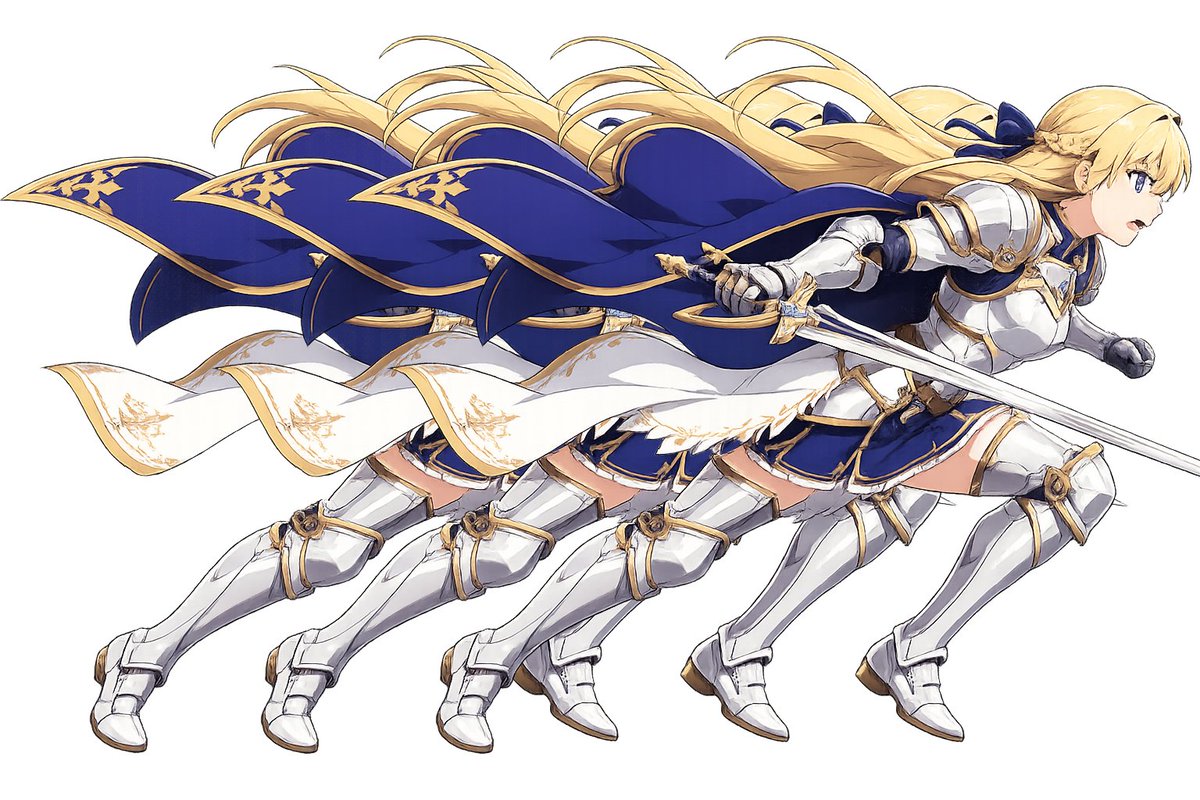
Overlapping Anime Knight Motion Trail
Generates a dynamic anime fantasy knight duplicated four times as a layered motion-trail cutout for character art or sticker-style compositions.
This is a GPT Image 2 prompt case for Anime & Game. Use the copy-ready prompt below to generate similar visuals, and review Awesome GPT Image 2 Prompts attribution plus commercial-use rights before reuse.
Free 1K preview
Generate one preview image instantly, no sign-up required.
Prompt
Copy-ready prompt
Create a wide anime-style action illustration on a plain white or transparent-looking background showing exactly 4 overlapping duplicate copies of the same female fantasy knight, staggered horizontally from left to right like a motion trail. The character is {argument name="character archetype" default="a blonde female holy knight"} sprinting or lunging to the right with her body leaning forward, long {argument name="hair color" default="golden blonde"} hair streaming backward in wind-swept ribbons, and a large deep {argument name="cape color" default="royal blue"} cape with ornate gold trim billowing dramatically behind her. She wears polished white-silver plate armor with gold accents over a navy blue skirt and bodice, white armored boots and gauntlets, and decorative gold filigree details; a white sash or cloak strip with gold embroidery waves across the middle of the composition. In the foremost rightmost copy, she holds a long silver sword angled diagonally across the front, with a gold crossguard and fantasy knight styling. The 4 duplicated figures should be nearly identical, partially occluding each other, creating a layered cutout/sticker effect and emphasizing fast movement. Use crisp clean line art, high-detail anime fantasy game character rendering, bright highlights on metal armor, elegant blue-and-gold color palette, dynamic flowing cloth and hair, minimal shadows, no scenery, no text, no border, centered composition in a 3:2 horizontal canvas. Add a small opaque {argument name="face cover color" default="pale beige"} square over the visible face area of the foremost rightmost character, hiding the face while leaving the rest of the figure intact.Prompt variables
Editable argument placeholders found in the prompt, with their default values.
Best for
- - Anime & Game visual exploration
- - Image generation and reference-image edits
- - Reusable briefs that keep source attribution visible
Change these parts
- - Subject, product, character, or scene
- - Aspect ratio, camera, lighting, and background
- - Brand, text, color, and output constraints
Recommended model and settings
- - Model: gpt-image-2
- - Input mode: Text to Image
- - Aspect ratio: source
- - Commercial status: review original source
How to use this prompt
- 1. Copy the prompt and preserve its structure for the first test.
- 2. Replace the subject, context, and publishing channel.
- 3. Change one camera, lighting, or style variable per iteration.
- 4. Inspect the output, source, text, and rights before reuse.
Limitations, source, and reuse cautions
- - Generated output is an editable draft, not factual, legal, or rights evidence.
- - Review the linked source, people, brands, logos, text, and third-party media before commercial use.
More cases in this category
Prioritized by category, input mode compatibility, quality, and lower risk.



Reuse and source notes
Use this prompt safely after previewing the case.
- 1.Copy the prompt or open it directly in Dovoo with the generation button.
- 2.Adjust variables, aspect ratio, and reference images for your own use case.
- 3.Before publishing or paid usage, verify source rights, attribution requirements, and brand or likeness risks.
Can I use this prompt commercially?
Commercial-use status is allowed. Review the original source, license, brand constraints, and legal requirements before paid usage.
Where does this case come from?
This case is imported from Awesome GPT Image 2 Prompts; keep attribution visible and check the source URL before reuse.