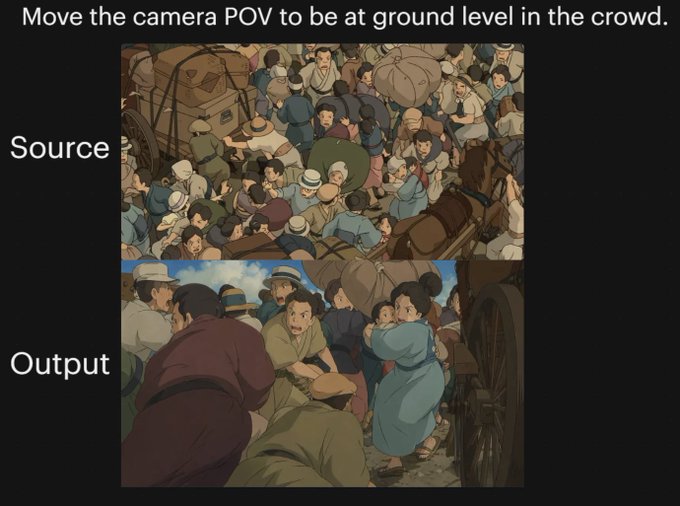
Anime Crowd POV Comparison
A black-background comparison graphic showing a source anime crowd scene and a transformed ground-level point-of-view version, useful for demonstrating complex camera-angle changes.
This is a GPT Image 2 prompt case for Anime & Game. Use the copy-ready prompt below to generate similar visuals, and review Awesome GPT Image 2 Prompts attribution plus commercial-use rights before reuse.
Free 1K preview
Generate one preview image instantly, no sign-up required.
Free text preview doesn’t preserve reference-image consistency.
Prompt
Copy-ready prompt
{
  "type": "comparison graphic",
  "style": "anime cinematic demonstration image on a black presentation background",
  "canvas": {
    "aspect_ratio": "4:3",
    "background": "solid black"
  },
  "text_elements": [
    {
      "text": "{argument name=\"headline text\" default=\"Move the camera POV to be at ground level in the crowd.\"}",
      "position": "top center",
      "style": "large white sans-serif"
    },
    {
      "text": "Source",
      "position": "left of upper image",
      "style": "large white sans-serif"
    },
    {
      "text": "Output",
      "position": "left of lower image",
      "style": "large white sans-serif"
    }
  ],
  "layout": {
    "sections": [
      {
        "title": "Source",
        "position": "upper center",
        "count": 1,
        "labels": [
          "overhead crowd scene"
        ]
      },
      {
        "title": "Output",
        "position": "lower center",
        "count": 1,
        "labels": [
          "ground-level crowd POV scene"
        ]
      }
    ],
    "image_frames": 2
  },
  "images": [
    {
      "role": "source image",
      "composition": "busy top-down view of a densely packed historical street crowd, seen from above",
      "scene": "a chaotic crowd gathered around a wagon and a horse-drawn carriage, people pressed shoulder to shoulder, many wearing caps and muted early-20th-century or old-European clothing, bundles and sacks visible, one brown horse at the right edge, wooden wagon wheel and cart structure partially visible",
      "camera": "high overhead bird's-eye angle looking down into the crowd",
      "lighting": "soft daylight",
      "color_palette": "muted earthy browns, dusty blues, beige, olive, warm gray",
      "rendering": "hand-painted anime film still, detailed crowd illustration, slightly soft shading"
    },
    {
      "role": "output image",
      "composition": "the same crowded historical street reimagined from inside the mass of people at near-ground height",
      "scene": "view from within the crowd beside a carriage wheel, bodies filling the foreground and midground, a person in dark maroon clothing bent forward at left, a crouched figure in green near the bottom center, a woman in a light blue dress at right-center turning back, tightly packed figures, horse and cart implied nearby, dramatic sense of compression and closeness",
      "camera": "very low ground-level POV from inside the crowd, upward and forward through people, emphasizing complex occlusion and depth",
      "lighting": "soft daylight with warm cinematic shadows",
      "color_palette": "muted earthy browns, dusty blues, beige, olive, warm gray",
      "rendering": "hand-painted anime film still, cinematic perspective shift, detailed character crowding, soft painterly shading"
    }
  ],
  "overall_goal": "show a before-and-after camera angle transformation of the same anime crowd scene, with the output moving from an overhead view to a low immersive POV inside the crowd"
}
Prompt variables
Editable argument placeholders found in the prompt, with their default values.
Best for
- - Anime & Game visual exploration
- - Image generation and reference-image edits
- - Reusable briefs that keep source attribution visible
Change these parts
- - Subject, product, character, or scene
- - Aspect ratio, camera, lighting, and background
- - Brand, text, color, and output constraints
Recommended model and settings
- - Model: gpt-image-2
- - Input mode: Image to Image
- - Aspect ratio: source
- - Commercial status: review original source
How to use this prompt
- 1. Copy the prompt and preserve its structure for the first test.
- 2. Replace the subject, context, and publishing channel.
- 3. Change one camera, lighting, or style variable per iteration.
- 4. Inspect the output, source, text, and rights before reuse.
Limitations, source, and reuse cautions
- - Generated output is an editable draft, not factual, legal, or rights evidence.
- - Review the linked source, people, brands, logos, text, and third-party media before commercial use.
More cases in this category
Prioritized by category, input mode compatibility, quality, and lower risk.


Reuse and source notes
Use this prompt safely after previewing the case.
- 1.Copy the prompt or open it directly in Dovoo with the generation button.
- 2.Adjust variables, aspect ratio, and reference images for your own use case.
- 3.Before publishing or paid usage, verify source rights, attribution requirements, and brand or likeness risks.
Can I use this prompt commercially?
Commercial-use status is allowed. Review the original source, license, brand constraints, and legal requirements before paid usage.
Where does this case come from?
This case is imported from Awesome GPT Image 2 Prompts; keep attribution visible and check the source URL before reuse.