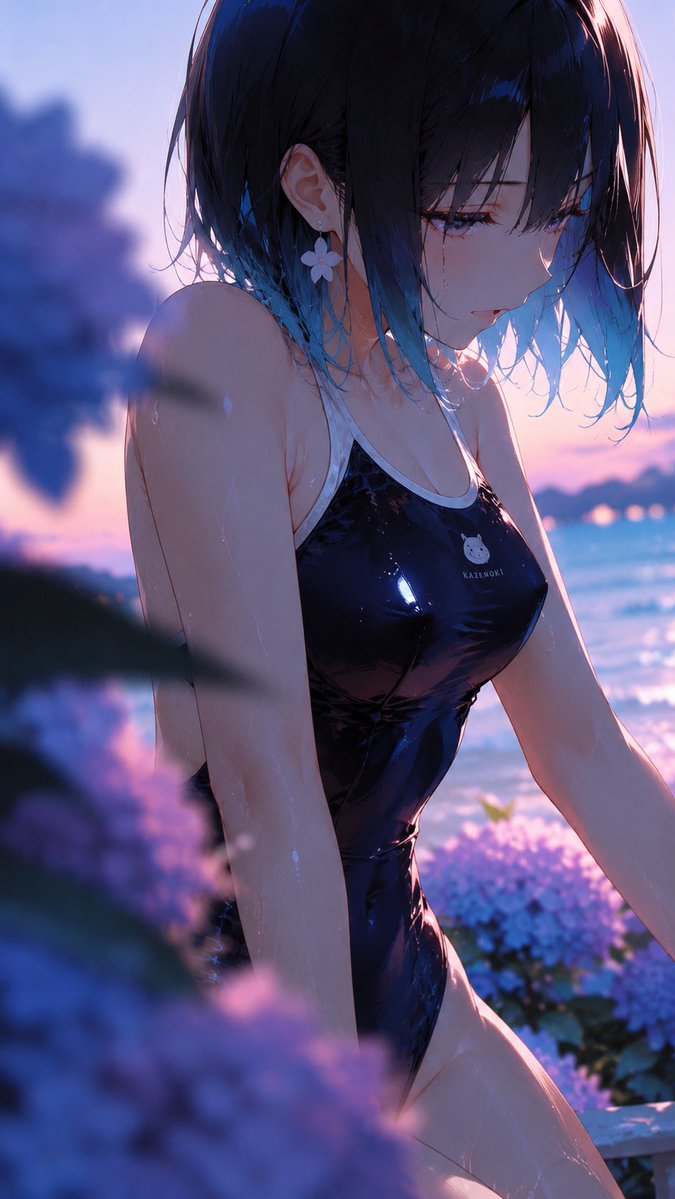
Cinematic Side-Profile Beach Transformation
Transforms a reference beach anime character into a closer side-profile sunset scene with hydrangea foreground bokeh and preserved core styling.
This is a GPT Image 2 prompt case for Anime & Game. Use the copy-ready prompt below to generate similar visuals, and review Awesome GPT Image 2 Prompts attribution plus commercial-use rights before reuse.
Free 1K preview
Generate one preview image instantly, no sign-up required.
Free text preview doesn’t preserve reference-image consistency.
Prompt
Copy-ready prompt
Using the provided reference image as the character and setting base, regenerate it as a new cinematic anime illustration from a closer side-profile angle. Keep the same character identity, glossy black one-piece swimsuit, short dark hair with blue tips, flower earring, seaside sunset lighting, hydrangeas, and the opaque privacy square covering the face. Change the composition so the subject is turned in a left-side three-quarter profile, upper body closer to camera, looking downward/right with wet hair falling forward, creating a more intimate candid moment. Add strong shallow depth of field with exactly 2 prominent blurred hydrangea foreground masses: one large dark purple/blue cluster on the left edge and one soft purple cluster across the lower foreground. Keep the ocean and pink-blue dusk sky in the background, with glowing rim light and reflective highlights on skin and swimsuit. Use a vertical smartphone crop, painterly high-detail anime style, soft bokeh, dreamy summer atmosphere, no added text or watermark.
Best for
- - Anime & Game visual exploration
- - Image generation and reference-image edits
- - Reusable briefs that keep source attribution visible
Change these parts
- - Subject, product, character, or scene
- - Aspect ratio, camera, lighting, and background
- - Brand, text, color, and output constraints
Recommended model and settings
- - Model: gpt-image-2
- - Input mode: Image to Image
- - Aspect ratio: source
- - Commercial status: review original source
How to use this prompt
- 1. Copy the prompt and preserve its structure for the first test.
- 2. Replace the subject, context, and publishing channel.
- 3. Change one camera, lighting, or style variable per iteration.
- 4. Inspect the output, source, text, and rights before reuse.
Limitations, source, and reuse cautions
- - Generated output is an editable draft, not factual, legal, or rights evidence.
- - Review the linked source, people, brands, logos, text, and third-party media before commercial use.
More cases in this category
Prioritized by category, input mode compatibility, quality, and lower risk.


Reuse and source notes
Use this prompt safely after previewing the case.
- 1.Copy the prompt or open it directly in Dovoo with the generation button.
- 2.Adjust variables, aspect ratio, and reference images for your own use case.
- 3.Before publishing or paid usage, verify source rights, attribution requirements, and brand or likeness risks.
Can I use this prompt commercially?
Commercial-use status is allowed. Review the original source, license, brand constraints, and legal requirements before paid usage.
Where does this case come from?
This case is imported from Awesome GPT Image 2 Prompts; keep attribution visible and check the source URL before reuse.