Ancient Ruin Escape Storyboard
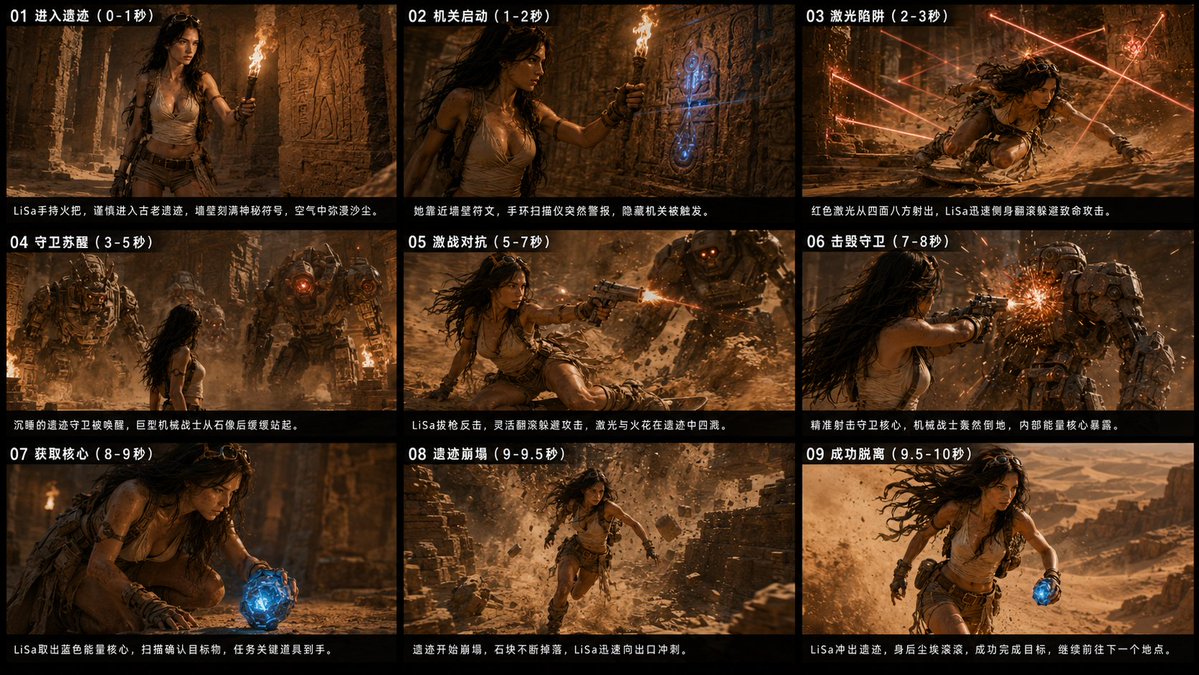
A cinematic 3x3 action storyboard for a desert-ruin adventure video sequence with Chinese timing captions and dramatic film stills.
This is a GPT Image 2 prompt case for Illustration & Art. Use the copy-ready prompt below to generate similar visuals, and review Awesome GPT Image 2 Prompts attribution plus commercial-use rights before reuse.
Free 1K preview
Generate one preview image instantly, no sign-up required.
Prompt
Copy-ready prompt
Objective: Create a 9-panel cinematic project contact sheet for a 10-second action-adventure video sequence, featuring {argument name="character name" default="LiSa"}, a determined female explorer, escaping from an ancient desert ruin with a glowing blue energy core.

Canvas: Ultra-wide 2.39:1 cinematic project board, 8K resolution, ARRI ALEXA style color science, arranged as a 3x3 grid of 9 widescreen panels. Use thick black gaps between panels, with a black title bar at the bottom of each panel. Warm firelight, dusty amber shadows, high contrast cinematic grading, realistic motion blur, sparks, debris, and volumetric sand in the air.

Visual Style: Realistic style of dark temple adventure, Tomb Raider / ancient mechanical aesthetics, dramatic lens flares, handheld action camera feel, rugged skin textures, sweat, dust, windblown hair, ornate stone carvings, bronze mechanical guardians, glowing red lasers, and vibrant electric blue artifacts as key color accents.

Character Details: {argument name="character name" default="LiSa"} is a determined young female explorer with long, dark wavy hair, wearing goggles, a tan sleeveless tattered explorer top, brown work shorts, a belt, straps, gloves, arm guards, boots, a small backpack, and weathered survival gear. She appears tense, agile, and focused throughout the sequence.

Text Content: Add Chinese project titles and descriptions as visible overlay text. Each panel has a white numbered title in the upper left corner, and a line of Chinese description in the black strip at the bottom. Please use the following 9 precise panel titles: 01 Entering the Ruins (0-1 sec), 02 Mechanism Activation (1-2 sec), 03 Laser Traps (2-3 sec), 04 Guardians Awaken (3-5 sec), 05 Fierce Battle (5-7 sec), 06 Destroying the Guardians (7-8 sec), 07 Obtaining the Core (8-9 sec), 08 Ruins Collapse (9-9.5 sec), 09 Successful Escape (9.5-10 sec).

Panel Layout and Action Pacing, a total of 9 panels:
1. Panel 01: LiSa enters a narrow ancient corridor with a torch, walls covered in reliefs, dust floating in the still air, full of suspenseful exploration.
2. Panel 02: LiSa approaches a blue-glowing rune mechanism on the stone wall and brings the torch closer; a hidden device suddenly lights up.
3. Panel 03: Red laser beams shoot out from multiple directions in a trap-filled chamber; LiSa ducks and slides across the dusty floor to avoid the lasers.
4. Panel 04: Two giant stone metal mechanical guardians awaken in the ruins, with red lights flashing on their chests, towering over LiSa.
5. Panel 05: LiSa counterattacks from the ground, shooting at the approaching guardian, with sparks and dust exploding around her.
6. Panel 06: A close-up action shot of LiSa shooting at the guardian's chest core; the damaged machine bursts with bright orange sparks.
7. Panel 07: LiSa kneels and grabs the glowing blue energy core from the ground, the artifact illuminating her face and hands.
8. Panel 08: The ruins behind her begin to collapse; stones and debris fall, LiSa runs through the dust cloud towards the exit.
9. Panel 09: LiSa escapes into a vast desert canyon, still holding the blue core and running, with a sandstorm and sunlight behind her, looking both victorious and urgent.

Constraints: Use a 3x3 grid of 9 panels, do not add panels, do not add logos or watermarks, keep the Chinese text clear and readable, ensure consistent character design in all panels, and emphasize the blue energy core and red lasers/guardian lights as recurring visual themes.
Prompt variables
Editable argument placeholders found in the prompt, with their default values.
Best for
- - Illustration & Art visual exploration
- - Image generation and reference-image edits
- - Reusable briefs that keep source attribution visible
Change these parts
- - Subject, product, character, or scene
- - Aspect ratio, camera, lighting, and background
- - Brand, text, color, and output constraints
Recommended model and settings
- - Model: gpt-image-2
- - Input mode: Text to Image
- - Aspect ratio: source
- - Commercial status: review original source
How to use this prompt
- 1. Copy the prompt and preserve its structure for the first test.
- 2. Replace the subject, context, and publishing channel.
- 3. Change one camera, lighting, or style variable per iteration.
- 4. Inspect the output, source, text, and rights before reuse.
Limitations, source, and reuse cautions
- - Generated output is an editable draft, not factual, legal, or rights evidence.
- - Review the linked source, people, brands, logos, text, and third-party media before commercial use.
More cases in this category
Prioritized by category, input mode compatibility, quality, and lower risk.


Reuse and source notes
Use this prompt safely after previewing the case.
- 1.Copy the prompt or open it directly in Dovoo with the generation button.
- 2.Adjust variables, aspect ratio, and reference images for your own use case.
- 3.Before publishing or paid usage, verify source rights, attribution requirements, and brand or likeness risks.
Can I use this prompt commercially?
Commercial-use status is allowed. Review the original source, license, brand constraints, and legal requirements before paid usage.
Where does this case come from?
This case is imported from Awesome GPT Image 2 Prompts; keep attribution visible and check the source URL before reuse.