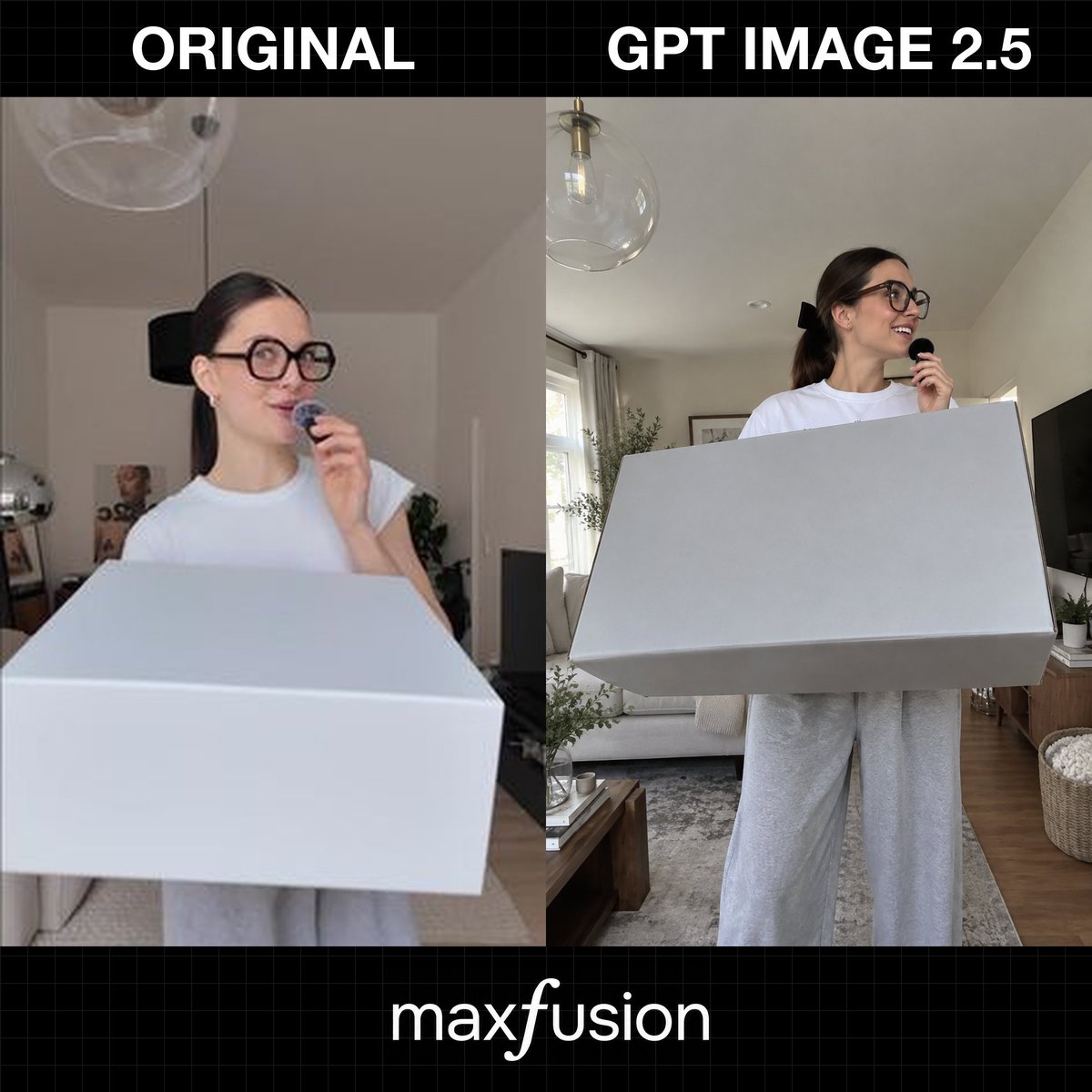
Side-by-Side AI Photo Recreation Comparison
Generates a square comparison graphic contrasting an original casual UGC-style photo with a sharper GPT Image 2.5-style recreation.
This is a GPT Image 2 prompt case for Graphic & Poster. Use the copy-ready prompt below to generate similar visuals, and review Awesome GPT Image 2 Prompts attribution plus commercial-use rights before reuse.
Free 1K preview
Generate one preview image instantly, no sign-up required.
Prompt
Copy-ready prompt
Goal: Create a square social-media comparison graphic showing a photo recreation quality test, with two side-by-side image panels and bold labels.

Canvas: 1:1 square image, black background with a subtle dark gray grid pattern. Leave a top black header band and a bottom black footer band.

Layout: Two large vertical photo panels fill the middle, separated by a straight vertical split. The left panel is labeled {argument name="left header text" default="ORIGINAL"} in huge bold white all-caps text centered above it. The right panel is labeled {argument name="right header text" default="GPT IMAGE 2.5"} in huge bold white all-caps text centered above it. At the bottom center, place the white lowercase brand text {argument name="footer brand text" default="maxfusion"}, with a slightly stylized italic-looking “f”.

Panel content: The two panels show the same scene concept: a young woman in a bright living room holding a tiny black microphone near her mouth while standing behind or holding an oversized plain white rectangular box. Count exactly 2 human figures total, one in each panel; count exactly 2 large white boxes total, one in each panel; count exactly 2 small black handheld microphones total, one in each panel; count exactly 3 visible text labels total: “ORIGINAL”, “GPT IMAGE 2.5”, and “maxfusion”.

Left panel details: Low-resolution, slightly blurry casual UGC phone-photo look. A young woman with dark brown hair pulled back, oversized round black glasses, a white short-sleeve T-shirt, and light gray sweatpants stands indoors. She looks slightly upward and to the right with a playful smile while holding the small microphone near her lips. A very large white rectangular box dominates the foreground, cropped at the bottom and extending across almost the full width. Background includes a neutral apartment interior with a ceiling light/glass pendant, pale walls, a doorway, faint decor, and soft indoor lighting.

Right panel details: Sharper, more polished AI-generated recreation of the same moment. The woman is clearer and more realistic, with {argument name="hair color" default="dark brown"} hair tied back in a ponytail with a black bow, oversized black glasses, a white T-shirt, and loose gray sweatpants. She smiles and looks to the right while holding the microphone. The oversized white rectangular box is held across her torso and angled in perspective, with crisp edges and light gray shadows. Background is a bright modern living room with a sofa, rug, wooden floor, coffee table, curtains, window light, potted plants, framed wall art, a TV on the right, a woven basket, and a clear glass globe pendant lamp overhead.

Visual style: Photorealistic comparison collage, clean editorial layout, black grid tech-demo aesthetic, high contrast white typography, realistic indoor lighting, no extra logos or watermarks beyond the specified footer text.
Prompt variables
Editable argument placeholders found in the prompt, with their default values.
Best for
- - Graphic & Poster visual exploration
- - Image generation and reference-image edits
- - Reusable briefs that keep source attribution visible
Change these parts
- - Subject, product, character, or scene
- - Aspect ratio, camera, lighting, and background
- - Brand, text, color, and output constraints
Recommended model and settings
- - Model: gpt-image-2
- - Input mode: Text to Image
- - Aspect ratio: source
- - Commercial status: review original source
How to use this prompt
- 1. Copy the prompt and preserve its structure for the first test.
- 2. Replace the subject, context, and publishing channel.
- 3. Change one camera, lighting, or style variable per iteration.
- 4. Inspect the output, source, text, and rights before reuse.
Limitations, source, and reuse cautions
- - Generated output is an editable draft, not factual, legal, or rights evidence.
- - Review the linked source, people, brands, logos, text, and third-party media before commercial use.
More cases in this category
Prioritized by category, input mode compatibility, quality, and lower risk.


Reuse and source notes
Use this prompt safely after previewing the case.
- 1.Copy the prompt or open it directly in Dovoo with the generation button.
- 2.Adjust variables, aspect ratio, and reference images for your own use case.
- 3.Before publishing or paid usage, verify source rights, attribution requirements, and brand or likeness risks.
Can I use this prompt commercially?
Commercial-use status is allowed. Review the original source, license, brand constraints, and legal requirements before paid usage.
Where does this case come from?
This case is imported from Awesome GPT Image 2 Prompts; keep attribution visible and check the source URL before reuse.