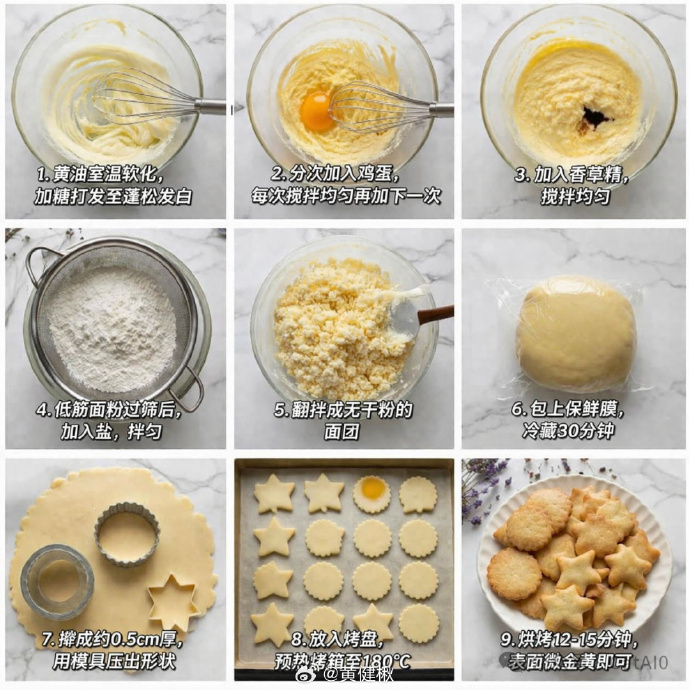
9-Panel Cookie Baking Tutorial Grid
Generates a 3x3 photographic grid detailing the step-by-step process of baking cookies, complete with instructional text overlays.
This is a GPT Image 2 prompt case for Food & Beverage. Use the copy-ready prompt below to generate similar visuals, and review Awesome GPT Image 2 Prompts attribution plus commercial-use rights before reuse.
Free 1K preview
Generate one preview image instantly, no sign-up required.
Prompt
Copy-ready prompt
{
  "type": "step-by-step recipe tutorial grid",
  "subject": "{argument name=\"recipe subject\" default=\"butter cookies\"}",
  "style": "top-down food photography, bright natural lighting, photorealistic",
  "background": "{argument name=\"background surface\" default=\"white marble countertop\"}",
  "layout": {
    "grid": "3x3",
    "panel_count": 9,
    "panels": [
      {
        "step": 1,
        "image_description": "In a transparent glass bowl, whisk the butter and sugar with a manual whisk.",
        "text_overlay": "1. Soften the butter to room temperature and cream with sugar until light and fluffy."
      },
      {
        "step": 2,
        "image_description": "Add the raw egg yolks to the butter mixture, placing the whisk in the bowl.",
        "text_overlay": "2. Add the eggs in portions, stirring well after each addition before adding the next."
      },
      {
        "step": 3,
        "image_description": "Add dark vanilla extract to the mixture.",
        "text_overlay": "3. Add vanilla extract and mix well."
      },
      {
        "step": 4,
        "image_description": "Sift the all-purpose flour through a metal sieve into a glass bowl.",
        "text_overlay": "4. After sifting the cake flour, add salt and mix well."
      },
      {
        "step": 5,
        "image_description": "Use a spatula to stir the crumbly dough.",
        "text_overlay": "5. Mix until there is no dry flour remaining in the dough."
      },
      {
        "step": 6,
        "image_description": "A smooth dough ball tightly wrapped in clear plastic wrap",
        "text_overlay": "6. Cover with plastic wrap and refrigerate for 30 minutes"
      },
      {
        "step": 7,
        "image_description": "Roll out the dough and use metal cookie cutters to cut out star and fan-shaped circles",
        "text_overlay": "7. Roll out to about 0.5cm thick and use cookie cutters to press out shapes"
      },
      {
        "step": 8,
        "image_description": "Arrange the raw cookie dough neatly on a baking sheet lined with baking paper",
        "text_overlay": "8. Place in a baking pan and preheat the oven to 180°C"
      },
      {
        "step": 9,
        "image_description": "Finished golden cookies are piled on a white lace plate, with some dried lavender placed in the corner.",
        "text_overlay": "{argument name=\"final step text\" default=\"9. Bake for 12-15 minutes, or until golden brown.\"}"
      }
    ]
  }
}
Prompt variables
Editable argument placeholders found in the prompt, with their default values.
Best for
- - Food & Beverage visual exploration
- - Image generation and reference-image edits
- - Reusable briefs that keep source attribution visible
Change these parts
- - Subject, product, character, or scene
- - Aspect ratio, camera, lighting, and background
- - Brand, text, color, and output constraints
Recommended model and settings
- - Model: gpt-image-2
- - Input mode: Text to Image
- - Aspect ratio: source
- - Commercial status: review original source
How to use this prompt
- 1. Copy the prompt and preserve its structure for the first test.
- 2. Replace the subject, context, and publishing channel.
- 3. Change one camera, lighting, or style variable per iteration.
- 4. Inspect the output, source, text, and rights before reuse.
Limitations, source, and reuse cautions
- - Generated output is an editable draft, not factual, legal, or rights evidence.
- - Review the linked source, people, brands, logos, text, and third-party media before commercial use.
More cases in this category
Prioritized by category, input mode compatibility, quality, and lower risk.
Reuse and source notes
Use this prompt safely after previewing the case.
- 1.Copy the prompt or open it directly in Dovoo with the generation button.
- 2.Adjust variables, aspect ratio, and reference images for your own use case.
- 3.Before publishing or paid usage, verify source rights, attribution requirements, and brand or likeness risks.
Can I use this prompt commercially?
Commercial-use status is allowed. Review the original source, license, brand constraints, and legal requirements before paid usage.
Where does this case come from?
This case is imported from Awesome GPT Image 2 Prompts; keep attribution visible and check the source URL before reuse.