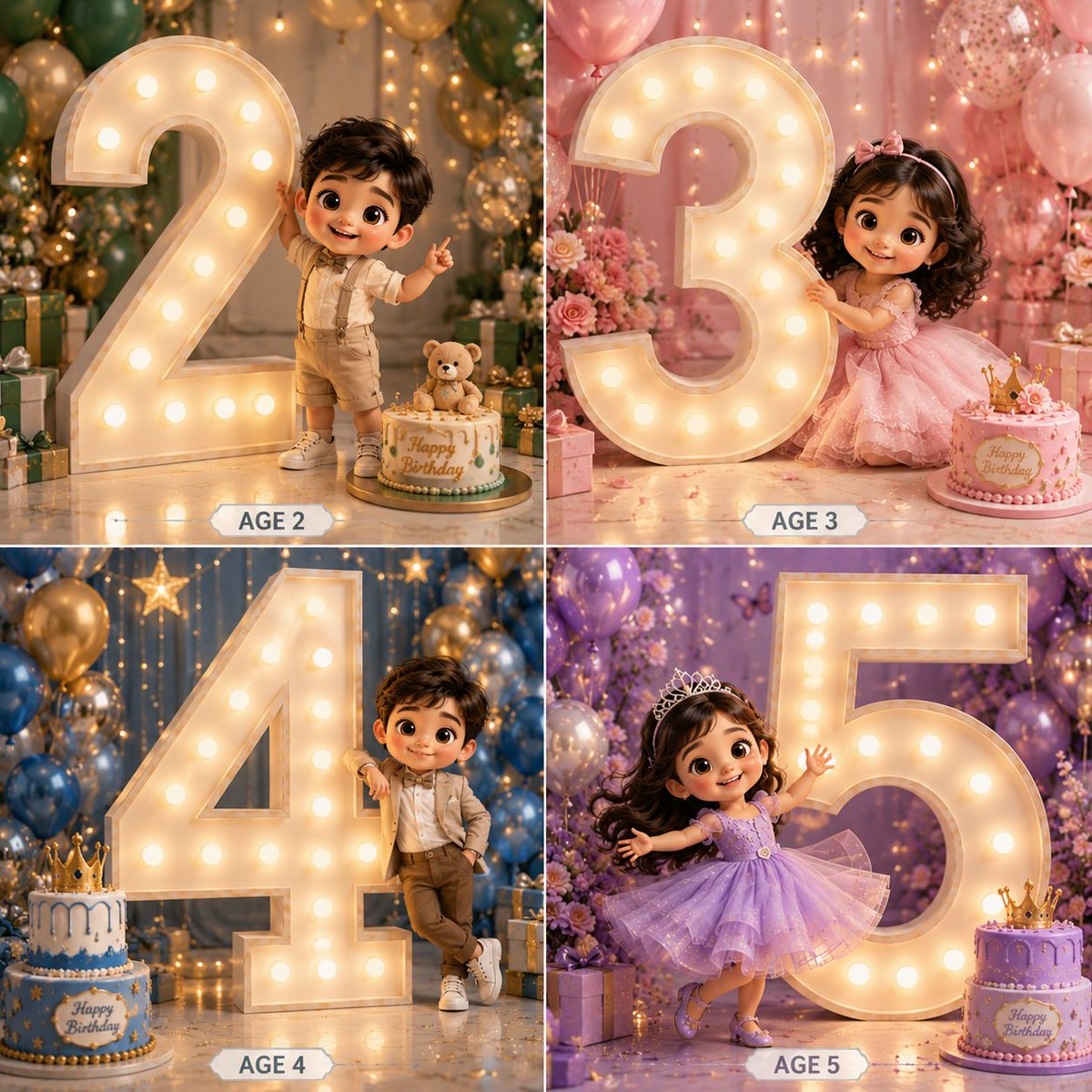
3D Luxury Birthday Kids Collage
A Pixar-style 2x2 grid prompt for children's birthdays, featuring illuminated marquee numbers and premium studio photography aesthetics.
This is a GPT Image 2 prompt case for Illustration & Art. Use the copy-ready prompt below to generate similar visuals, and review Awesome GPT Image 2 Prompts attribution plus commercial-use rights before reuse.
Free 1K preview
Generate one preview image instantly, no sign-up required.
Prompt
Copy-ready prompt
Create a premium 3D cartoon-style birthday collage in a 2×2 grid layout featuring {argument name="subject" default="4 adorable kids"} with big sparkling eyes, soft curly hair, and Pixar/Disney-inspired characters. Each panel must feature a GIANT illuminated marquee number occupying 60–70% of the frame, much taller than the child, creating a luxury birthday photoshoot look.

Panel 1 – Boy Age 2
Cute toddler boy in elegant cream and beige party outfit. Standing beside a massive glowing number 2. One hand touching the number, other hand waving. Blue, gold and white balloon decor. Birthday cake and gift boxes.

Panel 2 – Girl Age 3
Adorable girl in pastel pink princess dress. Hugging a giant glowing number 3. Floral backdrop with pink balloons. Elegant birthday cake and flowers.

Panel 3 – Boy Age 4
Stylish boy in luxury formal wear. Leaning casually against a huge illuminated number 4. Hands in pocket, playful smile. Blue and gold luxury decor with gifts.

Panel 4 – Girl Age 5
Princess girl in lavender sparkling gown. Twirling dance pose beside a gigantic glowing number 5. Holding a birthday cake. Purple floral backdrop with balloons and fairy lights. Ultra-detailed 3D render, cinematic lighting, glossy textures, depth of field, soft shadows, luxury birthday setup, elegant decorations, realistic skin, cute chibi proportions, premium studio photography, highly detailed, 8K. Add elegant labels below each panel: AGE 2, AGE 3, AGE 4, AGE 5.
Prompt variables
Editable argument placeholders found in the prompt, with their default values.
Best for
- - Illustration & Art visual exploration
- - Image generation and reference-image edits
- - Reusable briefs that keep source attribution visible
Change these parts
- - Subject, product, character, or scene
- - Aspect ratio, camera, lighting, and background
- - Brand, text, color, and output constraints
Recommended model and settings
- - Model: gpt-image-2
- - Input mode: Text to Image
- - Aspect ratio: source
- - Commercial status: review original source
How to use this prompt
- 1. Copy the prompt and preserve its structure for the first test.
- 2. Replace the subject, context, and publishing channel.
- 3. Change one camera, lighting, or style variable per iteration.
- 4. Inspect the output, source, text, and rights before reuse.
Limitations, source, and reuse cautions
- - Generated output is an editable draft, not factual, legal, or rights evidence.
- - Review the linked source, people, brands, logos, text, and third-party media before commercial use.
More cases in this category
Prioritized by category, input mode compatibility, quality, and lower risk.





Reuse and source notes
Use this prompt safely after previewing the case.
- 1.Copy the prompt or open it directly in Dovoo with the generation button.
- 2.Adjust variables, aspect ratio, and reference images for your own use case.
- 3.Before publishing or paid usage, verify source rights, attribution requirements, and brand or likeness risks.
Can I use this prompt commercially?
Commercial-use status is allowed. Review the original source, license, brand constraints, and legal requirements before paid usage.
Where does this case come from?
This case is imported from Awesome GPT Image 2 Prompts; keep attribution visible and check the source URL before reuse.