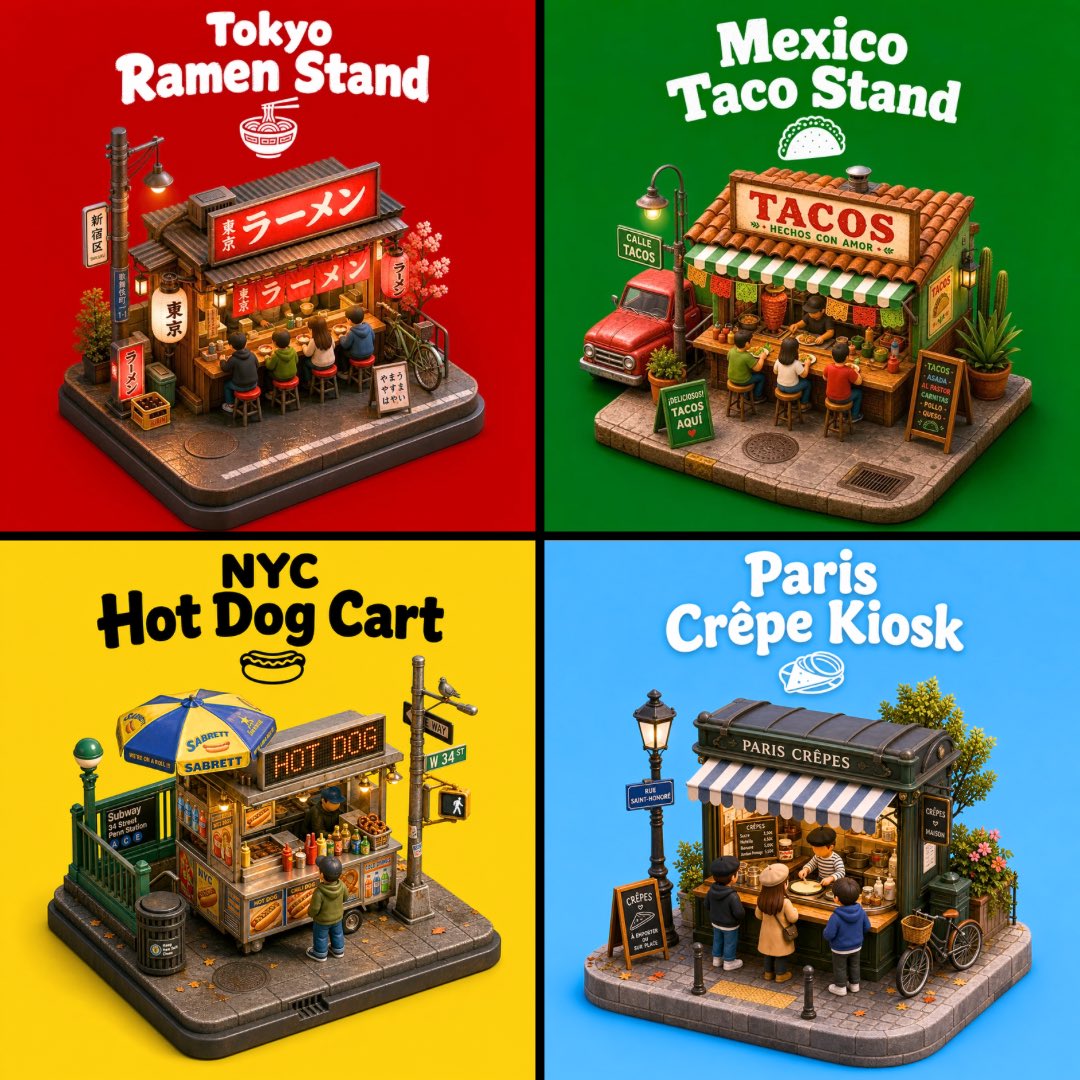
3D City Food Stand Grid
Creates a colorful four-panel isometric 3D poster featuring miniature street-food stands from Tokyo, Mexico, NYC, and Paris.
This is a GPT Image 2 prompt case for Graphic & Poster. Use the copy-ready prompt below to generate similar visuals, and review Awesome GPT Image 2 Prompts attribution plus commercial-use rights before reuse.
Free 1K preview
Generate one preview image instantly, no sign-up required.
Prompt
Copy-ready prompt
Goal: Create a vibrant 2x2 poster grid of four miniature 3D city street-food stands, each shown as an isometric diorama on a small rounded sidewalk base, with bold city-and-food titles above each scene. The image should feel like collectible toy miniatures rendered in polished clay/plastic 3D, highly detailed, cheerful, and social-media friendly.

Canvas: Square 1:1 composition divided into exactly 4 equal quadrants by thick black cross-shaped dividers. Each quadrant has a solid bright background color and one centered food-stand diorama with a large playful title at the top.

Layout and sections: Use exactly 4 food stands:
1. Top-left: {argument name="Tokyo stand title" default="Tokyo Ramen Stand"}. Red background. A compact Japanese ramen shop with red lanterns, Japanese signage, a glowing red ramen sign, wooden storefront, noren curtains, stools with customers eating at the counter, small crates, a bicycle, cherry blossom accents, and a tiny ramen bowl icon under the title.
2. Top-right: {argument name="Mexico stand title" default="Mexico Taco Stand"}. Green background. A Mexican taco stall with terracotta roof tiles, a large sign reading “TACOS,” green-and-white striped awning, customers on stools, taco ingredients at the counter, cactus plants, a red pickup truck parked beside it, streetlamp, menu boards, and a small taco icon under the title.
3. Bottom-left: {argument name="NYC stand title" default="NYC Hot Dog Cart"}. Yellow background. A New York hot dog cart with metal cart body, blue-and-yellow umbrella, illuminated “HOT DOG” sign, condiment bottles, pretzels or buns, one customer standing in front, subway entrance railing, trash can, street pole with signs, pedestrian signal, and a small hot dog icon under the title.
4. Bottom-right: {argument name="Paris stand title" default="Paris Crêpe Kiosk"}. Sky-blue background. A Paris crêpe kiosk with dark green vintage booth, striped awning, sign reading “PARIS CRÊPES,” customers gathered around the counter, chalkboard menus, ornate streetlamp, flowers, a leafy tree, bicycle, wicker basket, bollards, and a small crêpe icon under the title.

Visual style: Cute isometric 3D render, miniature diorama / toy model aesthetic, high detail, soft ambient occlusion, warm tiny lights, crisp shadows, saturated colors, rounded edges, realistic but stylized materials, thick playful white or black display lettering depending on contrast, slightly puffy retro typography.

Text content: Titles must be large, legible, and centered near the top of each quadrant. Keep the main shop signs readable where possible: “TACOS,” “HOT DOG,” and “PARIS CRÊPES.” Japanese shop signs can use authentic-looking Japanese characters. Avoid adding extra captions outside the four titles and shop signage.

Constraints: Exactly 4 quadrants and exactly 4 diorama food stands. Keep each stand fully visible within its quadrant, with no overlap across the black dividers. No watermark, no logo, no photorealistic humans, no extra panels.
Prompt variables
Editable argument placeholders found in the prompt, with their default values.
Best for
- - Graphic & Poster visual exploration
- - Image generation and reference-image edits
- - Reusable briefs that keep source attribution visible
Change these parts
- - Subject, product, character, or scene
- - Aspect ratio, camera, lighting, and background
- - Brand, text, color, and output constraints
Recommended model and settings
- - Model: gpt-image-2
- - Input mode: Text to Image
- - Aspect ratio: source
- - Commercial status: review original source
How to use this prompt
- 1. Copy the prompt and preserve its structure for the first test.
- 2. Replace the subject, context, and publishing channel.
- 3. Change one camera, lighting, or style variable per iteration.
- 4. Inspect the output, source, text, and rights before reuse.
Limitations, source, and reuse cautions
- - Generated output is an editable draft, not factual, legal, or rights evidence.
- - Review the linked source, people, brands, logos, text, and third-party media before commercial use.
More cases in this category
Prioritized by category, input mode compatibility, quality, and lower risk.

Reuse and source notes
Use this prompt safely after previewing the case.
- 1.Copy the prompt or open it directly in Dovoo with the generation button.
- 2.Adjust variables, aspect ratio, and reference images for your own use case.
- 3.Before publishing or paid usage, verify source rights, attribution requirements, and brand or likeness risks.
Can I use this prompt commercially?
Commercial-use status is allowed. Review the original source, license, brand constraints, and legal requirements before paid usage.
Where does this case come from?
This case is imported from Awesome GPT Image 2 Prompts; keep attribution visible and check the source URL before reuse.