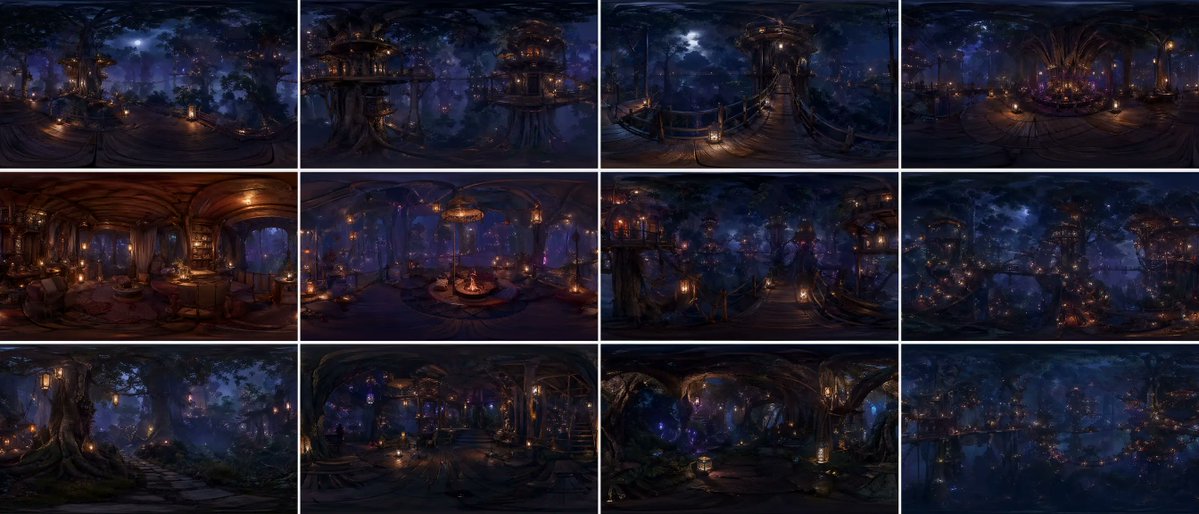
360-Degree Forest World Panorama Grid
A sophisticated prompt for generating a 12-panel equirectangular panorama of a continuous forest world with cinematic realism and global consistency.
This is a GPT Image 2 prompt case for Landscape & Nature. Use the copy-ready prompt below to generate similar visuals, and review Awesome GPT Image 2 Prompts attribution plus commercial-use rights before reuse.
Free 1K preview
Generate one preview image instantly, no sign-up required.
Prompt
Copy-ready prompt
{argument name="grid layout" default="12-panel grid (4x3)"}, each panel is an independent FULL equirectangular 360° panorama of the SAME continuous {argument name="environment" default="forest world"}

each panel = complete spherical environment (360° horizontal, 180° vertical)
true equirectangular projection with natural distortion:
stretched edges, curved horizon, vertical compression toward zenith and nadir

STRICT global consistency across panels:
same forest biome, same architectural language, same materials, same lighting logic, same scale, same color palette, no visual drift

cinematic photorealism, live-action quality, physically accurate rendering
natural light behavior, realistic exposure, subtle lens response, filmic dynamic range

ultra-detailed environment, grounded material response (wood, moss, fabric, stone), believable imperfections, micro-detail variation

massive forest environment with large-scale vertical structures integrated into trees
multi-layered platforms, bridges, embedded interiors, organic construction logic

lighting:
motivated light sources only (lanterns, windows, bioluminescence)
soft volumetric fog interacting with light beams
physically correct falloff, no overglow, no artificial bloom
balanced contrast, filmic highlights, deep but readable shadows

atmosphere:
dense air perspective, layered depth, subtle particle presence
natural haze, humidity, soft diffusion

CAMERA (IMPORTANT):
each panel = fixed central capture point of a spherical camera
true 360° capture, no framing, no composition bias, no cropped view
but with subtle real-world camera characteristics:
slight lens softness toward edges, mild exposure adaptation, natural highlight rolloff

each panel represents a different location within the SAME world:
canopy height, mid-bridge level, interior spaces, vertical clearings, forest floor transitions
continuous spatial logic between panels

viewer always positioned at the center of the environment

environment fully resolved in ALL directions:
above (canopy, sky gaps, light sources) and below (structures, roots, depth layers)

COLOR:
{argument name="color scheme" default="deep indigo night base, warm amber practical lights, restrained violet accents"}
cinematic color grading, natural color separation, no oversaturation

STYLE:
cinematic spherical realism, VR-ready environment, physically coherent world
high-end film production quality, not stylized, not game-like

no labels, no text, no numbers
Prompt variables
Editable argument placeholders found in the prompt, with their default values.
Best for
- - Landscape & Nature visual exploration
- - Image generation and reference-image edits
- - Reusable briefs that keep source attribution visible
Change these parts
- - Subject, product, character, or scene
- - Aspect ratio, camera, lighting, and background
- - Brand, text, color, and output constraints
Recommended model and settings
- - Model: gpt-image-2
- - Input mode: Text to Image
- - Aspect ratio: source
- - Commercial status: review original source
How to use this prompt
- 1. Copy the prompt and preserve its structure for the first test.
- 2. Replace the subject, context, and publishing channel.
- 3. Change one camera, lighting, or style variable per iteration.
- 4. Inspect the output, source, text, and rights before reuse.
Limitations, source, and reuse cautions
- - Generated output is an editable draft, not factual, legal, or rights evidence.
- - Review the linked source, people, brands, logos, text, and third-party media before commercial use.
More cases in this category
Prioritized by category, input mode compatibility, quality, and lower risk.

Reuse and source notes
Use this prompt safely after previewing the case.
- 1.Copy the prompt or open it directly in Dovoo with the generation button.
- 2.Adjust variables, aspect ratio, and reference images for your own use case.
- 3.Before publishing or paid usage, verify source rights, attribution requirements, and brand or likeness risks.
Can I use this prompt commercially?
Commercial-use status is allowed. Review the original source, license, brand constraints, and legal requirements before paid usage.
Where does this case come from?
This case is imported from Awesome GPT Image 2 Prompts; keep attribution visible and check the source URL before reuse.