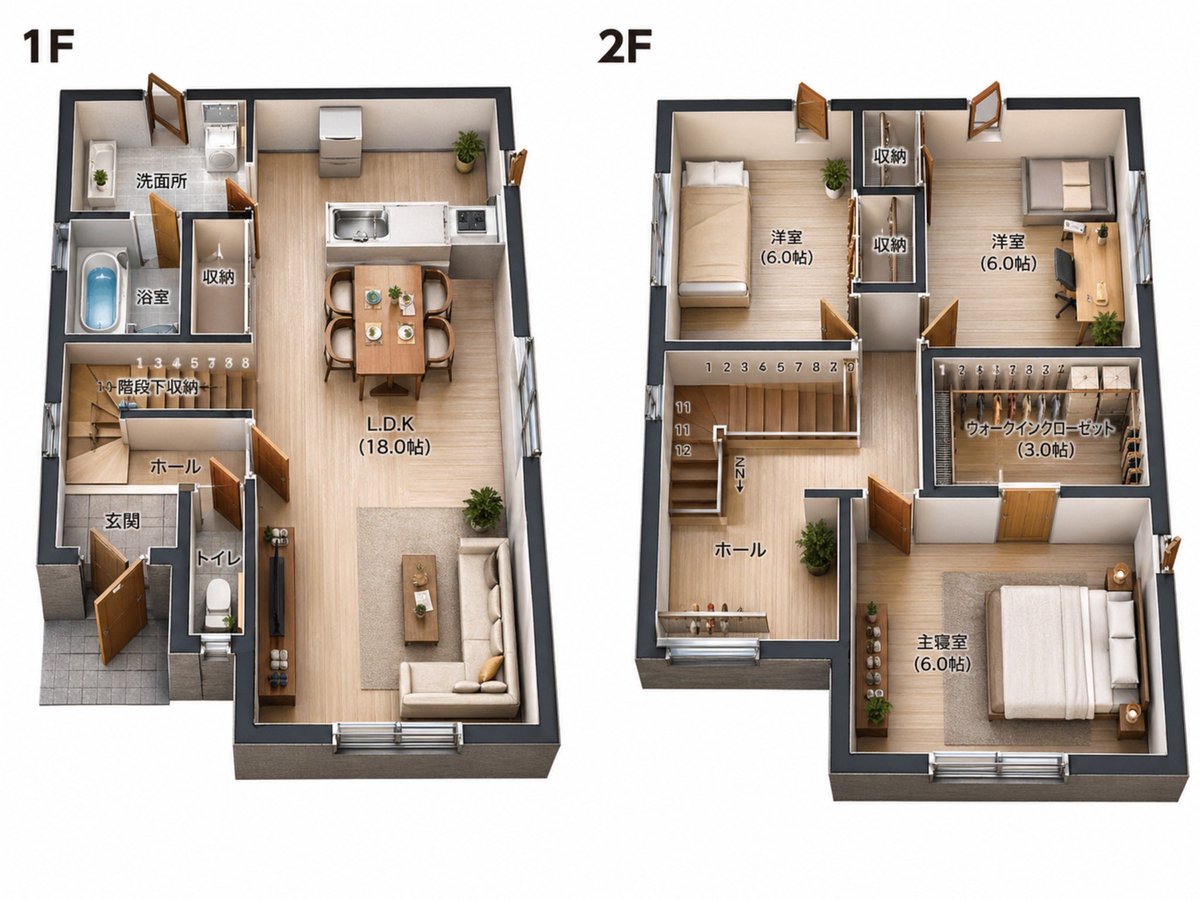
2D Floor Plan to 3D Real Estate Render
This prompt turns a simple architectural floor plan reference into a furnished 3D isometric real-estate marketing visual while keeping the original layout and labels intact.
This is a GPT Image 2 prompt case for Interior & Architecture. Use the copy-ready prompt below to generate similar visuals, and review Awesome GPT Image 2 Prompts attribution plus commercial-use rights before reuse.
Free 1K preview
Generate one preview image instantly, no sign-up required.
Free text preview doesn’t preserve reference-image consistency.
Prompt
Copy-ready prompt
Using the provided floor plan reference image, convert the 2D black-and-white architectural plan into a clean photorealistic 3D isometric real-estate floor plan render while preserving the original layout, room sizes, labels, and the side-by-side composition of the 1F and 2F plans. Add realistic wall thickness, light wood flooring, soft neutral wall colors, doors and windows with depth, and fully furnished interiors appropriate to each room. Keep all visible Japanese room labels in place, including 1F, 2F, 洗面所, 浴室, 収納, 階段下収納, ホール, 玄関, トイレ, L.D.K (18.0帖), 洋室 (6.0帖) for 2 rooms, ウォークインクローゼット (3.0帖), and 主寝室 (6.0帖). Stage the 1F with 1 kitchen, 1 dining table set for 4, 1 living area with sofa and coffee table, 1 toilet, 1 bathroom with tub, 1 wash area, and small plants. Stage the 2F with 3 sleeping/work rooms total: 1 bedroom with a single bed, 1 room with a desk and chair, and 1 master bedroom with a double bed, plus 2 storage spaces and 1 walk-in closet with shelving. Use a bright catalog-style presentation on a plain light background, viewed from a slightly elevated angled top-down perspective, suitable for a property sales brochure.
Best for
- - Interior & Architecture visual exploration
- - Image generation and reference-image edits
- - Reusable briefs that keep source attribution visible
Change these parts
- - Subject, product, character, or scene
- - Aspect ratio, camera, lighting, and background
- - Brand, text, color, and output constraints
Recommended model and settings
- - Model: gpt-image-2
- - Input mode: Image to Image
- - Aspect ratio: source
- - Commercial status: review original source
How to use this prompt
- 1. Copy the prompt and preserve its structure for the first test.
- 2. Replace the subject, context, and publishing channel.
- 3. Change one camera, lighting, or style variable per iteration.
- 4. Inspect the output, source, text, and rights before reuse.
Limitations, source, and reuse cautions
- - Generated output is an editable draft, not factual, legal, or rights evidence.
- - Review the linked source, people, brands, logos, text, and third-party media before commercial use.
More cases in this category
Prioritized by category, input mode compatibility, quality, and lower risk.
Reuse and source notes
Use this prompt safely after previewing the case.
- 1.Copy the prompt or open it directly in Dovoo with the generation button.
- 2.Adjust variables, aspect ratio, and reference images for your own use case.
- 3.Before publishing or paid usage, verify source rights, attribution requirements, and brand or likeness risks.
Can I use this prompt commercially?
Commercial-use status is allowed. Review the original source, license, brand constraints, and legal requirements before paid usage.
Where does this case come from?
This case is imported from Awesome GPT Image 2 Prompts; keep attribution visible and check the source URL before reuse.