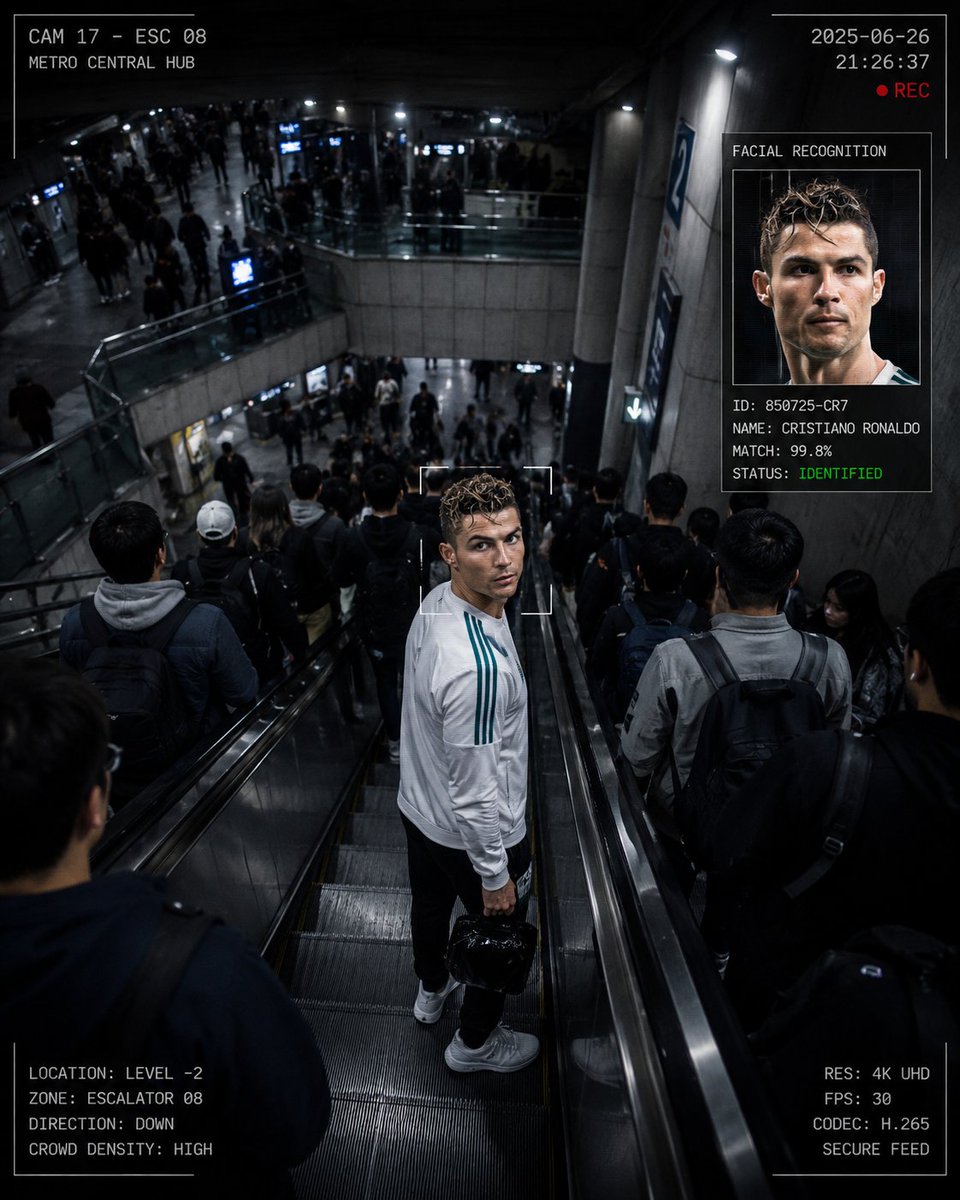
CCTV Surveillance Thriller Metro Station
A detailed prompt for creating a high-angle cinematic CCTV perspective in a crowded subway station, featuring a subject looking directly into the camera with HUD elements.
This is a GPT Image 2 prompt case for Interior & Architecture. Use the copy-ready prompt below to generate similar visuals, and review Awesome GPT Image 2 Prompts attribution plus commercial-use rights before reuse.
Free 1K preview
Generate one preview image instantly, no sign-up required.
Free text preview doesn’t preserve reference-image consistency.
Prompt
Copy-ready prompt
Create a cinematic surveillance-thriller image set inside a {argument name="location" default="massive multi-level underground metro station"}. The camera should feel like a ceiling-mounted CCTV positioned high above at roughly a 40-degree angle, looking down over a long industrial escalator and the complex architecture of the station. The composition should use a 4:5 vertical frame, with the escalator cutting diagonally through the image to create strong depth and scale. The station is crowded with hundreds of commuters moving in both directions, forming a chaotic flow of people with subtle motion blur. At the center of the frame, a single person {argument name="subject" default="matching the uploaded reference image"} is descending the escalator. The subject appears to be moving quickly, slightly leaning forward. One hand holds the escalator handrail for balance, while the other carries a small glossy black mini bag with realistic reflections. At a dramatic moment, the subject suddenly turns their head over their shoulder and looks directly into the camera, creating an intense fourth-wall-breaking moment, as if they know they are being watched. Add a realistic CCTV interface overlay, including: Live recording indicators, Timestamp and camera ID, A facial-tracking square locked onto the subject, A secondary zoomed-in facial recognition panel in one corner, Minimal technical HUD elements and surveillance graphics. Lighting should be cold and fluorescent, typical of a modern subway station, with realistic reflections on the metallic escalator surfaces and polished handrails. Keep the surrounding crowd slightly blurred while the subject remains sharp and in focus. Overall mood: high-end documentary surveillance thriller, ultra-photorealistic, cinematic composition, realistic skin textures, natural crowd behavior, detailed environmental reflections, and professional movie-grade realism.Prompt variables
Editable argument placeholders found in the prompt, with their default values.
Best for
- - Interior & Architecture visual exploration
- - Image generation and reference-image edits
- - Reusable briefs that keep source attribution visible
Change these parts
- - Subject, product, character, or scene
- - Aspect ratio, camera, lighting, and background
- - Brand, text, color, and output constraints
Recommended model and settings
- - Model: gpt-image-2
- - Input mode: Image to Image
- - Aspect ratio: source
- - Commercial status: review original source
How to use this prompt
- 1. Copy the prompt and preserve its structure for the first test.
- 2. Replace the subject, context, and publishing channel.
- 3. Change one camera, lighting, or style variable per iteration.
- 4. Inspect the output, source, text, and rights before reuse.
Limitations, source, and reuse cautions
- - Generated output is an editable draft, not factual, legal, or rights evidence.
- - Review the linked source, people, brands, logos, text, and third-party media before commercial use.
More cases in this category
Prioritized by category, input mode compatibility, quality, and lower risk.
Reuse and source notes
Use this prompt safely after previewing the case.
- 1.Copy the prompt or open it directly in Dovoo with the generation button.
- 2.Adjust variables, aspect ratio, and reference images for your own use case.
- 3.Before publishing or paid usage, verify source rights, attribution requirements, and brand or likeness risks.
Can I use this prompt commercially?
Commercial-use status is allowed. Review the original source, license, brand constraints, and legal requirements before paid usage.
Where does this case come from?
This case is imported from Awesome GPT Image 2 Prompts; keep attribution visible and check the source URL before reuse.