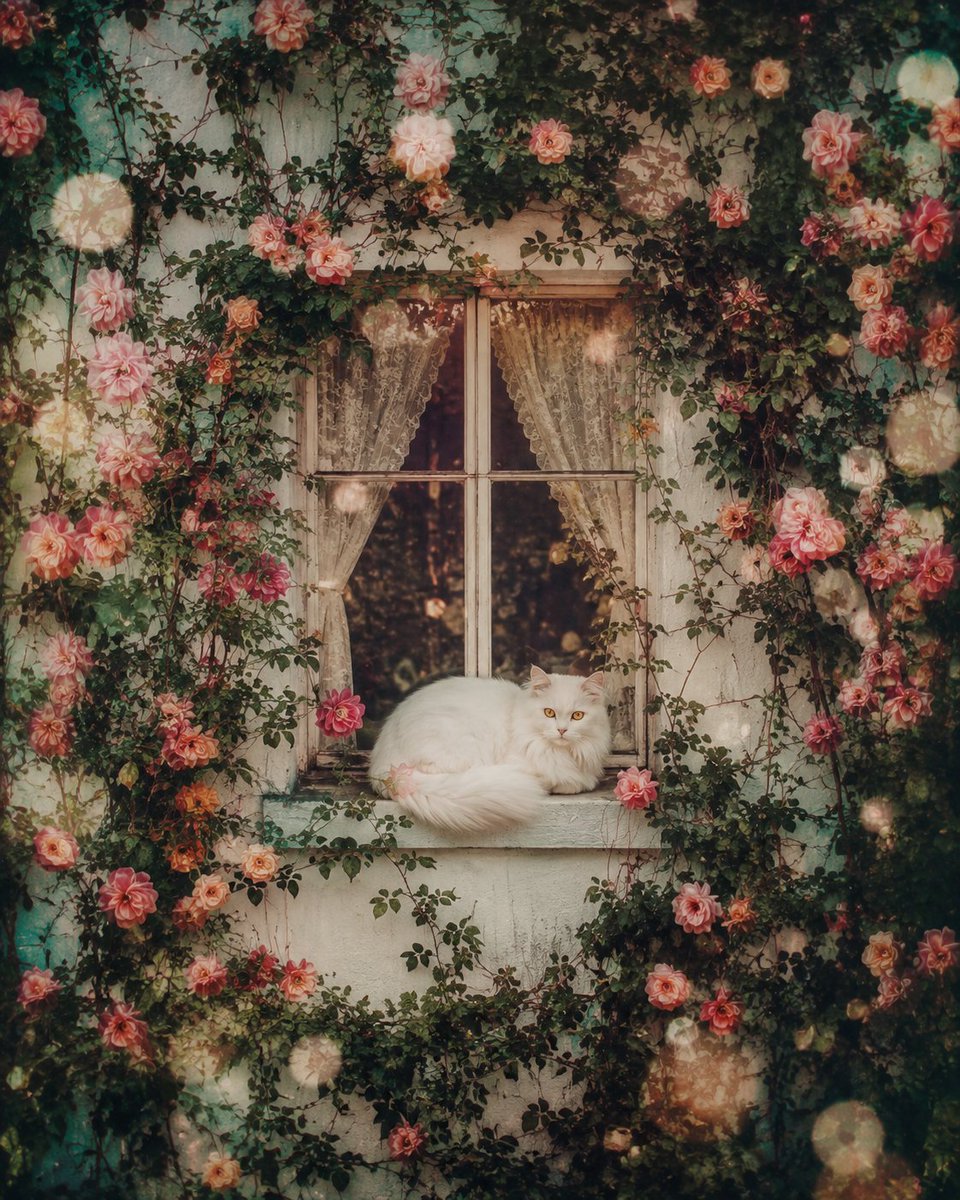
Ethereal Window Cat Photography
Creates a nostalgic, dreamlike image of a white cat on a window sill surrounded by blooming vines and flowers, using an analog film aesthetic.
이것은 인물과 캐릭터 에 대한 GPT Image 2 프롬프트 사례입니다. 아래의 복사 가능한 프롬프트를 사용하여 유사한 시각 자료를 생성하고, 재사용하기 전에 Awesome GPT Image 2 Prompts 의 저작자 표시 및 상업적 사용 권한을 검토하십시오.
전체 프롬프트 세트가 필요하신가요? 다음을 사용하세요. 인물과 캐릭터 더 많은 관련 예시를 보려면 주제 허브를 열거나 다음을 열어보세요. GPT Image 2 프롬프트 카탈로그 전체 예제 색인, 재사용 가능한 구조 및 출처 표기는 다음을 참조하십시오.
Free 1K preview
Generate one preview image instantly, no sign-up required.
2160/4000
프롬프트
복사 준비 프롬프트
A pristine white wall fills the frame, interrupted only by a single elegant window perfectly centered in the composition. The window frame appears carved directly into the wall, while lush climbing vines weave organically around it, intertwining with hundreds of {argument name="flower colors" default="delicate blooming flowers"} that spread across every inch of the white surface, creating a breathtaking living tapestry. Resting peacefully on the windowsill is a {argument name="cat type" default="snow-white long-haired cat"}, its luxurious silky fur illuminated by soft natural light. The cat is curled into a comfortable sleeping position, yet its mesmerizing {argument name="eye color" default="amber"} eyes remain gently open, reflecting a mysterious hazy golden glow that adds an ethereal sense of life and quiet wonder. The entire scene feels suspended in time, drenched in an ultra-soft analog film aesthetic with subtle overexposed highlights, faded sun-bleached tones, delicate film grain, blooming light, pastel color transitions, dreamy bokeh, diffused edges, chromatic softness, and floating dust particles dancing through the warm air. Tiny faded light leaks drift gracefully among the flower petals while gentle lens bloom creates glowing halos around every highlight. The atmosphere evokes the feeling of discovering a forgotten photograph hidden inside an old wooden drawer for decades—a fragile memory preserved beyond time. Every element carries nostalgic emotion, dreamlike tranquility, and poetic silence. Soft breeze barely moves the vines and flower petals while warm afternoon light filters through the window, creating cinematic volumetric illumination and subtle shadows across the wall. Hyper-realistic botanical detail, luxurious fur rendering, organic vine textures, delicate floral realism, ultra-photorealistic materials, cinematic composition, centered framing, shallow depth of field, premium color grading, fine-art photography, timeless nostalgia, surreal realism, dreamy memorycore aesthetic, soft focus, atmospheric perspective, masterpiece quality, 8K, HDR, ultra-detailed, emotionally evocative, visually breathtaking.프롬프트 변수
프롬프트에 있는 편집 가능한 인수 자리 표시자와 해당 기본값입니다.
변하기 쉬운
flower colors
기본
delicate blooming flowers
변하기 쉬운
cat type
기본
snow-white long-haired cat
변하기 쉬운
eye color
기본
amber
Best for
- - 인물과 캐릭터 visual exploration
- - Image generation and reference-image edits
- - Reusable briefs that keep source attribution visible
Change these parts
- - Subject, product, character, or scene
- - Aspect ratio, camera, lighting, and background
- - Brand, text, color, and output constraints
Recommended model and settings
- - Model: gpt-image-2
- - Input mode: 텍스트 to 이미지
- - Aspect ratio: source
- - Commercial status: review original source
How to use this prompt
- 1. Copy the prompt and preserve its structure for the first test.
- 2. Replace the subject, context, and publishing channel.
- 3. Change one camera, lighting, or style variable per iteration.
- 4. Inspect the output, source, text, and rights before reuse.
Limitations, source, and reuse cautions
- - Generated output is an editable draft, not factual, legal, or rights evidence.
- - Review the linked source, people, brands, logos, text, and third-party media before commercial use.
Awesome GPT Image 2 Prompts 에서 가져왔습니다. 출처 표기가 필요합니다. 상업적 이용 가능 여부는 allowed 입니다. 유료 사용 전에 원저작권 정보를 확인하세요.
이 범주에 속하는 더 많은 사례
범주, 입력 방식 호환성, 품질 및 위험도에 따라 우선순위가 정해집니다.


재사용 및 출처 참고 사항
사례를 미리 확인한 후 이 안내 메시지를 안전하게 사용하십시오.
- 1.프롬프트를 복사하거나 Dovoo의 생성 버튼을 사용하여 직접 엽니다.
- 2.사용 사례에 맞게 변수, 화면 비율 및 참조 이미지를 조정하십시오.
- 3.출판 또는 유료 사용 전에 저작권, 출처 표기 요건 및 브랜드 또는 초상권 관련 위험을 확인하십시오.