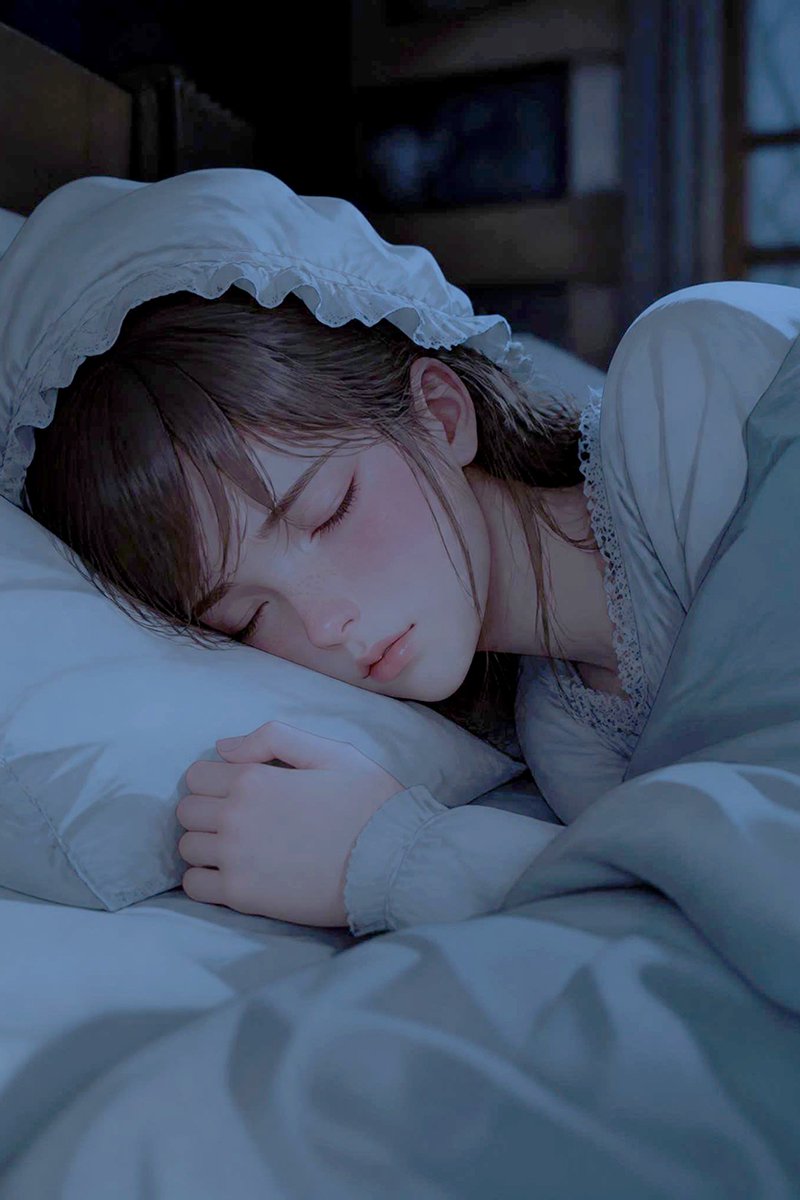
Sleeping Woman in Nightcap
A photorealistic nighttime bedroom portrait of a peaceful young woman sleeping in a lace nightcap, useful for cinematic character or mood imagery.
이것은 인물과 캐릭터 에 대한 GPT Image 2 프롬프트 사례입니다. 아래의 복사 가능한 프롬프트를 사용하여 유사한 시각 자료를 생성하고, 재사용하기 전에 Awesome GPT Image 2 Prompts 의 저작자 표시 및 상업적 사용 권한을 검토하십시오.
전체 프롬프트 세트가 필요하신가요? 다음을 사용하세요. 인물과 캐릭터 더 많은 관련 예시를 보려면 주제 허브를 열거나 다음을 열어보세요. GPT Image 2 프롬프트 카탈로그 전체 예제 색인, 재사용 가능한 구조 및 출처 표기는 다음을 참조하십시오.
Free 1K preview
Generate one preview image instantly, no sign-up required.
1131/4000
프롬프트
복사 준비 프롬프트
Create a photorealistic cinematic close-up of {argument name="character name" default="a young woman"} sleeping peacefully in bed at night, shown from a slightly elevated bedside angle in vertical portrait orientation. She has {argument name="hair color" default="dark brown hair"} with soft bangs and loose strands framing her face, pale delicate skin, closed eyes, relaxed lips, and a serene expression. She wears a white vintage nightgown with lace trim and a white ruffled nightcap with a scalloped frill edge, the cap clearly visible and naturally shaped around her head. Her head rests sideways on a white pillow, one hand gently curled near her face, while a pale blue-gray blanket covers her body and fills the foreground with soft folds. The room is dim and quiet, with a dark blurred bedroom background, faint furniture silhouettes, and cool moonlight entering from the right, creating blue nighttime shadows and subtle highlights on the fabric and skin. Use shallow depth of field, realistic skin texture, soft cinematic lighting, gentle contrast, intimate calm mood, high detail, no text, no watermark, no extra people.프롬프트 변수
프롬프트에 있는 편집 가능한 인수 자리 표시자와 해당 기본값입니다.
변하기 쉬운
character name
기본
a young woman
변하기 쉬운
hair color
기본
dark brown hair
Best for
- - 인물과 캐릭터 visual exploration
- - Image generation and reference-image edits
- - Reusable briefs that keep source attribution visible
Change these parts
- - Subject, product, character, or scene
- - Aspect ratio, camera, lighting, and background
- - Brand, text, color, and output constraints
Recommended model and settings
- - Model: gpt-image-2
- - Input mode: 텍스트 to 이미지
- - Aspect ratio: source
- - Commercial status: review original source
How to use this prompt
- 1. Copy the prompt and preserve its structure for the first test.
- 2. Replace the subject, context, and publishing channel.
- 3. Change one camera, lighting, or style variable per iteration.
- 4. Inspect the output, source, text, and rights before reuse.
Limitations, source, and reuse cautions
- - Generated output is an editable draft, not factual, legal, or rights evidence.
- - Review the linked source, people, brands, logos, text, and third-party media before commercial use.
Awesome GPT Image 2 Prompts 에서 가져왔습니다. 출처 표기가 필요합니다. 상업적 이용 가능 여부는 allowed 입니다. 유료 사용 전에 원저작권 정보를 확인하세요.
이 범주에 속하는 더 많은 사례
범주, 입력 방식 호환성, 품질 및 위험도에 따라 우선순위가 정해집니다.


재사용 및 출처 참고 사항
사례를 미리 확인한 후 이 안내 메시지를 안전하게 사용하십시오.
- 1.프롬프트를 복사하거나 Dovoo의 생성 버튼을 사용하여 직접 엽니다.
- 2.사용 사례에 맞게 변수, 화면 비율 및 참조 이미지를 조정하십시오.
- 3.출판 또는 유료 사용 전에 저작권, 출처 표기 요건 및 브랜드 또는 초상권 관련 위험을 확인하십시오.