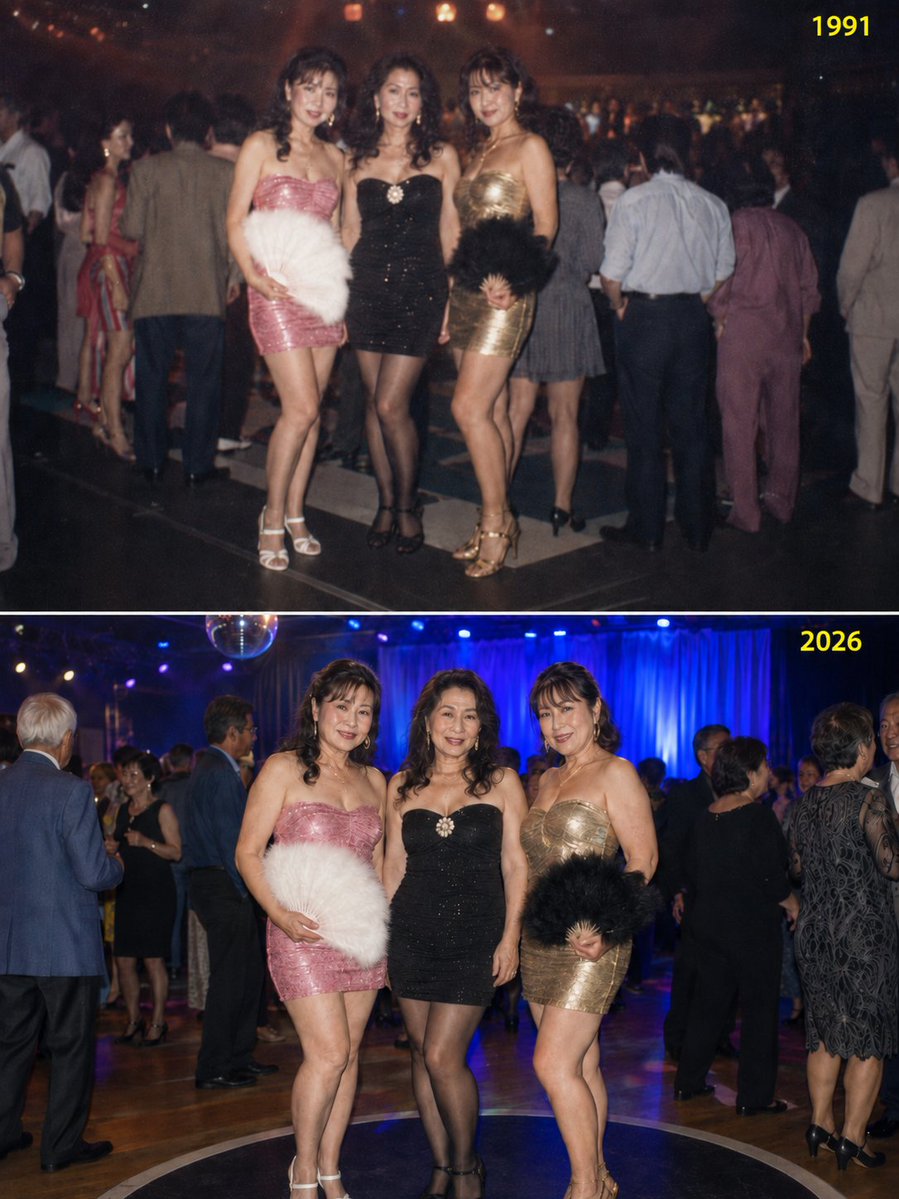
Disco Friends Reunion Comparison
A sophisticated prompt that generates a split-screen comparison of three friends at a disco in 1991 at age 25 and their reunion in 2026 at age 60, maintaining outfit consistency.
이것은 인물과 캐릭터 에 대한 GPT Image 2 프롬프트 사례입니다. 아래의 복사 가능한 프롬프트를 사용하여 유사한 시각 자료를 생성하고, 재사용하기 전에 Awesome GPT Image 2 Prompts 의 저작자 표시 및 상업적 사용 권한을 검토하십시오.
전체 프롬프트 세트가 필요하신가요? 다음을 사용하세요. 인물과 캐릭터 더 많은 관련 예시를 보려면 주제 허브를 열거나 다음을 열어보세요. GPT Image 2 프롬프트 카탈로그 전체 예제 색인, 재사용 가능한 구조 및 출처 표기는 다음을 참조하십시오.
Free 1K preview
Generate one preview image instantly, no sign-up required.
1053/4000
프롬프트
복사 준비 프롬프트
一张三位美丽好友的快照,她们在 {argument name="past year" default="1991"} 年时 25 岁(每人身高约 165 厘米),当时正在迪斯科“舞台”上跳舞;35 年后,她们在 {argument name="present year" default="2026"} 年一场特别的“经典之夜”迪斯科派对上重聚,此时她们已 60 岁。

生成的图像应采用 3:4 的纵向比例,在一个 PNG 文件中由上下两部分组成,上半部分代表 {argument name="past year" default="1991"} 年,下半部分代表 {argument name="present year" default="2026"} 年。
在上半部分的右上角应清晰可见“{argument name="past year" default="1991"}”字样,下半部分的右上角应清晰可见“{argument name="present year" default="2026"}”字样,文字颜色需与背景形成鲜明对比(如黄色或亮绿色)。

[重要提示]
三位女性的服装(紧身连衣短裙和高跟鞋)以及羽毛扇等配饰在 {argument name="past year" default="1991"} 年和 {argument name="present year" default="2026"} 年之间必须完全一致。
虽然每位女性的紧身裙在款式和颜色上各不相同,但每个人在两个时间段内必须穿着完全相同的服装。
在 {argument name="past year" default="1991"} 年的图像中,她们应呈现 25 岁的青春活力;在 {argument name="present year" default="2026"} 年的图像中,她们应呈现 60 岁时更丰满的体态。
这是一张站立的快照,而非她们在舞台上跳舞的照片。
她们在两个时间段的姿势应基本一致。
背景舞台设计以及背景中跳舞的其他人物在 {argument name="past year" default="1991"} 年和 {argument name="present year" default="2026"} 年之间应有所不同,以体现 35 年的时光流逝。
{argument name="past year" default="1991"} 年的图像应略微失焦,呈现出老式胶片照片的氛围。
프롬프트 변수
프롬프트에 있는 편집 가능한 인수 자리 표시자와 해당 기본값입니다.
변하기 쉬운
past year
기본
1991
변하기 쉬운
present year
기본
2026
Best for
- - 인물과 캐릭터 visual exploration
- - Image generation and reference-image edits
- - Reusable briefs that keep source attribution visible
Change these parts
- - Subject, product, character, or scene
- - Aspect ratio, camera, lighting, and background
- - Brand, text, color, and output constraints
Recommended model and settings
- - Model: gpt-image-2
- - Input mode: 텍스트 to 이미지
- - Aspect ratio: source
- - Commercial status: review original source
How to use this prompt
- 1. Copy the prompt and preserve its structure for the first test.
- 2. Replace the subject, context, and publishing channel.
- 3. Change one camera, lighting, or style variable per iteration.
- 4. Inspect the output, source, text, and rights before reuse.
Limitations, source, and reuse cautions
- - Generated output is an editable draft, not factual, legal, or rights evidence.
- - Review the linked source, people, brands, logos, text, and third-party media before commercial use.
Awesome GPT Image 2 Prompts 에서 가져왔습니다. 출처 표기가 필요합니다. 상업적 이용 가능 여부는 allowed 입니다. 유료 사용 전에 원저작권 정보를 확인하세요.
이 범주에 속하는 더 많은 사례
범주, 입력 방식 호환성, 품질 및 위험도에 따라 우선순위가 정해집니다.


재사용 및 출처 참고 사항
사례를 미리 확인한 후 이 안내 메시지를 안전하게 사용하십시오.
- 1.프롬프트를 복사하거나 Dovoo의 생성 버튼을 사용하여 직접 엽니다.
- 2.사용 사례에 맞게 변수, 화면 비율 및 참조 이미지를 조정하십시오.
- 3.출판 또는 유료 사용 전에 저작권, 출처 표기 요건 및 브랜드 또는 초상권 관련 위험을 확인하십시오.