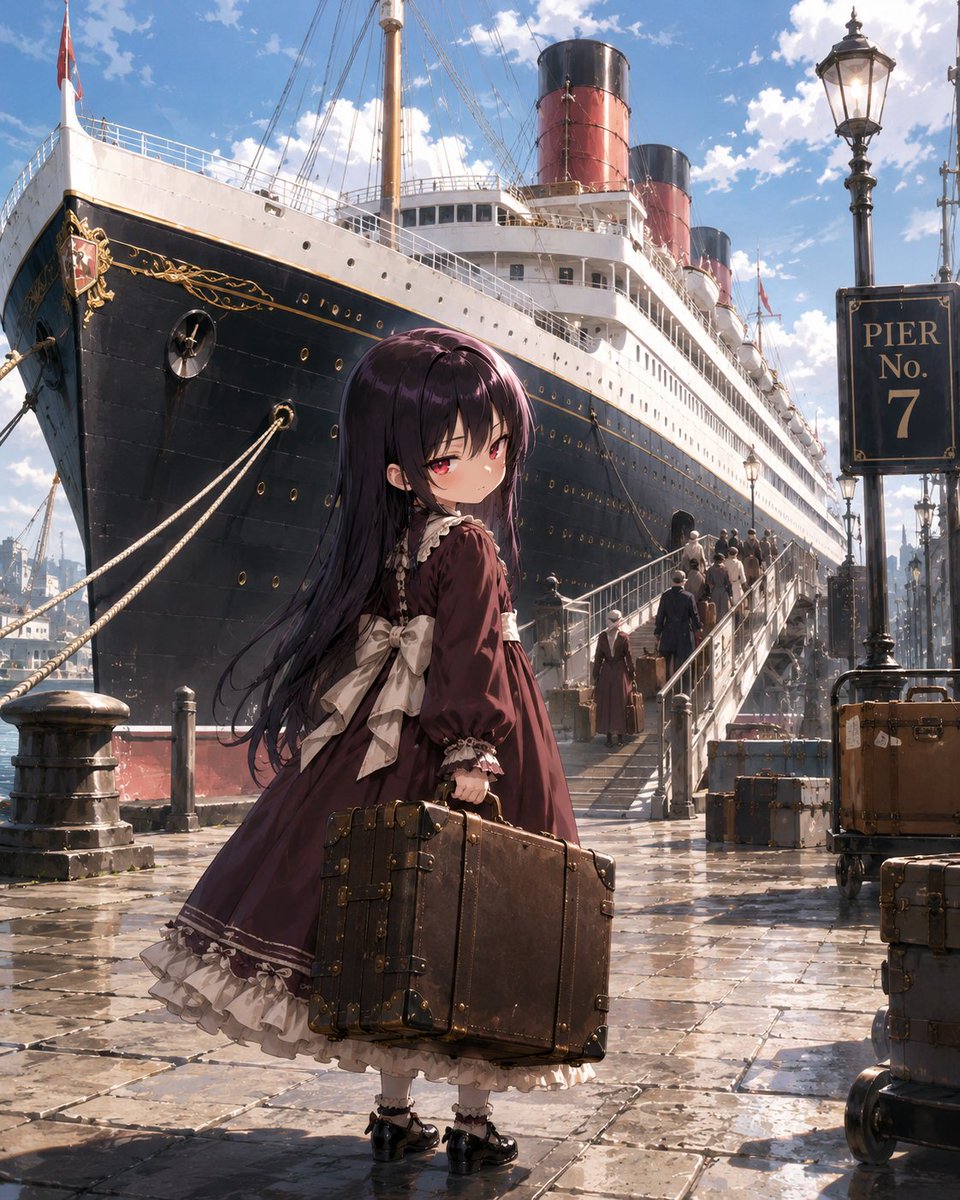
Little Girl in Ruined City
A narrative prompt featuring a young girl traveling through a ruined Central European capital to confront her destiny.
Questo è un esempio di prompt GPT Image 2 per Ritratto e personaggio . Utilizza il prompt pronto per la copia qui sotto per generare immagini simili e verifica l'attribuzione Awesome GPT Image 2 Prompts e i diritti di utilizzo commerciale prima del riutilizzo.
Hai bisogno del set completo di prompt? Usa il Ritratto e personaggio hub tematico per ulteriori esempi correlati oppure apri il GPT Image 2 catalogo rapido per l'indice completo degli esempi, le strutture riutilizzabili e l'attribuzione delle fonti.
Free 1K preview
Generate one preview image instantly, no sign-up required.
2242/4000
Richiesta
prompt pronto per la copia
Create a highly detailed, cinematic anime illustration. The main character is {argument name="character name" default="Kudo Tamamo"}, a five-year-old girl, standing on a wet stone dock in front of a massive early 20th-century luxury ocean liner. The girl is positioned in the foreground, full body, slightly turned away from the viewer but looking back with a calm, melancholic, and resolute expression; she has {argument name="hair color" default="Extremely long dark purple-black hair"}, red eyes, pale skin, and a petite build. She is wearing a deep wine-red Victorian Gothic Lolita travel dress with puff sleeves, cream-colored lace cuffs, a cream-colored ruffled hem, multiple petticoats, and a large cream-colored bow tied at the back, along with white socks and shiny black Mary Jane shoes. Her right hand holds 1 worn brown leather suitcase with brass corners and straps, heavy enough to cause her body to lean slightly. Behind her, showcase 1 massive black and white ocean liner docked at the pier, using a striking low-angle shot, with the bow occupying the left side of the frame; include decorative gold trim on the bow, portholes, rigging, a white upper deck, lifeboats, and 3 smokestacks extending into the distance with red and black coloring. A gangway on the right side leads to the ship, and several retro-style passengers wearing coats, hats, and carrying luggage can be seen boarding. Place 1 black vintage street lamp with a sign reading {argument name="pier sign text" default="PIER No. 7"} in the right foreground. Add pier luggage: a stack of 3 blue-gray suitcases next to the gangway, 1 tall brown steamer trunk on a handcart next to the signpost, and 1 partially cropped brown suitcase in the lower right corner. The scene is set in {argument name="setting" default="European port dock"}, with a clear blue sky dotted with white clouds; sunlight glistens on puddles and wet cobblestones, creating reflections. Atmosphere: nostalgic, grand, lonely farewell, with a narrative atmosphere of fate. Visual style: exquisite high-end anime key visual, complex lines, realistic perspective, painterly lighting and shadows, rich texture, including historical travel details, soft rim lighting, no modern items, no watermarks.Variabili di richiesta
Segnaposto per gli argomenti modificabili presenti nel prompt, con i relativi valori predefiniti.
Variabile
character name
Predefinito
Kudo Tamamo
Variabile
hair color
Predefinito
Extremely long dark purple-black hair
Variabile
pier sign text
Predefinito
PIER No. 7
Variabile
setting
Predefinito
European port dock
Best for
- - Ritratto e personaggio visual exploration
- - Image generation and reference-image edits
- - Reusable briefs that keep source attribution visible
Change these parts
- - Subject, product, character, or scene
- - Aspect ratio, camera, lighting, and background
- - Brand, text, color, and output constraints
Recommended model and settings
- - Model: gpt-image-2
- - Input mode: Testo in immagine
- - Aspect ratio: source
- - Commercial status: review original source
How to use this prompt
- 1. Copy the prompt and preserve its structure for the first test.
- 2. Replace the subject, context, and publishing channel.
- 3. Change one camera, lighting, or style variable per iteration.
- 4. Inspect the output, source, text, and rights before reuse.
Limitations, source, and reuse cautions
- - Generated output is an editable draft, not factual, legal, or rights evidence.
- - Review the linked source, people, brands, logos, text, and third-party media before commercial use.
Importato da Awesome GPT Image 2 Prompts . È richiesta l'attribuzione. Lo stato di utilizzo commerciale è allowed ; verificare i diritti della fonte prima dell'utilizzo a pagamento.
Altri casi in questa categoria
Prioritizzazione in base a categoria, compatibilità della modalità di input, qualità e minor rischio.
Note sul riutilizzo e sulla fonte
Utilizza questo prompt in tutta sicurezza dopo aver visualizzato in anteprima il caso.
- 1.Copia il prompt oppure aprilo direttamente in Dovoo tramite il pulsante di generazione.
- 2.Regola le variabili, le proporzioni e le immagini di riferimento in base alle tue esigenze.
- 3.Prima della pubblicazione o dell'utilizzo a pagamento, verificare i diritti di fonte, i requisiti di attribuzione e i rischi relativi al marchio o all'immagine.