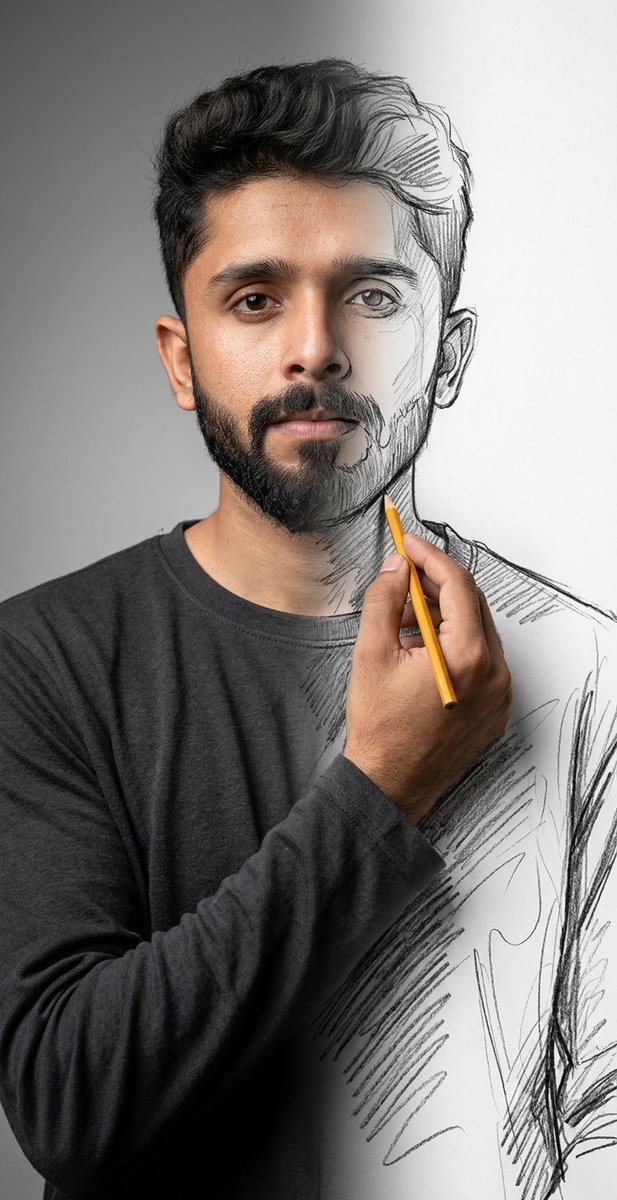
Surreal Mixed-Media Charcoal Portrait
A surrealist prompt that blends high-resolution 8K photography with rough charcoal sketching, creating a meta-fictional effect where the subject appears to be drawing themselves into existence.
Questo è un esempio di prompt GPT Image 2 per Ritratto e personaggio . Utilizza il prompt pronto per la copia qui sotto per generare immagini simili e verifica l'attribuzione Awesome GPT Image 2 Prompts e i diritti di utilizzo commerciale prima del riutilizzo.
Free 1K preview
Generate one preview image instantly, no sign-up required.
Richiesta
prompt pronto per la copia
Using {argument name="subject face" default="uploaded face"} as reference. A mind-bending surrealist mixed-media portrait featuring uploaded face as reference, captured in a pristine studio setting with a neutral gradient grey background and soft, diffuse softbox lighting. The composition utilizes a split-reality technique where the left side of the subject is rendered in hyper-realistic 8k photography with visible skin pores, subsurface scattering, and lifelike textures, while the right side abruptly transitions into a rough, gestural charcoal and graphite pencil sketch on white paper. The subject's realistic right hand crosses the chest, holding a {argument name="drawing tool" default="yellow wooden pencil"} with a sharp tip, physically drawing the sketched outline of the jaw and neck, creating a meta-fictional loop of self-creation. The subject wears a {argument name="shirt style" default="dark charcoal long-sleeve crewneck shirt"} that morphs from heavy, draped fabric on the left into loose, scribbled hatch lines and unfinished contour strokes on the right.

The image features a shallow depth of field focused on the pencil tip and the transition line, combining the aesthetics of high-end commercial portraiture with raw, artistic sketching, reminiscent of Ben Heine's 'Pencil vs Camera' style, highly intricate textures, volumetric lighting, and photorealistic raytracing.
Variabili di richiesta
Segnaposto per gli argomenti modificabili presenti nel prompt, con i relativi valori predefiniti.
Best for
- - Ritratto e personaggio visual exploration
- - Image generation and reference-image edits
- - Reusable briefs that keep source attribution visible
Change these parts
- - Subject, product, character, or scene
- - Aspect ratio, camera, lighting, and background
- - Brand, text, color, and output constraints
Recommended model and settings
- - Model: gpt-image-2
- - Input mode: Testo in immagine
- - Aspect ratio: source
- - Commercial status: review original source
How to use this prompt
- 1. Copy the prompt and preserve its structure for the first test.
- 2. Replace the subject, context, and publishing channel.
- 3. Change one camera, lighting, or style variable per iteration.
- 4. Inspect the output, source, text, and rights before reuse.
Limitations, source, and reuse cautions
- - Generated output is an editable draft, not factual, legal, or rights evidence.
- - Review the linked source, people, brands, logos, text, and third-party media before commercial use.
Altri casi in questa categoria
Prioritizzazione in base a categoria, compatibilità della modalità di input, qualità e minor rischio.
Note sul riutilizzo e sulla fonte
Utilizza questo prompt in tutta sicurezza dopo aver visualizzato in anteprima il caso.
- 1.Copia il prompt oppure aprilo direttamente in Dovoo tramite il pulsante di generazione.
- 2.Regola le variabili, le proporzioni e le immagini di riferimento in base alle tue esigenze.
- 3.Prima della pubblicazione o dell'utilizzo a pagamento, verificare i diritti di fonte, i requisiti di attribuzione e i rischi relativi al marchio o all'immagine.