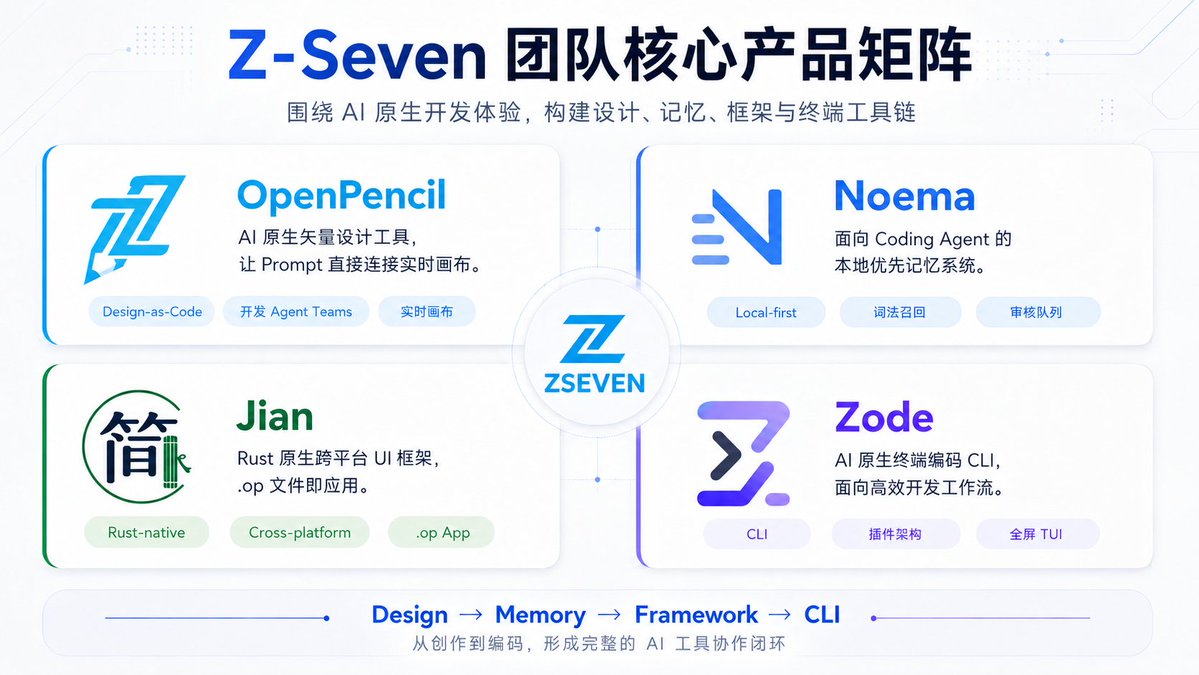
Z-Seven AI Product Matrix Slide
A polished 16:9 Chinese tech presentation slide showcasing four AI-native products around a central Z-Seven brand hub.
This is a GPT Image 2 prompt case for Graphic & Poster. Use the copy-ready prompt below to generate similar visuals, and review Awesome GPT Image 2 Prompts attribution plus commercial-use rights before reuse.
Free 1K preview
Generate one preview image instantly, no sign-up required.
Prompt
Copy-ready prompt
Objective: Create a concise and futuristic Chinese tech product matrix Slides for {argument name="brand name" default="Z-Seven"}, showcasing the team's core AI native product lineup.

Canvas: 16:9 horizontal presentation Slides, with a white to very light blue background, featuring subtle circuit board textures, tiny dot matrix tech patterns, fine connecting lines, and soft shadows, presenting a refined SaaS/AI startup aesthetic.

Title: A large, centered title in dark navy blue and bright blue: {argument name="headline text" default="Z-Seven Team Core Product Matrix"}. Below it, a smaller gray-blue subtitle: {argument name="subtitle text" default="Build a design, memory, framework, and terminal toolchain around a native AI development experience."}.

Layout: Arrange 4 rounded rectangle product cards in a 2x2 grid around a central circular hub. The cards are large white panels with subtle shadows, soft borders, and a colored accent line on the left edge or corner. Connect the four cards to the center with faint blue connecting lines and small nodes. Place a circular badge in the center containing a stylized blue Z logo and the text “ZSEVEN”.

Product Cards: Include 4 cards, each containing a Logo, a product name, a two-line description, and 3 capsule-shaped tags.
1. Top-left card: Product name “OpenPencil”, in bright cyan blue. A large, angular blue pencil/Z-shaped Logo on the left. Description: “AI native vector design tool,\nconnecting Prompt directly to the live canvas.” Tags (3 total): “Design-as-Code”, “Development Agent Teams”, “Live Canvas”.
2. Top-right card: Product name “Noema”, in vibrant blue. A minimalist blue gradient N-shaped Logo with three short, dynamic horizontal lines. Description: “Local-first memory system\nfor Coding Agents.” Tags (3 total): “Local-first”, “Lexical Recall”, “Audit Queue”.
3. Bottom-left card: Product name “Jian”, in green. A Logo resembling the Chinese character “简” (simple) within a thin green circle, with a small vertical mark resembling bamboo. Description: “Rust native cross-platform UI framework,\n.op file is the application.” Tags (3 total): “Rust-native”, “Cross-platform”, “ .op App”.
4. Bottom-right card: Product name “Zode”, in purple-blue gradient. A Logo that is a bold, futuristic Z/terminal symbol in purple and navy blue. Description: “AI native terminal coding CLI,\nfor efficient development workflows.” Tags (3 total): “CLI”, “Plugin Architecture”, “Full-screen TUI”.

Footer: Add a rounded horizontal bottom bar with fine blue lines and dot decorations. Display 4 workflow steps separated by arrows in the center: “Design → Memory → Framework → CLI”. Add small Chinese text below: “Form a complete AI tool collaboration loop from creation to coding”.

Visual Style: Modern enterprise-level AI product Slides, clear vector-style typography, accented with blue/cyan/purple/green, soft gradients, high readability, no photo textures, no watermarks. Use balanced margins to ensure all text is clear and easy to read.
Prompt variables
Editable argument placeholders found in the prompt, with their default values.
Best for
- - Graphic & Poster visual exploration
- - Image generation and reference-image edits
- - Reusable briefs that keep source attribution visible
Change these parts
- - Subject, product, character, or scene
- - Aspect ratio, camera, lighting, and background
- - Brand, text, color, and output constraints
Recommended model and settings
- - Model: gpt-image-2
- - Input mode: Text to Image
- - Aspect ratio: source
- - Commercial status: review original source
How to use this prompt
- 1. Copy the prompt and preserve its structure for the first test.
- 2. Replace the subject, context, and publishing channel.
- 3. Change one camera, lighting, or style variable per iteration.
- 4. Inspect the output, source, text, and rights before reuse.
Limitations, source, and reuse cautions
- - Generated output is an editable draft, not factual, legal, or rights evidence.
- - Review the linked source, people, brands, logos, text, and third-party media before commercial use.
More cases in this category
Prioritized by category, input mode compatibility, quality, and lower risk.




Reuse and source notes
Use this prompt safely after previewing the case.
- 1.Copy the prompt or open it directly in Dovoo with the generation button.
- 2.Adjust variables, aspect ratio, and reference images for your own use case.
- 3.Before publishing or paid usage, verify source rights, attribution requirements, and brand or likeness risks.
Can I use this prompt commercially?
Commercial-use status is allowed. Review the original source, license, brand constraints, and legal requirements before paid usage.
Where does this case come from?
This case is imported from Awesome GPT Image 2 Prompts; keep attribution visible and check the source URL before reuse.