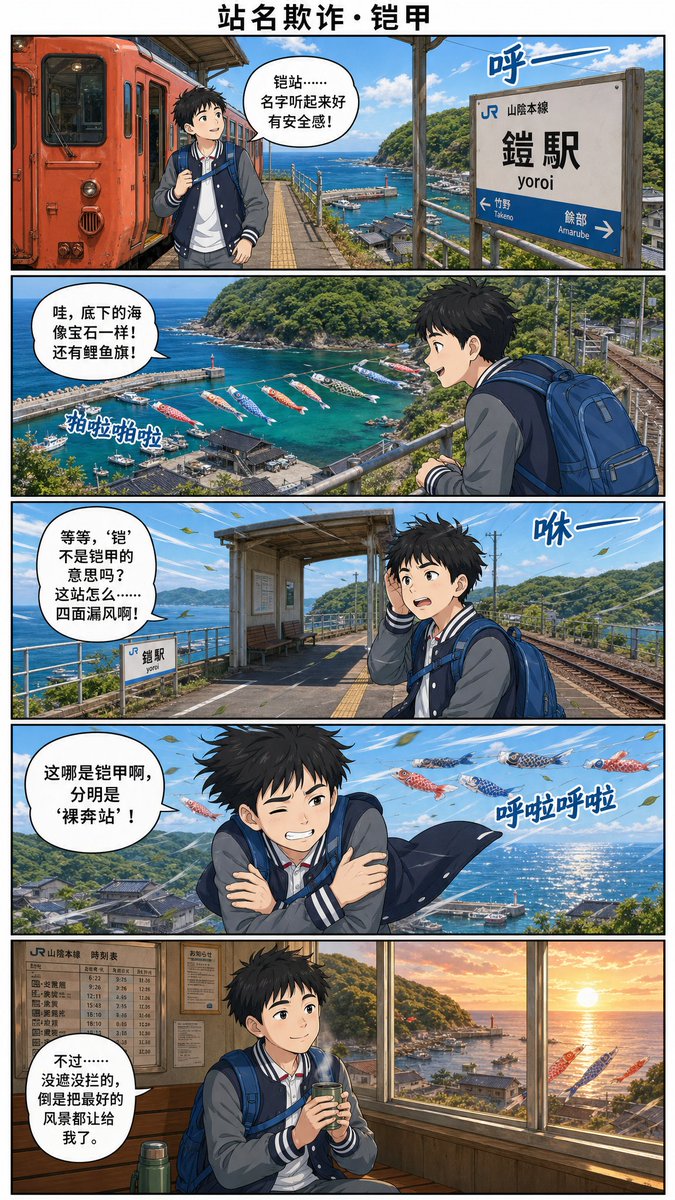
Yoroi Station Seaside Manga Comic
A five-panel Chinese-language anime travel comic set at Japan’s JR Yoroi Station, ideal for humorous railway tourism storytelling.
This is a GPT Image 2 prompt case for Anime & Game. Use the copy-ready prompt below to generate similar visuals, and review Awesome GPT Image 2 Prompts attribution plus commercial-use rights before reuse.
Free 1K preview
Generate one preview image instantly, no sign-up required.
Prompt
Copy-ready prompt
Goal: Create a vertical full-color manga travel comic page about a boy discovering a station-name misunderstanding at a seaside railway stop, using Chinese dialogue and Japanese station signage.

Canvas: Tall webcomic page in a 2:3 aspect ratio, clean white margins, black panel borders, five horizontal panels stacked vertically. Add a bold centered Chinese title at the top: {argument name="comic title" default="站名欺诈・铠甲"}. Use cinematic anime realism with detailed backgrounds, bright ocean colors, crisp linework, and polished gpt-image-2 style rendering.

Main character: A teenage Japanese schoolboy traveler with messy black hair, average build, wearing a navy-and-gray varsity jacket over a white shirt, dark pants, and a large blue backpack. Show every face clearly with natural, detailed facial features. He carries a small drink cup in the final panel. Mood progression: excited, amazed, confused, shivering, then comforted.

Setting: JR Yoro Station on the Sanin Main Line, a small coastal station high above a harbor. Show a red-orange local train, platform roof, rails, station signs, blue sea, green hills, fishing harbor, lighthouse, boats, and koinobori carp streamers flying over the water. The station name sign should read Japanese text: 「JR 山陰本線」「鎧駅」「yoroi」 with arrows toward 「竹野 Takenō」 and 「餘部 Amarube」. Keep the station identity legible.

Layout and panel details: Use exactly 5 panels.
1. Panel 1: At the station platform beside a red-orange train on the left, the boy stands with backpack and looks around. The ocean and harbor are visible beyond the platform. Add one speech bubble saying: {argument name="panel 1 dialogue" default="Armor Station... the name sounds so secure!"}. Add one blue wind sound effect near the station sign: 「呼ー」.
2. Panel 2: Wide scenic overlook from the platform railing, showing turquoise harbor water, boats, a lighthouse, green hills, and many colorful carp streamers over the sea. The boy is seen from behind/right with his blue backpack. Add one speech bubble saying: {argument name="panel 2 dialogue" default="Wow, the sea below looks like jewels! And there are koi flags!"}. Add one sound effect near the carp streamers: 「拍啦拍啦」.
3. Panel 3: The boy stands on the platform near tracks and the small station structure, holding a hand to his head as wind blows. A small station sign is visible. Add one speech bubble saying: {argument name="panel 3 dialogue" default="Wait, doesn't 'Armor' mean armor? Why is this station... leaking wind from all sides!"}. Add one blue wind sound effect: 「咻ー」.
4. Panel 4: Dramatic windy panel with the boy crossing his arms and shivering, jacket flapping, sea glittering behind him, carp streamers flying overhead. Add one speech bubble saying: {argument name="panel 4 dialogue" default="This isn't armor at all, it's clearly a 'Naked Run Station'!"}. Add one sound effect: 「呼啦呼啦」.
5. Panel 5: Warm indoor waiting room at sunset, wooden interior, timetable board on the wall, large windows overlooking the harbor and orange sun over the sea, a thermos near the boy. The boy sits calmly holding a hot drink. Add one speech bubble saying: {argument name="panel 5 dialogue" default="However... with nothing blocking the view, it actually lets me enjoy the best scenery."}.

Text constraints: Preserve the Chinese title and dialogue exactly as written, with clean readable lettering inside white speech bubbles. Preserve the Japanese station sign text exactly. Include exactly 5 speech bubbles, exactly 4 blue sound effects, and exactly 5 comic panels. Do not add extra captions, logos, watermarks, or unrelated characters.
Prompt variables
Editable argument placeholders found in the prompt, with their default values.
Best for
- - Anime & Game visual exploration
- - Image generation and reference-image edits
- - Reusable briefs that keep source attribution visible
Change these parts
- - Subject, product, character, or scene
- - Aspect ratio, camera, lighting, and background
- - Brand, text, color, and output constraints
Recommended model and settings
- - Model: gpt-image-2
- - Input mode: Text to Image
- - Aspect ratio: source
- - Commercial status: review original source
How to use this prompt
- 1. Copy the prompt and preserve its structure for the first test.
- 2. Replace the subject, context, and publishing channel.
- 3. Change one camera, lighting, or style variable per iteration.
- 4. Inspect the output, source, text, and rights before reuse.
Limitations, source, and reuse cautions
- - Generated output is an editable draft, not factual, legal, or rights evidence.
- - Review the linked source, people, brands, logos, text, and third-party media before commercial use.
More cases in this category
Prioritized by category, input mode compatibility, quality, and lower risk.
Reuse and source notes
Use this prompt safely after previewing the case.
- 1.Copy the prompt or open it directly in Dovoo with the generation button.
- 2.Adjust variables, aspect ratio, and reference images for your own use case.
- 3.Before publishing or paid usage, verify source rights, attribution requirements, and brand or likeness risks.
Can I use this prompt commercially?
Commercial-use status is allowed. Review the original source, license, brand constraints, and legal requirements before paid usage.
Where does this case come from?
This case is imported from Awesome GPT Image 2 Prompts; keep attribution visible and check the source URL before reuse.