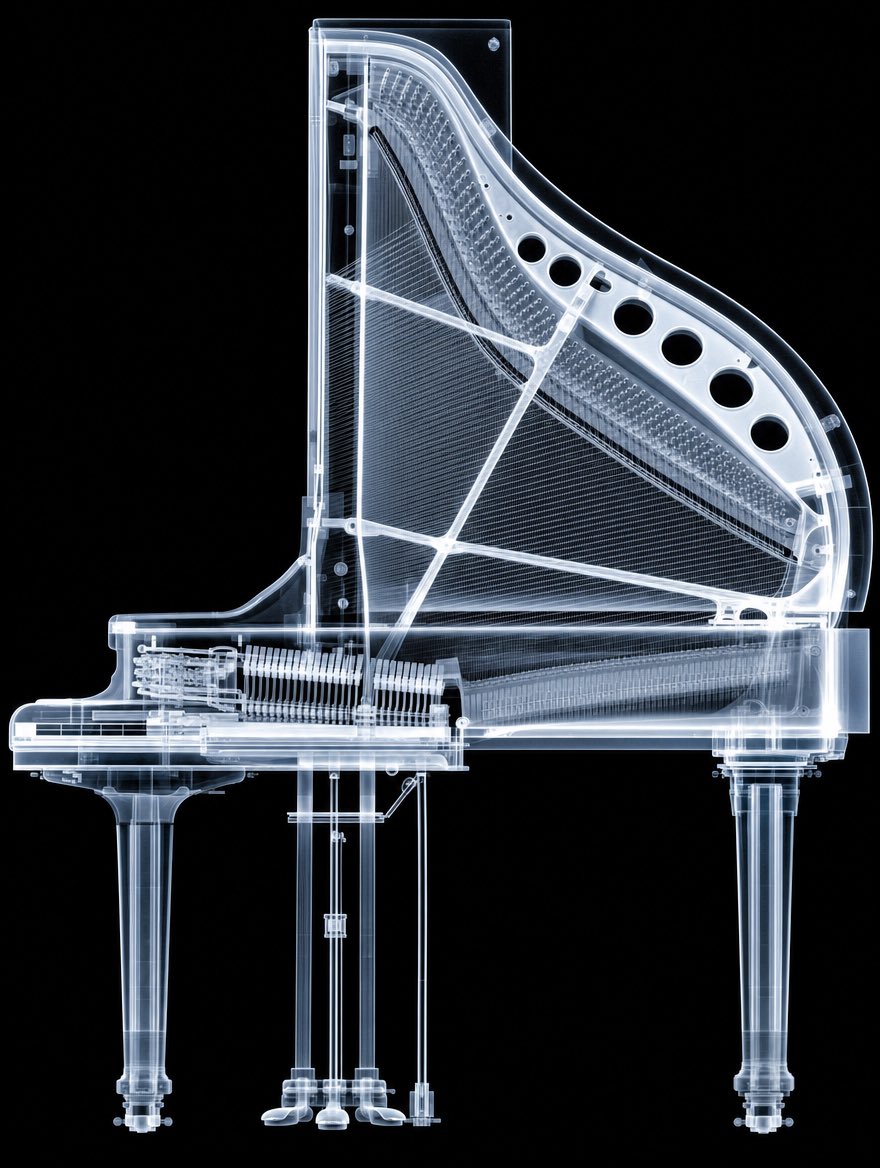
X-Ray Transparent Grand Piano
Generates a photorealistic black-background X-ray view of a grand piano with its internal strings, frame, action, legs, and hardware visible.
This is a GPT Image 2 prompt case for Illustration & Art. Use the copy-ready prompt below to generate similar visuals, and review Awesome GPT Image 2 Prompts attribution plus commercial-use rights before reuse.
Free 1K preview
Generate one preview image instantly, no sign-up required.
Prompt
Copy-ready prompt
Create a highly detailed photorealistic X-ray image of a transparent grand piano, shown in clean side profile on a pure black background. The piano should look like it is made of glowing translucent glass and pale blue-white radiographic material, revealing all internal mechanisms: the harp-shaped frame, dense parallel strings, soundboard ribs, cross braces, tuning pin area, keyboard action, hammers, dampers, pedal rods, and structural supports. Show exactly 3 visible legs: one front left leg under the keyboard, one central support/pedal assembly area with thin vertical rods, and one rear right leg under the body. Include exactly 6 large circular sound holes along the upper curved rim of the piano frame. Make the outer casing thick and transparent with bright illuminated edges, fine screws and hardware visible, and layered internal components overlapping like a medical scan. Use crisp high-contrast lighting, luminous cyan-white highlights, subtle bloom, sharp technical detail, and no text, no people, no watermark. Center the object vertically and horizontally, with the full piano visible and cropped only by the image frame margins. The overall effect should be a futuristic museum-quality X-ray scan of a {argument name="object" default="grand piano"}, combining engineering cutaway precision with dramatic black-background radiography.Prompt variables
Editable argument placeholders found in the prompt, with their default values.
Best for
- - Illustration & Art visual exploration
- - Image generation and reference-image edits
- - Reusable briefs that keep source attribution visible
Change these parts
- - Subject, product, character, or scene
- - Aspect ratio, camera, lighting, and background
- - Brand, text, color, and output constraints
Recommended model and settings
- - Model: gpt-image-2
- - Input mode: Text to Image
- - Aspect ratio: source
- - Commercial status: review original source
How to use this prompt
- 1. Copy the prompt and preserve its structure for the first test.
- 2. Replace the subject, context, and publishing channel.
- 3. Change one camera, lighting, or style variable per iteration.
- 4. Inspect the output, source, text, and rights before reuse.
Limitations, source, and reuse cautions
- - Generated output is an editable draft, not factual, legal, or rights evidence.
- - Review the linked source, people, brands, logos, text, and third-party media before commercial use.
More cases in this category
Prioritized by category, input mode compatibility, quality, and lower risk.
Reuse and source notes
Use this prompt safely after previewing the case.
- 1.Copy the prompt or open it directly in Dovoo with the generation button.
- 2.Adjust variables, aspect ratio, and reference images for your own use case.
- 3.Before publishing or paid usage, verify source rights, attribution requirements, and brand or likeness risks.
Can I use this prompt commercially?
Commercial-use status is allowed. Review the original source, license, brand constraints, and legal requirements before paid usage.
Where does this case come from?
This case is imported from Awesome GPT Image 2 Prompts; keep attribution visible and check the source URL before reuse.