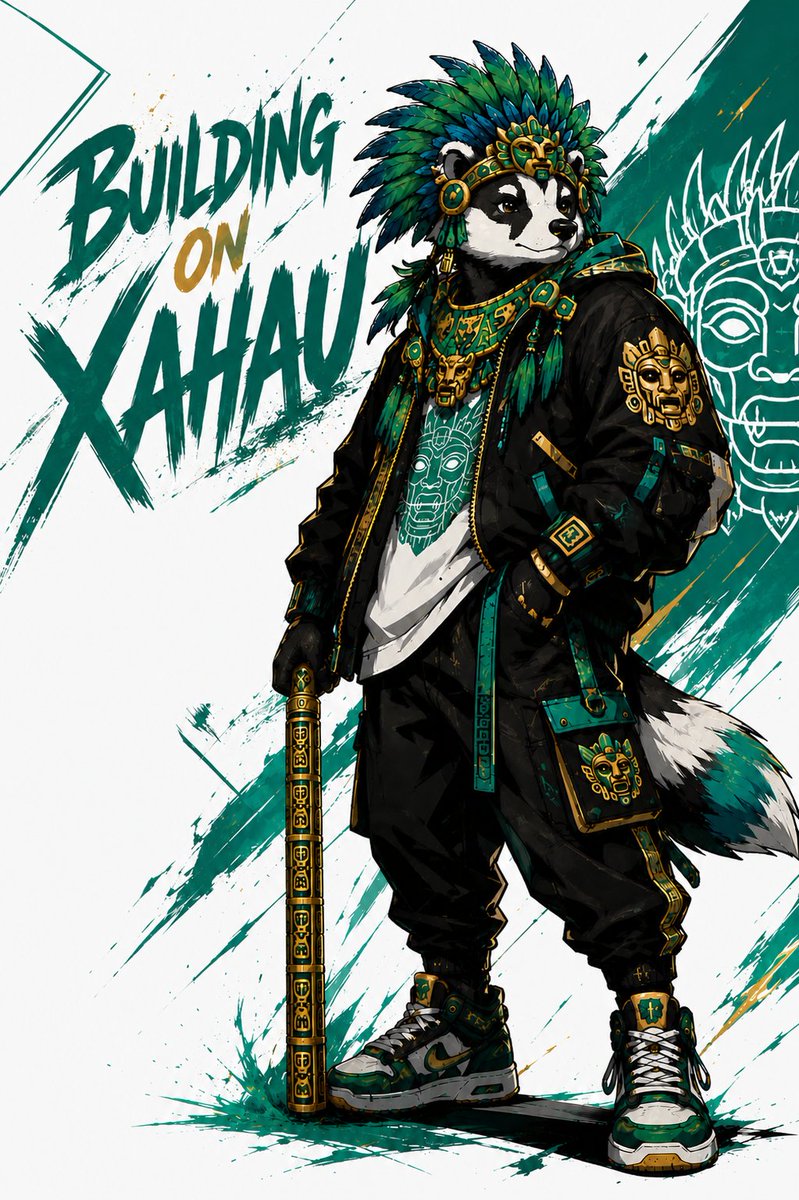
Xahau Panda Streetwear Poster
Generates a bold anthropomorphic panda character poster blending Mesoamerican ornamentation, streetwear fashion, and Xahau-themed graffiti typography.
This is a GPT Image 2 prompt case for Graphic & Poster. Use the copy-ready prompt below to generate similar visuals, and review Awesome GPT Image 2 Prompts attribution plus commercial-use rights before reuse.
Free 1K preview
Generate one preview image instantly, no sign-up required.
Prompt
Copy-ready prompt
Create a dynamic streetwear character poster on a white background with teal and gold paint-splatter brush strokes. The main subject is one anthropomorphic {argument name="animal character" default="panda"} standing full body in a confident three-quarter pose, looking to the side, with one hand in a pocket and the other holding one ornate vertical staff/cane decorated with gold-and-teal geometric glyphs. The character wears a dramatic Aztec/Mesoamerican-inspired feather headdress in teal, emerald, navy, black, and gold, a gold ceremonial forehead mask ornament, layered turquoise-and-gold jewelry, a black oversized bomber jacket with gold patches and teal trim, a white graphic T-shirt printed with a stylized ancient mask face, loose black cargo pants with teal straps and gold side detailing, chunky green-black-white sneakers, gloves, and one small teal crossbody pouch with a golden mask emblem. Add a visible fluffy black-white-teal tail behind the legs. The composition includes exactly 3 large brush-lettered words on the left reading “{argument name="headline text" default="BUILDING ON XAHAU"}”, with “BUILDING” and “XAHAU” in dark teal and “ON” in metallic gold; place the text diagonally and make it look hand-painted with splashes. On the right background, include one large thin white line-art mask illustration over a dark teal brush-stroke panel. Use high-contrast comic/anime concept art styling, sharp ink outlines, energetic splatter effects, detailed fabric folds, gold highlights, and a premium crypto-street-culture aesthetic.Prompt variables
Editable argument placeholders found in the prompt, with their default values.
Best for
- - Graphic & Poster visual exploration
- - Image generation and reference-image edits
- - Reusable briefs that keep source attribution visible
Change these parts
- - Subject, product, character, or scene
- - Aspect ratio, camera, lighting, and background
- - Brand, text, color, and output constraints
Recommended model and settings
- - Model: gpt-image-2
- - Input mode: Text to Image
- - Aspect ratio: source
- - Commercial status: review original source
How to use this prompt
- 1. Copy the prompt and preserve its structure for the first test.
- 2. Replace the subject, context, and publishing channel.
- 3. Change one camera, lighting, or style variable per iteration.
- 4. Inspect the output, source, text, and rights before reuse.
Limitations, source, and reuse cautions
- - Generated output is an editable draft, not factual, legal, or rights evidence.
- - Review the linked source, people, brands, logos, text, and third-party media before commercial use.
More cases in this category
Prioritized by category, input mode compatibility, quality, and lower risk.

Reuse and source notes
Use this prompt safely after previewing the case.
- 1.Copy the prompt or open it directly in Dovoo with the generation button.
- 2.Adjust variables, aspect ratio, and reference images for your own use case.
- 3.Before publishing or paid usage, verify source rights, attribution requirements, and brand or likeness risks.
Can I use this prompt commercially?
Commercial-use status is allowed. Review the original source, license, brand constraints, and legal requirements before paid usage.
Where does this case come from?
This case is imported from Awesome GPT Image 2 Prompts; keep attribution visible and check the source URL before reuse.