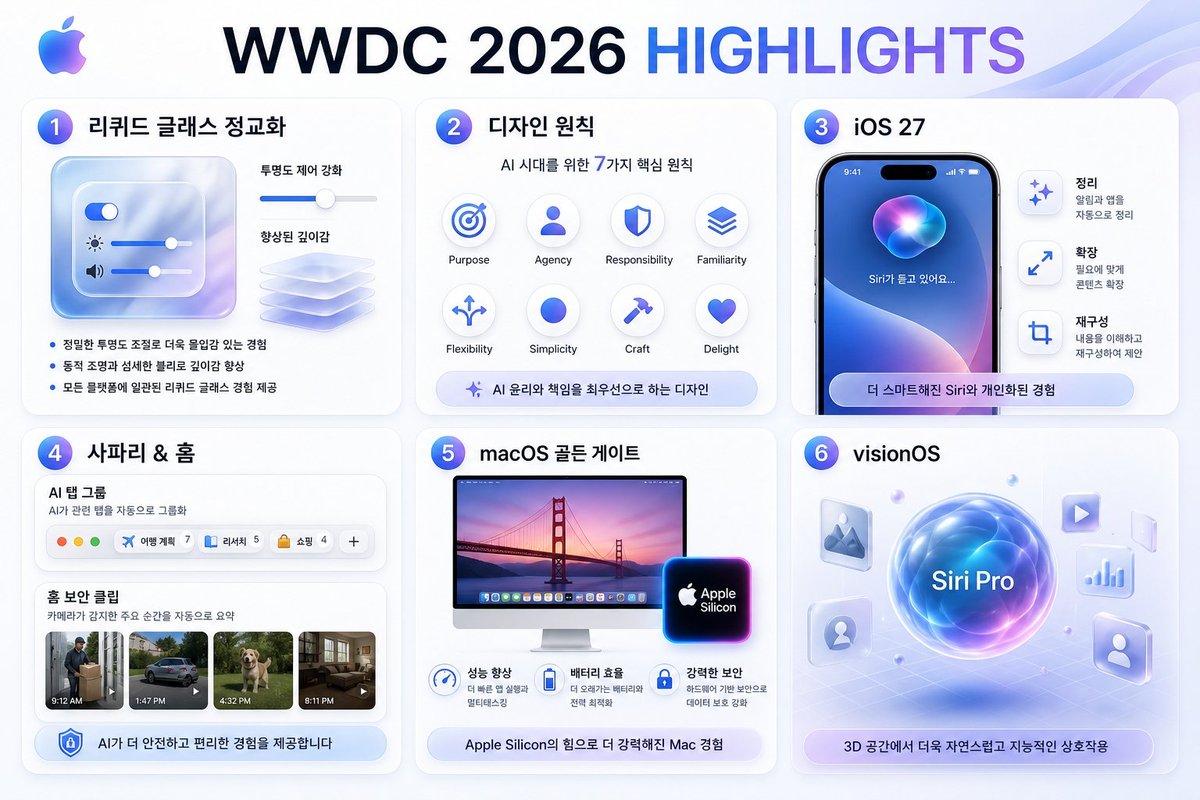
WWDC 2026 Highlights Infographic
Generates a Korean Apple-style WWDC highlights slide with six glassmorphic feature cards for design and platform updates.
This is a GPT Image 2 prompt case for Graphic & Poster. Use the copy-ready prompt below to generate similar visuals, and review Awesome GPT Image 2 Prompts attribution plus commercial-use rights before reuse.
Free 1K preview
Generate one preview image instantly, no sign-up required.
Prompt
Copy-ready prompt
Goal: Create a polished Apple-style Korean infographic slide summarizing {argument name="headline text" default="WWDC 2026 HIGHLIGHTS"} from a designer perspective.

Canvas: 16:9 horizontal presentation graphic, 1152×768 feel, white-to-pale-blue gradient background with soft translucent wave ribbons in the top-right corner. Use Apple-inspired glassmorphism, rounded cards, subtle shadows, blue/purple gradients, clean SF Pro-like typography, and a small multicolor Apple logo at the top-left.

Layout: Large centered headline at the top, with “WWDC 2026” in dark navy and “HIGHLIGHTS” in blue-to-purple gradient. Under it, arrange exactly 6 rounded white cards in a 3-column by 2-row grid, each card numbered with a glossy blue-purple circular badge from 1 to 6.

Card 1: Title {argument name="liquid glass title" default="리퀴드 글래스 정교화"}. Show a translucent frosted-glass control panel with exactly 3 horizontal sliders: a toggle slider, a brightness slider with sun icon, and a volume slider with speaker icon. To the right, show a depth-enhancement slider and a stack of translucent glass sheets. Include exactly 3 Korean bullet points: “정밀한 투명도 조절로 더욱 몰입감 있는 경험”, “동적 조명과 섬세한 블러로 깊이감 향상”, “모든 플랫폼에 일관된 리퀴드 글래스 경험 제공”.

Card 2: Title {argument name="design principles title" default="디자인 원칙"}. Subtitle “AI 시대를 위한 7가지 핵심 원칙”. Show exactly 7 circular principle icons in a neat grid, labeled in English: Purpose, Agency, Responsibility, Familiarity, Flexibility, Simplicity, Craft, Delight. Even though 8 label positions are visible, emphasize the subtitle says 7 principles while the visual grid contains these 8 labeled icon circles. Bottom pill caption: “AI 윤리와 책임을 최우선으로 하는 디자인”.

Card 3: Title {argument name="ios title" default="iOS 27"}. Show a realistic iPhone mockup with dynamic island, blue-purple Siri orb wallpaper, and Korean text on screen “Siri가 듣고 있어요...”. To the right, include exactly 3 vertical feature rows with icons and Korean headings: “정리” with smaller text “알림과 앱을 자동으로 정리”, “확장” with smaller text “필요에 맞게 콘텐츠 확장”, and “재구성” with smaller text “내용을 이해하고 재구성하여 제안”. Bottom rounded pill: “더 스마트해진 Siri와 개인화된 경험”.

Card 4: Title {argument name="safari home title" default="사파리 & 홈"}. Show a Safari-like AI tab group module labeled “AI 탭 그룹” with subtitle “AI가 관련 탭을 자동으로 그룹화”. Include exactly 4 visible tab chips plus one plus button: “여행 계획 7”, “리서치 5”, “쇼핑 4”, and a final add button “+”. Below, show a Home security clipping section titled “홈 보안 클립” with subtitle “카메라가 감지한 주요 순간을 자동으로 요약”. Include exactly 4 video thumbnails with time labels: 9:12 AM delivery person, 1:47 PM car, 4:32 PM dog, 8:11 PM living room. Bottom pill: “AI가 더 안전하고 편리한 경험을 제공합니다”.

Card 5: Title {argument name="macos title" default="macOS 골든 게이트"}. Show an iMac display with Golden Gate Bridge sunset wallpaper and a glowing Apple Silicon chip badge. Under it, include exactly 3 benefit icons with Korean headings and short subtext: “성능 향상”, “배터리 효율”, “강력한 보안”. Bottom pill: “Apple Silicon의 힘으로 더 강력해진 Mac 경험”.

Card 6: Title “visionOS”. Create a futuristic spatial-computing scene: a glowing central blue-purple orb labeled “Siri Pro” hovering over a faint perspective grid. Around it place exactly 6 floating translucent app tiles/icons: image/photo icon, play icon, chart icon, person icon, profile silhouette icon, and one small glass panel. Bottom pill: “3D 공간에서 더욱 자연스럽고 지능적인 상호작용”.

Visual style: High-end Apple keynote recap aesthetic, crisp vector UI mixed with soft 3D glass elements, blue/purple glow accents, consistent spacing, rounded 24px cards, light shadows, premium minimalism. Keep all Korean text legible and correctly spelled. Avoid extra logos, watermarks, signatures, or additional cards.
Prompt variables
Editable argument placeholders found in the prompt, with their default values.
Best for
- - Graphic & Poster visual exploration
- - Image generation and reference-image edits
- - Reusable briefs that keep source attribution visible
Change these parts
- - Subject, product, character, or scene
- - Aspect ratio, camera, lighting, and background
- - Brand, text, color, and output constraints
Recommended model and settings
- - Model: gpt-image-2
- - Input mode: Text to Image
- - Aspect ratio: source
- - Commercial status: review original source
How to use this prompt
- 1. Copy the prompt and preserve its structure for the first test.
- 2. Replace the subject, context, and publishing channel.
- 3. Change one camera, lighting, or style variable per iteration.
- 4. Inspect the output, source, text, and rights before reuse.
Limitations, source, and reuse cautions
- - Generated output is an editable draft, not factual, legal, or rights evidence.
- - Review the linked source, people, brands, logos, text, and third-party media before commercial use.
More cases in this category
Prioritized by category, input mode compatibility, quality, and lower risk.




Reuse and source notes
Use this prompt safely after previewing the case.
- 1.Copy the prompt or open it directly in Dovoo with the generation button.
- 2.Adjust variables, aspect ratio, and reference images for your own use case.
- 3.Before publishing or paid usage, verify source rights, attribution requirements, and brand or likeness risks.
Can I use this prompt commercially?
Commercial-use status is allowed. Review the original source, license, brand constraints, and legal requirements before paid usage.
Where does this case come from?
This case is imported from Awesome GPT Image 2 Prompts; keep attribution visible and check the source URL before reuse.