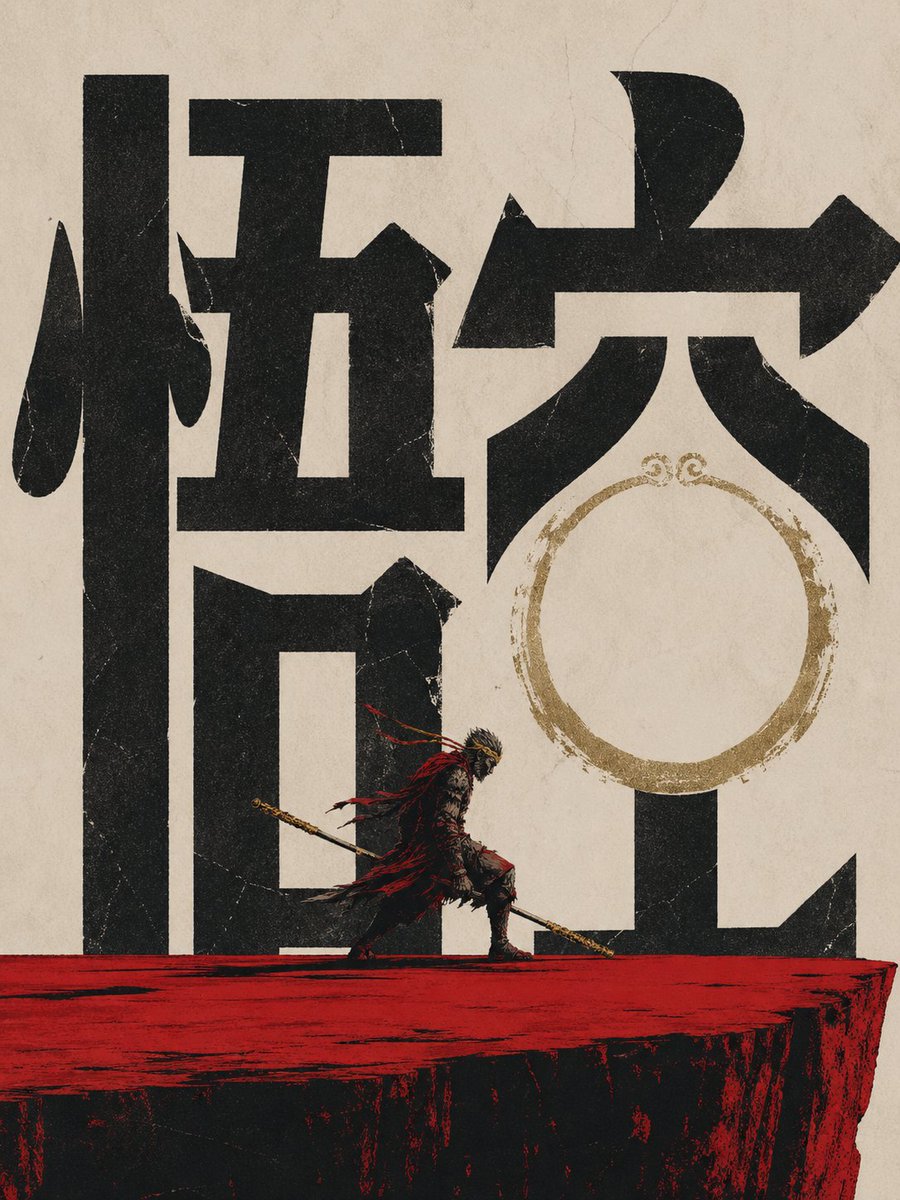
Wukong Calligraphy Poster
A distressed mythic poster featuring monumental Chinese calligraphy and a small Monkey King warrior on a red cliff, suitable for cinematic fantasy key art.
This is a GPT Image 2 prompt case for Graphic & Poster. Use the copy-ready prompt below to generate similar visuals, and review Awesome GPT Image 2 Prompts attribution plus commercial-use rights before reuse.
Free 1K preview
Generate one preview image instantly, no sign-up required.
Prompt
Copy-ready prompt
Create a dramatic vertical vintage Chinese mythic poster on aged beige rice paper with visible fibers, cracks, scratches, and distressed print texture. The composition is dominated by two enormous black Chinese calligraphy characters reading {argument name="main calligraphy text" default="Monkey King"}, rendered as bold blocky brush typography filling almost the entire background from edge to edge. Place a small heroic Monkey King warrior figure near the lower center, walking left to right across a rough horizontal red cliff or platform; he wears dark ornate armor with ragged flowing red cloth ribbons, a golden headband or crown, and carries a long golden staff angled downward across his body. Behind the right side of the calligraphy, add a worn circular gold ink ring motif, like a faded seal or halo, partially overlapping the negative space of the character. Use a limited palette of matte black, parchment beige, blood red, and tarnished gold, with high contrast, rough screen-printed edges, ink bleed, grunge speckles, and cinematic wuxia energy. Make the figure tiny compared with the monumental typography to emphasize scale and legend. No modern objects, no border, poster-style centered layout.Prompt variables
Editable argument placeholders found in the prompt, with their default values.
Best for
- - Graphic & Poster visual exploration
- - Image generation and reference-image edits
- - Reusable briefs that keep source attribution visible
Change these parts
- - Subject, product, character, or scene
- - Aspect ratio, camera, lighting, and background
- - Brand, text, color, and output constraints
Recommended model and settings
- - Model: gpt-image-2
- - Input mode: Text to Image
- - Aspect ratio: source
- - Commercial status: review original source
How to use this prompt
- 1. Copy the prompt and preserve its structure for the first test.
- 2. Replace the subject, context, and publishing channel.
- 3. Change one camera, lighting, or style variable per iteration.
- 4. Inspect the output, source, text, and rights before reuse.
Limitations, source, and reuse cautions
- - Generated output is an editable draft, not factual, legal, or rights evidence.
- - Review the linked source, people, brands, logos, text, and third-party media before commercial use.
More cases in this category
Prioritized by category, input mode compatibility, quality, and lower risk.
Reuse and source notes
Use this prompt safely after previewing the case.
- 1.Copy the prompt or open it directly in Dovoo with the generation button.
- 2.Adjust variables, aspect ratio, and reference images for your own use case.
- 3.Before publishing or paid usage, verify source rights, attribution requirements, and brand or likeness risks.
Can I use this prompt commercially?
Commercial-use status is allowed. Review the original source, license, brand constraints, and legal requirements before paid usage.
Where does this case come from?
This case is imported from Awesome GPT Image 2 Prompts; keep attribution visible and check the source URL before reuse.