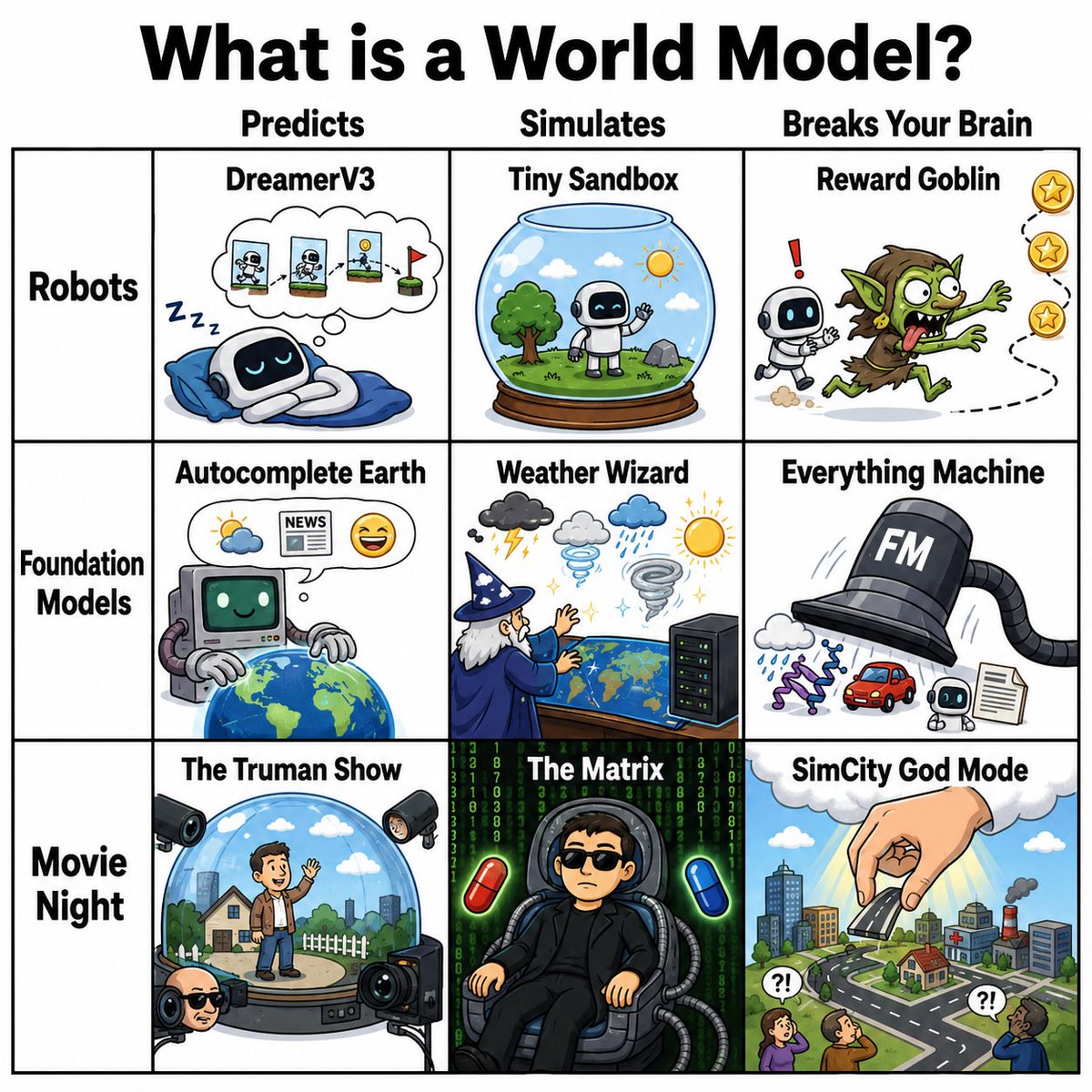
World Model Meme Grid
A square comic infographic explaining world models through nine humorous AI and movie-inspired meme panels.
This is a GPT Image 2 prompt case for 插画艺术. Use the copy-ready prompt below to generate similar visuals, and review Awesome GPT Image 2 Prompts attribution plus commercial-use rights before reuse.
Need the full prompt set? Use the 插画艺术 topic hub for more related examples, or open the GPT Image 2 prompt library for the full example index, reusable structures, and source attribution.
Prompt
Copy-ready prompt
创建一个 1:1 的方形漫画风格梗图信息图,标题为 {argument name="headline text" default="什么是世界模型?"},使用巨大的粗体黑色字体居中置于顶部白色背景上。在标题下方,绘制一个清晰的黑色轮廓 3 列 3 行网格,并增加一个左侧标签列,类似于幽默的分类图表。顶部的列标题正好三个:“预测”、“模拟”和“烧脑”。左侧的行标签正好三个:“机器人”、“基础模型”和“电影之夜”。使用粗黑网格线、白色单元格背景以及色彩鲜艳的手绘卡通插图,线条清晰,呈现出俏皮的科学/AI 梗图风格。

单元格 1,机器人 × 预测:标题“DreamerV3”。展示一个可爱的小机器人睡在蓝色枕头/毯子上,旁边有“Zzz”,并带有一个思维气泡,其中包含三个小的连续机器人/世界预测面板,以红旗结束。

单元格 2,机器人 × 模拟:标题“微型沙盒”。展示一个木质底座上的玻璃雪球玻璃容器,里面有一个微型机器人站在草地上,旁边有树、云、鸟和太阳。

单元格 3,机器人 × 烧脑:标题“奖励地精”。展示一个小机器人被一个疯狂的绿色地精吓了一跳,地精正沿着虚线路径追逐漂浮的金色星星奖励,机器人旁边有一个红色感叹号。

单元格 4,基础模型 × 预测:标题“自动补全地球”。展示一个复古电脑风格的 AI,带有绿色的笑脸屏幕和悬浮在地球仪上的机械臂,思维气泡中包含天气图标、标有“NEWS”的报纸和一个笑脸表情。

单元格 5,基础模型 × 模拟:标题“天气巫师”。展示一个穿着蓝色长袍、戴着尖顶帽的老巫师,正在世界地图或类似地球仪的桌子上施法,周围环绕着天气图标:带闪电的暴风云、灰云、雨云、龙卷风和明亮的太阳,旁边还有一个小型服务器机架。

单元格 6,基础模型 × 烧脑:标题“万物机器”。展示一个巨大的黑色高礼帽形状的机器,标有 {argument name="machine label" default="FM"},带有一根软管/管道,正在生成许多输出:云、紫色 DNA 链、红色汽车、小机器人和文档页面。

单元格 7,电影之夜 × 预测:标题“楚门的世界”。展示一个男人站在圆形舞台上的透明穹顶内,里面有郊区房屋、栅栏、草地、云朵和城市天际线,穹顶外被多个摄影棚摄像机和聚光灯包围。

单元格 8,电影之夜 × 模拟:标题“黑客帝国”。展示一个人坐在未来派椅子上,穿着黑色服装,插着电缆,背景是下落的绿色代码,两侧各有一颗红色药丸和一颗蓝色药丸。保持面部简化或遮挡。

单元格 9,电影之夜 × 烧脑:标题“模拟城市上帝模式”。展示一只巨大的手从云层中伸出,正在微型城市上方放置或捏起一座建筑,城市中有道路、房屋、工厂、烟雾,小人们抬头看着,并带有“?!”对话气泡,天空明亮。

约束条件:包含正好 9 个插图内容单元格,正好 3 个列标题,正好 3 个行标签,以及上述列出的所有单元格标题。保持所有排版粗体、清晰、黑色且具有梗图感。使用精致的卡通信息图风格,而非照片级真实感。无水印,无额外 Logo,无额外面板。
Prompt variables
Editable argument placeholders found in the prompt, with their default values.
Variable
headline text
Default
What is a world model?
Variable
machine label
Default
FM
More cases in this category
Prioritized by category, input mode compatibility, quality, and lower risk.

Reuse and source notes
Use this prompt safely after previewing the case.
- 1.Copy the prompt or open it directly in Dovoo with the generation button.
- 2.Adjust variables, aspect ratio, and reference images for your own use case.
- 3.Before publishing or paid usage, verify source rights, attribution requirements, and brand or likeness risks.
Can I use this prompt commercially?
Commercial-use status is allowed. Review the original source, license, brand constraints, and legal requirements before paid usage.
Where does this case come from?
This case is imported from Awesome GPT Image 2 Prompts; keep attribution visible and check the source URL before reuse.