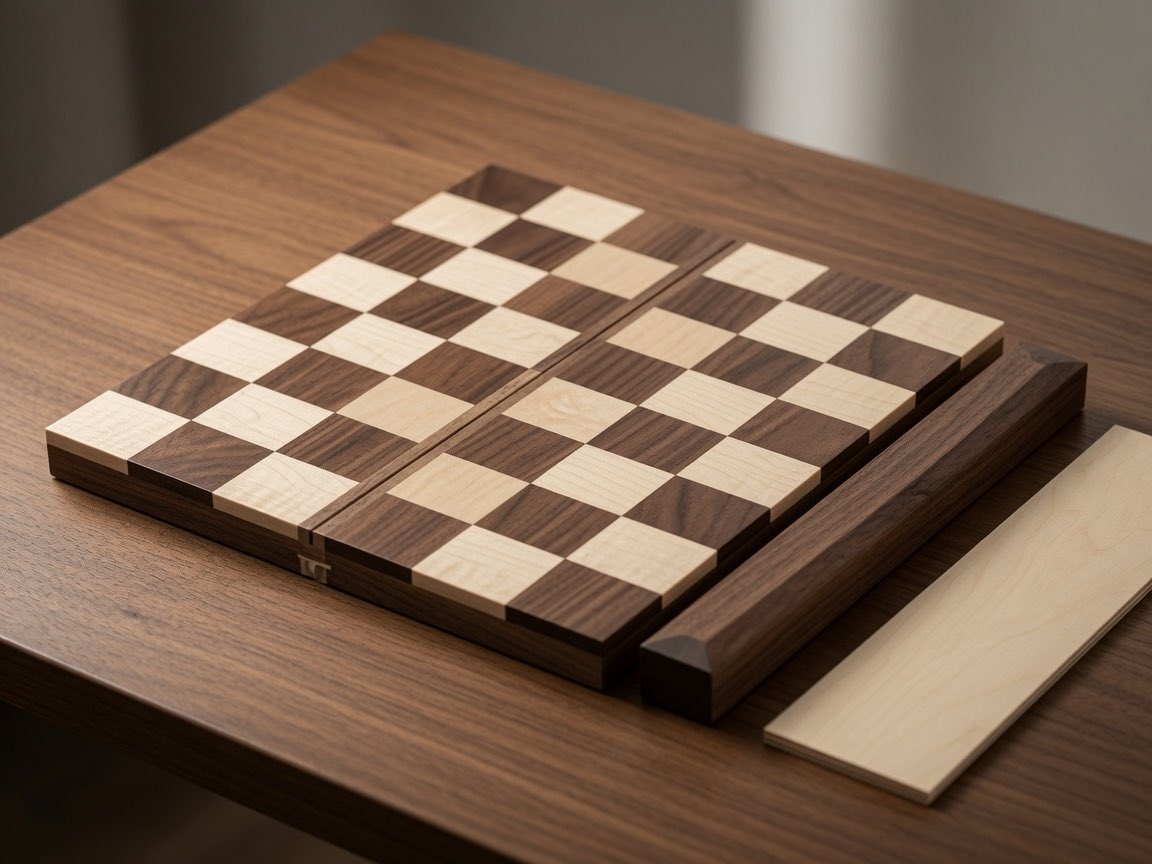
Wooden Travel Chessboard
A photorealistic product shot of a foldable wooden travel chessboard with loose side pieces on a warm walnut tabletop.
This is a GPT Image 2 prompt case for Product & Commercial. Use the copy-ready prompt below to generate similar visuals, and review Awesome GPT Image 2 Prompts attribution plus commercial-use rights before reuse.
Free 1K preview
Generate one preview image instantly, no sign-up required.
Prompt
Copy-ready prompt
Create a photorealistic close-up product-style image of a handcrafted wooden travel chessboard on a walnut tabletop. The scene shows exactly 1 folding chessboard made from 2 rectangular wooden halves separated by a narrow central hinge groove, with a checker pattern of exactly 64 raised square tiles in alternating pale maple and dark walnut wood. Add exactly 2 loose accessory pieces beside it: 1 long dark walnut side rail resting parallel to the right edge of the board and 1 flat pale maple wooden strip lying farther right. Include exactly 1 small brass-colored latch or clasp visible on the near front edge of the board. Use warm natural window light from the upper left, shallow depth of field, realistic wood grain, beveled edges, soft shadows, and a cozy workshop or tabletop atmosphere. Camera angle: three-quarter overhead view, slightly tilted, focused on the board surface. Make the board appear like {argument name="product type" default="a foldable travel chessboard"} made of {argument name="dark wood" default="walnut"} and {argument name="light wood" default="maple"}, placed on {argument name="surface" default="a walnut table"}. No chess pieces, no people, no text, no watermark.Prompt variables
Editable argument placeholders found in the prompt, with their default values.
Best for
- - Product & Commercial visual exploration
- - Image generation and reference-image edits
- - Reusable briefs that keep source attribution visible
Change these parts
- - Subject, product, character, or scene
- - Aspect ratio, camera, lighting, and background
- - Brand, text, color, and output constraints
Recommended model and settings
- - Model: gpt-image-2
- - Input mode: Text to Image
- - Aspect ratio: source
- - Commercial status: review original source
How to use this prompt
- 1. Copy the prompt and preserve its structure for the first test.
- 2. Replace the subject, context, and publishing channel.
- 3. Change one camera, lighting, or style variable per iteration.
- 4. Inspect the output, source, text, and rights before reuse.
Limitations, source, and reuse cautions
- - Generated output is an editable draft, not factual, legal, or rights evidence.
- - Review the linked source, people, brands, logos, text, and third-party media before commercial use.
More cases in this category
Prioritized by category, input mode compatibility, quality, and lower risk.
Reuse and source notes
Use this prompt safely after previewing the case.
- 1.Copy the prompt or open it directly in Dovoo with the generation button.
- 2.Adjust variables, aspect ratio, and reference images for your own use case.
- 3.Before publishing or paid usage, verify source rights, attribution requirements, and brand or likeness risks.
Can I use this prompt commercially?
Commercial-use status is allowed. Review the original source, license, brand constraints, and legal requirements before paid usage.
Where does this case come from?
This case is imported from Awesome GPT Image 2 Prompts; keep attribution visible and check the source URL before reuse.