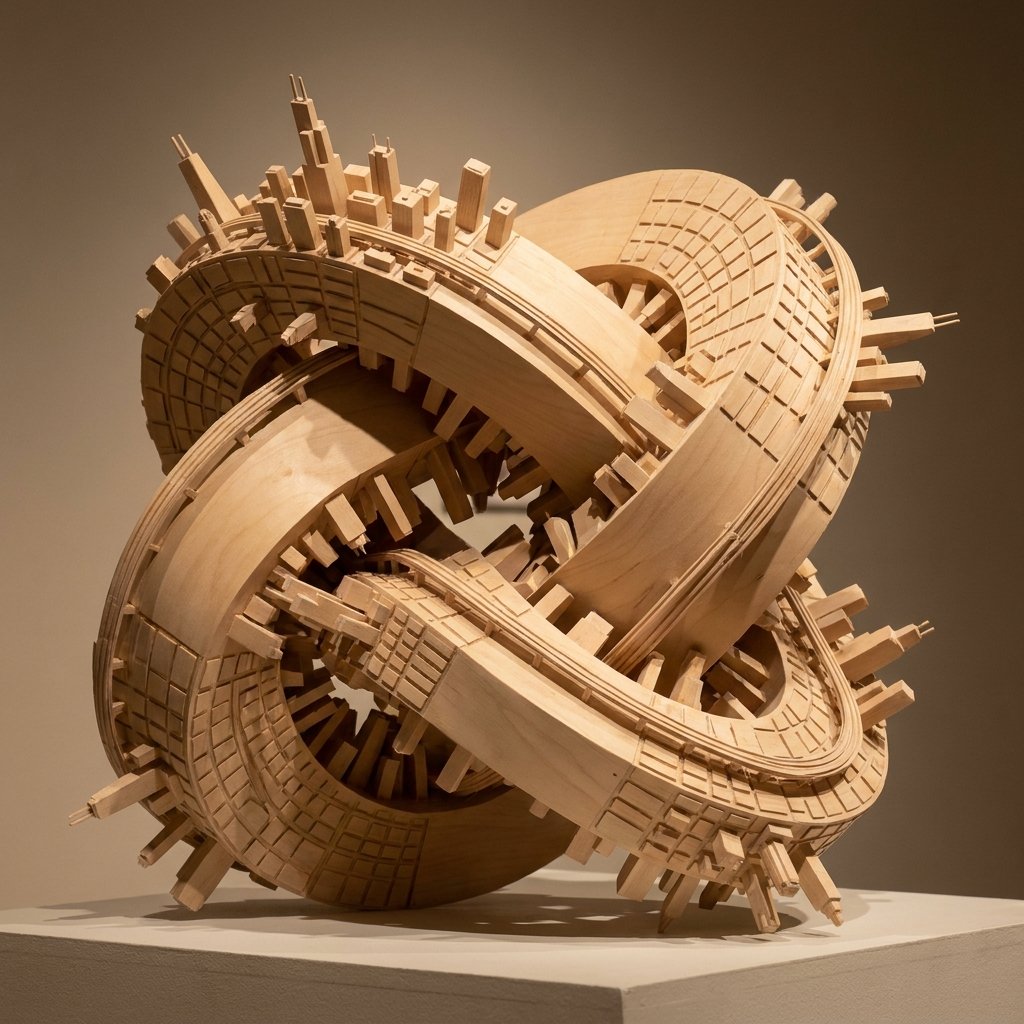
Wooden Impossible City Knot
A realistic macro studio prompt for generating a pale wooden tabletop sculpture where an impossible self-intersecting city manifold carries an extruded urban skyline across every surface.
This is a GPT Image 2 prompt case for Illustration & Art. Use the copy-ready prompt below to generate similar visuals, and review Awesome GPT Image 2 Prompts attribution plus commercial-use rights before reuse.
Free 1K preview
Generate one preview image instantly, no sign-up required.
Prompt
Copy-ready prompt
Create a macro-lens studio photograph of a tabletop sculpture: a closed, continuous, self-intersecting impossible-city manifold shaped like a thick wooden knot or tangled torus, constructed entirely from pale, smooth architectural modeling wood. Uniformly map the urban center of {argument name="urban center" default="Chicago"} across every curved surface of the manifold, with the recognizable skyline, dense downtown blocks, gridded streets, raised rails, and bridge-like infrastructure physically extruded from the wood. Emphasize the spatial paradox that there is no true up direction: skyscrapers, rectangular buildings, street grids, and rail strips protrude inward into hollow openings, outward from the outer rim, and sideways along twisting bands simultaneously, while roads loop back onto themselves around the knot. The sculpture sits on a simple white gallery pedestal, undeniably small-scale and hand-built, with visible wood grain, precise laser-cut grooves, clean beveled edges, and miniature architectural details. Use pristine warm gallery illumination with sharp, complex intersecting shadows cast through the hollow gaps, a neutral taupe background, shallow depth of field, and a three-quarter view that reveals the central voids, overlapping ribbons, and impossible geometry. The mood is elegant, mathematical, architectural, and surreal, rendered as a highly realistic product-style museum photograph.Prompt variables
Editable argument placeholders found in the prompt, with their default values.
Best for
- - Illustration & Art visual exploration
- - Image generation and reference-image edits
- - Reusable briefs that keep source attribution visible
Change these parts
- - Subject, product, character, or scene
- - Aspect ratio, camera, lighting, and background
- - Brand, text, color, and output constraints
Recommended model and settings
- - Model: gpt-image-2
- - Input mode: Text to Image
- - Aspect ratio: source
- - Commercial status: review original source
How to use this prompt
- 1. Copy the prompt and preserve its structure for the first test.
- 2. Replace the subject, context, and publishing channel.
- 3. Change one camera, lighting, or style variable per iteration.
- 4. Inspect the output, source, text, and rights before reuse.
Limitations, source, and reuse cautions
- - Generated output is an editable draft, not factual, legal, or rights evidence.
- - Review the linked source, people, brands, logos, text, and third-party media before commercial use.
More cases in this category
Prioritized by category, input mode compatibility, quality, and lower risk.
Reuse and source notes
Use this prompt safely after previewing the case.
- 1.Copy the prompt or open it directly in Dovoo with the generation button.
- 2.Adjust variables, aspect ratio, and reference images for your own use case.
- 3.Before publishing or paid usage, verify source rights, attribution requirements, and brand or likeness risks.
Can I use this prompt commercially?
Commercial-use status is allowed. Review the original source, license, brand constraints, and legal requirements before paid usage.
Where does this case come from?
This case is imported from Awesome GPT Image 2 Prompts; keep attribution visible and check the source URL before reuse.