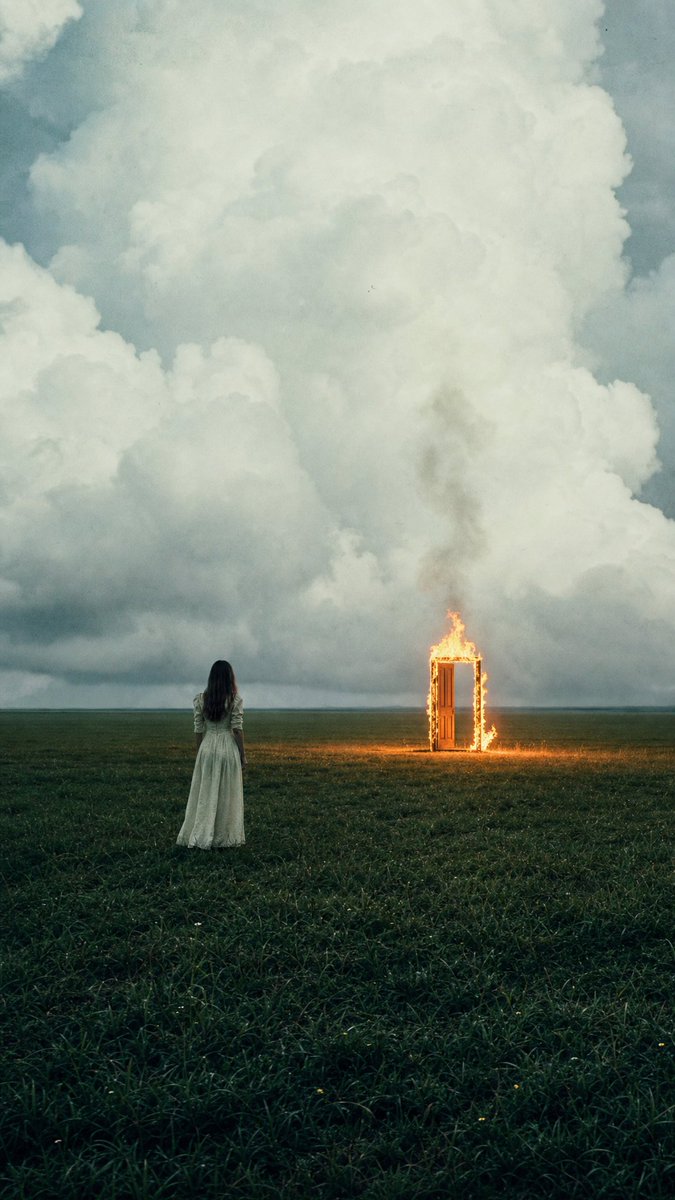
Woman Facing Burning Doorway
A cinematic surreal film-style scene of a lone woman in a field facing a burning doorway beneath towering storm clouds.
This is a GPT Image 2 prompt case for Illustration & Art. Use the copy-ready prompt below to generate similar visuals, and review Awesome GPT Image 2 Prompts attribution plus commercial-use rights before reuse.
Free 1K preview
Generate one preview image instantly, no sign-up required.
Prompt
Copy-ready prompt
Create a vertical cinematic surreal photograph of a lone {argument name="subject" default="young woman"} seen from behind, standing in a vast dark green grassy field under enormous storm clouds. She wears a long pale {argument name="dress color" default="off-white"} vintage dress with long sleeves, her dark hair loose down her back, small in the frame and positioned slightly left of center. Far ahead to the right stands a single freestanding wooden doorway or doorframe, upright in the open field, engulfed in bright orange flames along the frame and top edge, casting a small warm glow on the grass. The scene contains exactly two main subjects: the woman and the burning doorway. Use a low horizon so the sky dominates most of the image, filled with towering soft cumulus storm clouds in blue-gray and cream tones, moody overcast light, distant flat horizon, no buildings or trees. Style it like an imperfect analog film still: muted teal-green color grading, visible grain, slight haze, soft focus, subtle dust specks and photographic artifacts, natural lens perspective, dramatic contrast between cold cloudy sky and warm firelight. Vertical 2:3 composition, melancholic and mysterious magical-realism atmosphere, no text, no watermark.Prompt variables
Editable argument placeholders found in the prompt, with their default values.
Best for
- - Illustration & Art visual exploration
- - Image generation and reference-image edits
- - Reusable briefs that keep source attribution visible
Change these parts
- - Subject, product, character, or scene
- - Aspect ratio, camera, lighting, and background
- - Brand, text, color, and output constraints
Recommended model and settings
- - Model: gpt-image-2
- - Input mode: Text to Image
- - Aspect ratio: source
- - Commercial status: review original source
How to use this prompt
- 1. Copy the prompt and preserve its structure for the first test.
- 2. Replace the subject, context, and publishing channel.
- 3. Change one camera, lighting, or style variable per iteration.
- 4. Inspect the output, source, text, and rights before reuse.
Limitations, source, and reuse cautions
- - Generated output is an editable draft, not factual, legal, or rights evidence.
- - Review the linked source, people, brands, logos, text, and third-party media before commercial use.
More cases in this category
Prioritized by category, input mode compatibility, quality, and lower risk.
Reuse and source notes
Use this prompt safely after previewing the case.
- 1.Copy the prompt or open it directly in Dovoo with the generation button.
- 2.Adjust variables, aspect ratio, and reference images for your own use case.
- 3.Before publishing or paid usage, verify source rights, attribution requirements, and brand or likeness risks.
Can I use this prompt commercially?
Commercial-use status is allowed. Review the original source, license, brand constraints, and legal requirements before paid usage.
Where does this case come from?
This case is imported from Awesome GPT Image 2 Prompts; keep attribution visible and check the source URL before reuse.