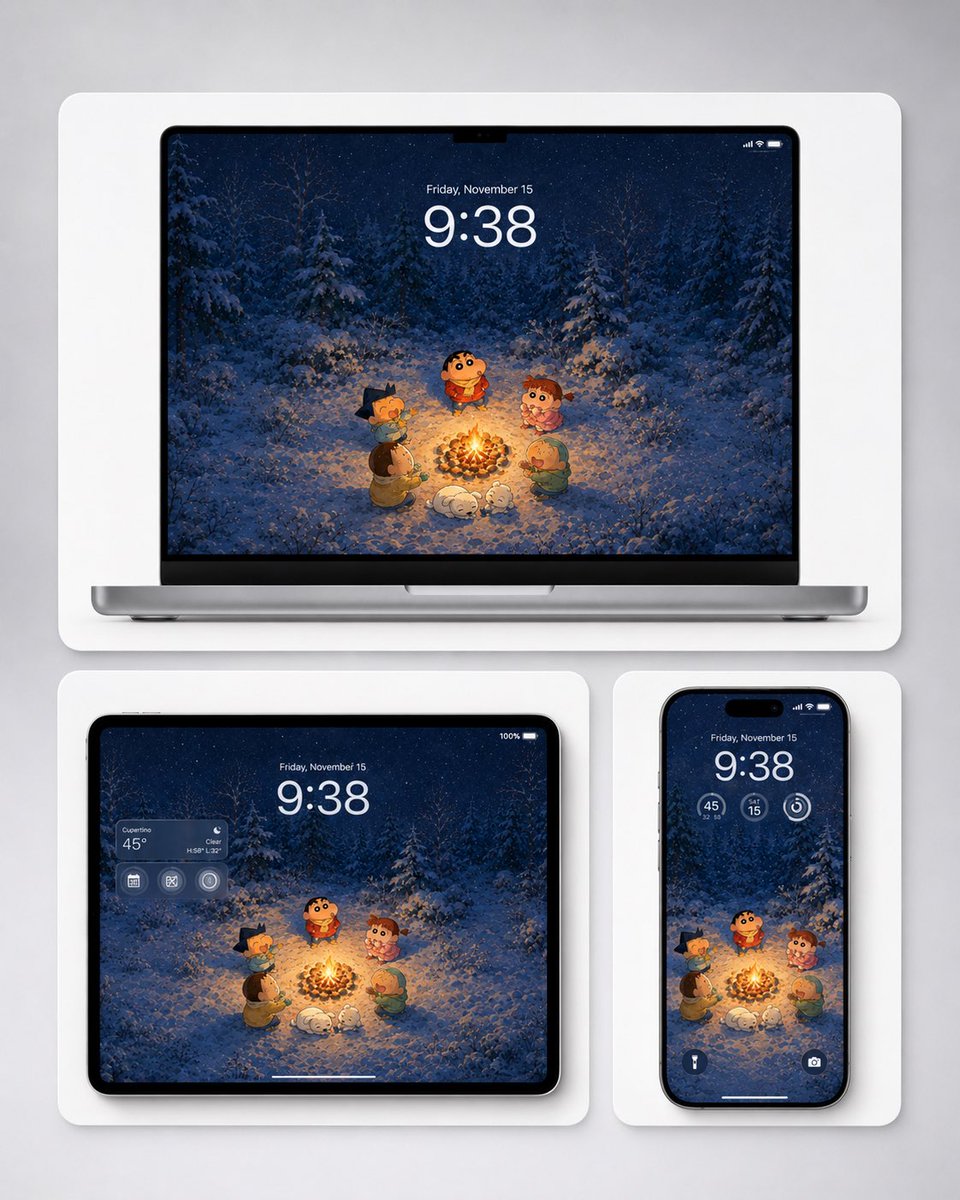
Winter Campfire Wallpaper Device Mockup
Generates a cozy anime-style winter campfire wallpaper previewed on laptop, tablet, and phone mockups for multi-device wallpaper promotion.
This is a GPT Image 2 prompt case for Product & Commercial. Use the copy-ready prompt below to generate similar visuals, and review Awesome GPT Image 2 Prompts attribution plus commercial-use rights before reuse.
Free 1K preview
Generate one preview image instantly, no sign-up required.
Prompt
Copy-ready prompt
Create a polished product mockup showing a cozy winter campfire wallpaper adapted across three Apple-style devices. The wallpaper illustration should resemble a cute Japanese crayon-anime style without logos: five small cartoon children and one small white dog gathered around a bright campfire in a snowy pine forest at night, with falling snow, deep navy-blue trees, warm orange firelight illuminating the characters and snow, and a soft magical winter atmosphere. The main character is a round-faced child in a red winter sweater standing behind the fire, surrounded by four friends: one with dark spiky hair on the left, one in a brown coat at lower left, one curly-haired child in pink on the right, and one child in a green hood at lower right; the white dog sleeps or curls up near the fire in front. Show exactly three devices on a light gray studio background, each inside a rounded white display card with soft shadows: one large laptop mockup centered at the top, one tablet mockup at bottom left, and one smartphone mockup at bottom right. On all screens, display the same wallpaper composition, cropped appropriately. Add realistic lock-screen UI overlays: large time {argument name="time" default="9:38"}, date {argument name="date" default="Friday, November 15"}, small status icons, and subtle translucent widgets. The tablet should include a translucent weather widget on the upper left showing {argument name="weather location" default="Cupertino"} and {argument name="temperature" default="45°"}; the phone should include three circular widgets below the time and two small bottom lock-screen icons. Use clean high-end Apple product rendering, black bezels, thin device frames, rounded corners, soft ambient shadows, sharp screen detail, and a balanced wallpaper-preview layout suitable for desktop, tablet, and mobile backgrounds. Avoid brand logos, watermarks, extra text, or additional devices.Prompt variables
Editable argument placeholders found in the prompt, with their default values.
Best for
- - Product & Commercial visual exploration
- - Image generation and reference-image edits
- - Reusable briefs that keep source attribution visible
Change these parts
- - Subject, product, character, or scene
- - Aspect ratio, camera, lighting, and background
- - Brand, text, color, and output constraints
Recommended model and settings
- - Model: gpt-image-2
- - Input mode: Text to Image
- - Aspect ratio: source
- - Commercial status: review original source
How to use this prompt
- 1. Copy the prompt and preserve its structure for the first test.
- 2. Replace the subject, context, and publishing channel.
- 3. Change one camera, lighting, or style variable per iteration.
- 4. Inspect the output, source, text, and rights before reuse.
Limitations, source, and reuse cautions
- - Generated output is an editable draft, not factual, legal, or rights evidence.
- - Review the linked source, people, brands, logos, text, and third-party media before commercial use.
More cases in this category
Prioritized by category, input mode compatibility, quality, and lower risk.
Reuse and source notes
Use this prompt safely after previewing the case.
- 1.Copy the prompt or open it directly in Dovoo with the generation button.
- 2.Adjust variables, aspect ratio, and reference images for your own use case.
- 3.Before publishing or paid usage, verify source rights, attribution requirements, and brand or likeness risks.
Can I use this prompt commercially?
Commercial-use status is allowed. Review the original source, license, brand constraints, and legal requirements before paid usage.
Where does this case come from?
This case is imported from Awesome GPT Image 2 Prompts; keep attribution visible and check the source URL before reuse.