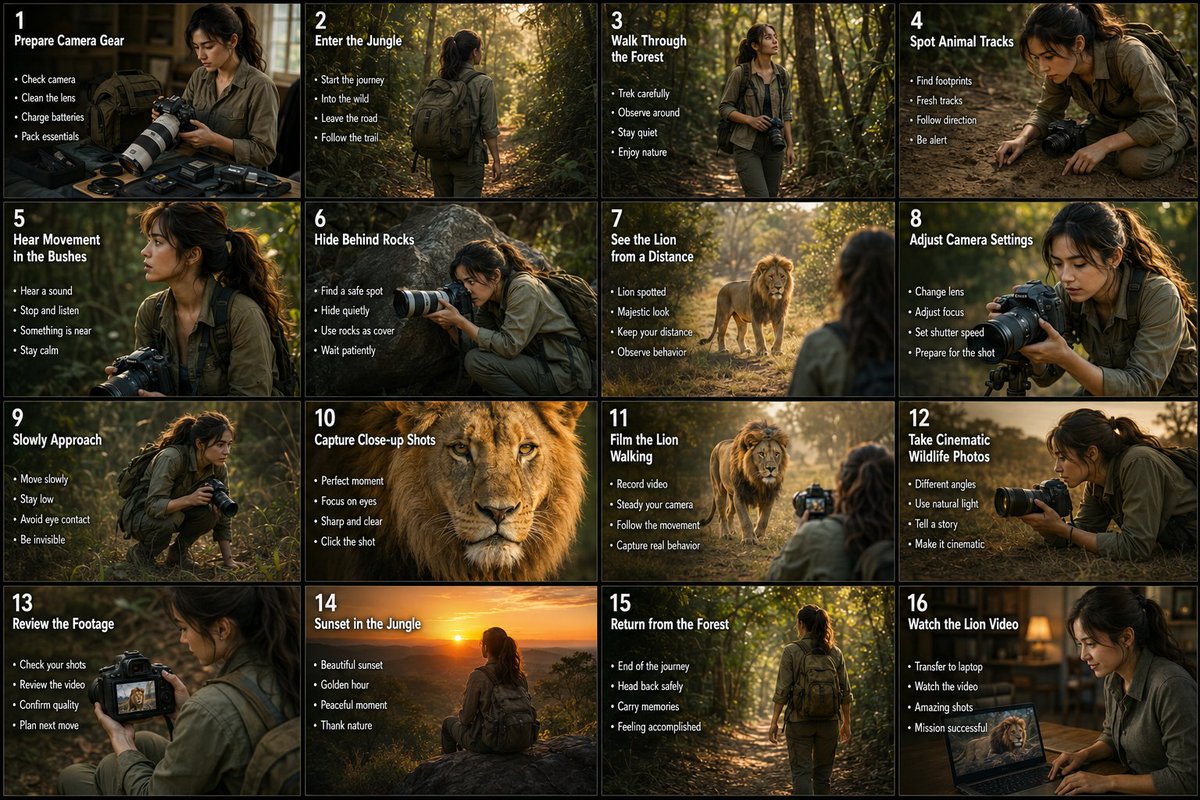
Wildlife Photographer Adventure Storyboard
A professional 16-panel storyboard infographic detailing the journey of a wildlife photographer capturing a lion in a deep forest.
This is a GPT Image 2 prompt case for Illustration & Art. Use the copy-ready prompt below to generate similar visuals, and review Awesome GPT Image 2 Prompts attribution plus commercial-use rights before reuse.
Free 1K preview
Generate one preview image instantly, no sign-up required.
Prompt
Copy-ready prompt
Create a cinematic 16-panel storyboard infographic showing the adventure of a young female wildlife photographer traveling into a deep forest to photograph a majestic lion. Use a realistic movie-storyboard style with warm natural colors, dramatic sunlight, jungle atmosphere, cinematic camera angles, and professional wildlife documentary aesthetics. The same realistic young woman should appear consistently in every panel wearing outdoor explorer clothing, hiking boots, backpack, and carrying a professional DSLR camera with a telephoto lens. Arrange the storyboard in a clean 4x4 grid with numbered scenes, bold titles, small bullet points, and visual motion arrows. Scenes should include: preparing camera gear, entering the jungle, walking through trees, spotting animal tracks, hearing movement in bushes, carefully hiding behind rocks, seeing the lion from a distance, adjusting camera settings, slowly approaching, capturing close-up lion shots, filming the lion walking, taking cinematic wildlife photos, reviewing footage on the camera screen, sunset in the jungle, returning safely from the forest, and finally showing the captured lion video proudly on a laptop or camera display. Include realistic forest lighting, dust particles, leaves moving, cinematic shadows, wildlife atmosphere, dramatic expressions, camera close-ups, and emotional storytelling. Ultra-realistic photography style, nature documentary mood, high-detail jungle environment, realistic human appearance, premium cinematic composition, 4K quality, no anime, no cartoon, no CGI look.
Best for
- - Illustration & Art visual exploration
- - Image generation and reference-image edits
- - Reusable briefs that keep source attribution visible
Change these parts
- - Subject, product, character, or scene
- - Aspect ratio, camera, lighting, and background
- - Brand, text, color, and output constraints
Recommended model and settings
- - Model: gpt-image-2
- - Input mode: Text to Image
- - Aspect ratio: source
- - Commercial status: review original source
How to use this prompt
- 1. Copy the prompt and preserve its structure for the first test.
- 2. Replace the subject, context, and publishing channel.
- 3. Change one camera, lighting, or style variable per iteration.
- 4. Inspect the output, source, text, and rights before reuse.
Limitations, source, and reuse cautions
- - Generated output is an editable draft, not factual, legal, or rights evidence.
- - Review the linked source, people, brands, logos, text, and third-party media before commercial use.
More cases in this category
Prioritized by category, input mode compatibility, quality, and lower risk.
Reuse and source notes
Use this prompt safely after previewing the case.
- 1.Copy the prompt or open it directly in Dovoo with the generation button.
- 2.Adjust variables, aspect ratio, and reference images for your own use case.
- 3.Before publishing or paid usage, verify source rights, attribution requirements, and brand or likeness risks.
Can I use this prompt commercially?
Commercial-use status is allowed. Review the original source, license, brand constraints, and legal requirements before paid usage.
Where does this case come from?
This case is imported from Awesome GPT Image 2 Prompts; keep attribution visible and check the source URL before reuse.