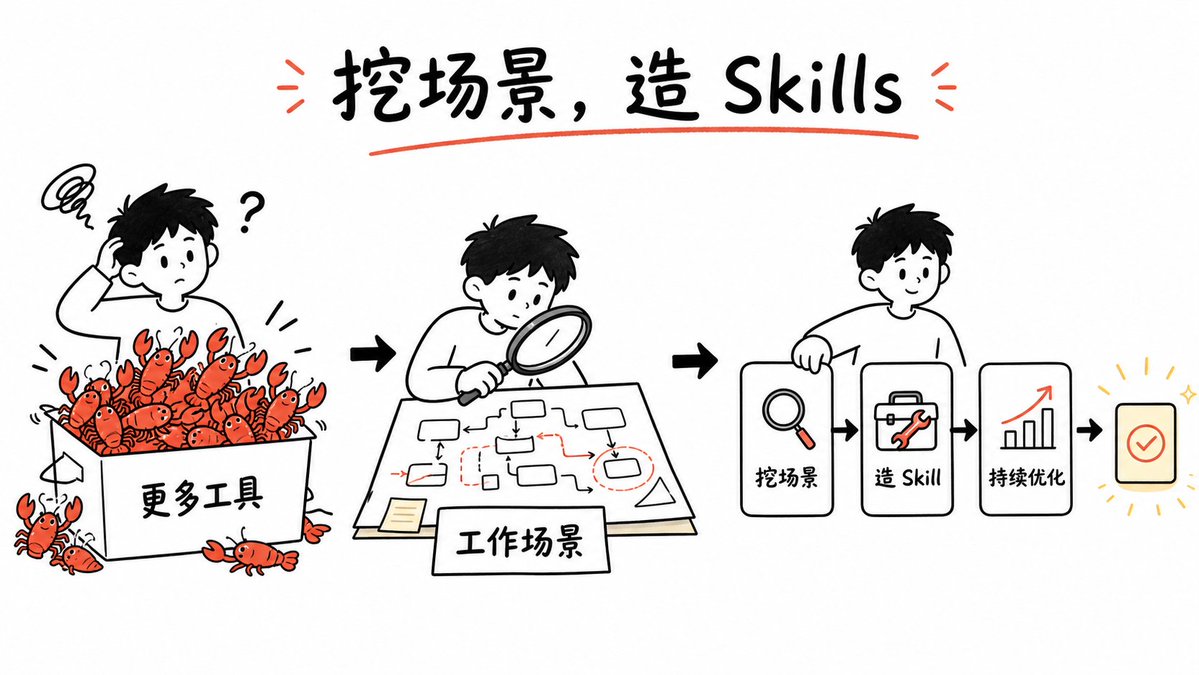
Whiteboard Skill-Building Workflow
A hand-drawn whiteboard explainer showing how messy tool overload becomes reusable skills through scenario analysis and optimization.
This is a GPT Image 2 prompt case for Illustration & Art. Use the copy-ready prompt below to generate similar visuals, and review Awesome GPT Image 2 Prompts attribution plus commercial-use rights before reuse.
Free 1K preview
Generate one preview image instantly, no sign-up required.
Prompt
Copy-ready prompt
Goal: Create a clean whiteboard hand-drawn explainer illustration about turning messy tool overload into reusable GPT image skills. Use a playful black marker sketch style with selective red-orange accents and a few yellow highlights.

Canvas: Wide 16:9 horizontal canvas, white background, generous margins, centered composition. Hand-drawn black outlines, slightly imperfect marker strokes, minimal shading, no photorealism.

Title: At the top center, write the large handwritten headline {argument name="headline text" default="Dig scenes, create Skills"}. Use bold black brush lettering, underline it with one red-orange curved stroke, and add two small red-orange emphasis marks on each side of the title.

Layout: Arrange the story as a left-to-right workflow with three main illustrated scenes connected by bold black arrows. Scene 1 on the left shows confusion and too many tools; scene 2 in the center shows analyzing the work scenario; scene 3 on the right shows a simplified skill-building pipeline.

Scene 1: Draw a confused young person with short black hair scratching their head, a question mark beside them, and a scribbly frustration cloud above. They stand behind a large open box labeled {argument name="tool box label" default="More tools"}. The box is overflowing with exactly 18 small red-orange cartoon crawfish/lobsters as a metaphor for too many tools: 15 visible inside or on the rim of the box and 3 outside near the bottom/left edges. Each crawfish has simple black eyes, claws, and segmented bodies. Add small motion lines around the box.

Scene 2: Draw the same young person leaning over a table with a magnifying glass, studying a paper workflow map. The paper contains a hand-drawn process diagram with exactly 10 small rounded rectangles/nodes, thin black connector arrows, and a few red dashed boxes and red arrows marking important points. Add a small sticky note on the lower left of the paper. In front of the table, place a rectangular label card reading {argument name="scenario label" default="Work Scenarios"}.

Scene 3: Draw the same young person smiling and holding or leaning on the first card of a pipeline. The pipeline contains exactly 4 visible cards/icons arranged horizontally: card 1 with a magnifying glass icon and label {argument name="step one label" default="Dig for Scenarios"}; card 2 with a toolbox/wrench icon and label {argument name="step two label" default="Build Skills"}; card 3 with an upward bar chart and red rising arrow icon labeled {argument name="step three label" default="Continuous Optimization"}; card 4 is a small rounded square success card with a red-orange checkmark, surrounded by short yellow radiating lines and sparkle marks. Connect the cards with bold black arrows.

Visual style: Simple black-and-white whiteboard illustration, friendly Notion-like doodle proportions, rounded characters, thick marker outlines, sparse red-orange accent color on crawfish, arrows, tools, underlines, and chart arrow. Keep the background empty and uncluttered.

Constraints: Preserve the left-to-right narrative and the exact counts of the three main scenes, 18 crawfish/lobsters, 10 workflow nodes, and 4 pipeline cards. Do not add extra panels, logos, watermarks, or dense explanatory text.
Prompt variables
Editable argument placeholders found in the prompt, with their default values.
Best for
- - Illustration & Art visual exploration
- - Image generation and reference-image edits
- - Reusable briefs that keep source attribution visible
Change these parts
- - Subject, product, character, or scene
- - Aspect ratio, camera, lighting, and background
- - Brand, text, color, and output constraints
Recommended model and settings
- - Model: gpt-image-2
- - Input mode: Text to Image
- - Aspect ratio: source
- - Commercial status: review original source
How to use this prompt
- 1. Copy the prompt and preserve its structure for the first test.
- 2. Replace the subject, context, and publishing channel.
- 3. Change one camera, lighting, or style variable per iteration.
- 4. Inspect the output, source, text, and rights before reuse.
Limitations, source, and reuse cautions
- - Generated output is an editable draft, not factual, legal, or rights evidence.
- - Review the linked source, people, brands, logos, text, and third-party media before commercial use.
More cases in this category
Prioritized by category, input mode compatibility, quality, and lower risk.

Reuse and source notes
Use this prompt safely after previewing the case.
- 1.Copy the prompt or open it directly in Dovoo with the generation button.
- 2.Adjust variables, aspect ratio, and reference images for your own use case.
- 3.Before publishing or paid usage, verify source rights, attribution requirements, and brand or likeness risks.
Can I use this prompt commercially?
Commercial-use status is allowed. Review the original source, license, brand constraints, and legal requirements before paid usage.
Where does this case come from?
This case is imported from Awesome GPT Image 2 Prompts; keep attribution visible and check the source URL before reuse.