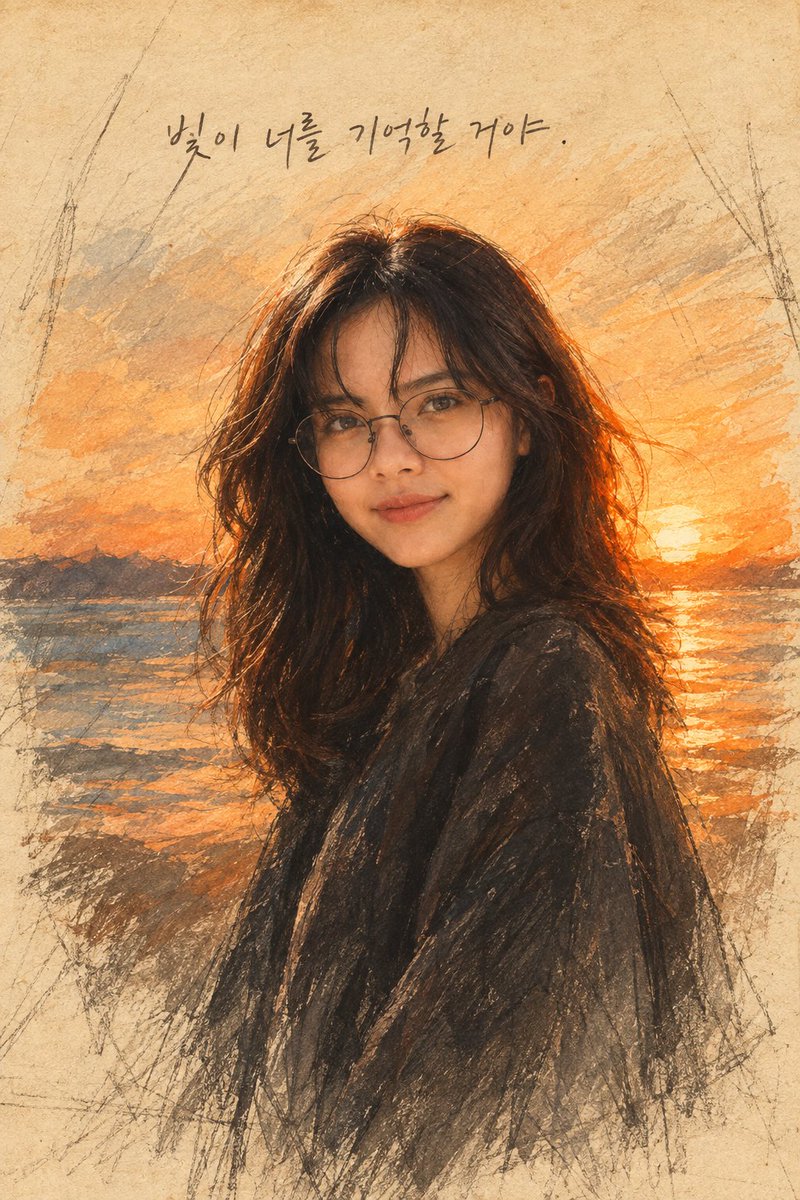
Watercolor Sunset Portrait
Generates a nostalgic watercolor-and-charcoal portrait of a young woman against an ocean sunset with a handwritten Korean quote.
This is a GPT Image 2 prompt case for Portrait & Character. Use the copy-ready prompt below to generate similar visuals, and review Awesome GPT Image 2 Prompts attribution plus commercial-use rights before reuse.
Free 1K preview
Generate one preview image instantly, no sign-up required.
Prompt
Copy-ready prompt
Create a timeless traditional watercolor portrait on aged beige textured paper, showing {argument name="subject description" default="a young woman with long dark wavy hair, round wire-frame glasses, soft natural makeup, and a calm slight smile"} in a three-quarter bust pose, facing the viewer. Preserve realistic natural facial proportions and a recognizable human likeness: detailed eyes, nose, lips, jawline, skin tone, and gentle expression. She wears {argument name="clothing" default="a loose dark charcoal shawl or coat"}. Set her against {argument name="background scene" default="a glowing orange sunset over the ocean with distant dark hills, shimmering water reflections, and the sun near the horizon"}. Use a hybrid style of delicate watercolor washes, charcoal pencil sketch lines, dry-brush texture, and expressive unfinished edges, with visible graphite construction marks around the border. The palette should be warm amber, burnt orange, sepia, muted blue-gray, and deep charcoal, with golden rim light in the hair. Add a single handwritten Korean phrase at the top center reading {argument name="handwritten quote" default="빛이 너를 기억할 거야。"}. Vertical portrait composition, centered subject, nostalgic cinematic mood, soft paper grain, no modern UI elements, no watermark, no extra text.Prompt variables
Editable argument placeholders found in the prompt, with their default values.
Best for
- - Portrait & Character visual exploration
- - Image generation and reference-image edits
- - Reusable briefs that keep source attribution visible
Change these parts
- - Subject, product, character, or scene
- - Aspect ratio, camera, lighting, and background
- - Brand, text, color, and output constraints
Recommended model and settings
- - Model: gpt-image-2
- - Input mode: Text to Image
- - Aspect ratio: source
- - Commercial status: review original source
How to use this prompt
- 1. Copy the prompt and preserve its structure for the first test.
- 2. Replace the subject, context, and publishing channel.
- 3. Change one camera, lighting, or style variable per iteration.
- 4. Inspect the output, source, text, and rights before reuse.
Limitations, source, and reuse cautions
- - Generated output is an editable draft, not factual, legal, or rights evidence.
- - Review the linked source, people, brands, logos, text, and third-party media before commercial use.
More cases in this category
Prioritized by category, input mode compatibility, quality, and lower risk.

Reuse and source notes
Use this prompt safely after previewing the case.
- 1.Copy the prompt or open it directly in Dovoo with the generation button.
- 2.Adjust variables, aspect ratio, and reference images for your own use case.
- 3.Before publishing or paid usage, verify source rights, attribution requirements, and brand or likeness risks.
Can I use this prompt commercially?
Commercial-use status is allowed. Review the original source, license, brand constraints, and legal requirements before paid usage.
Where does this case come from?
This case is imported from Awesome GPT Image 2 Prompts; keep attribution visible and check the source URL before reuse.