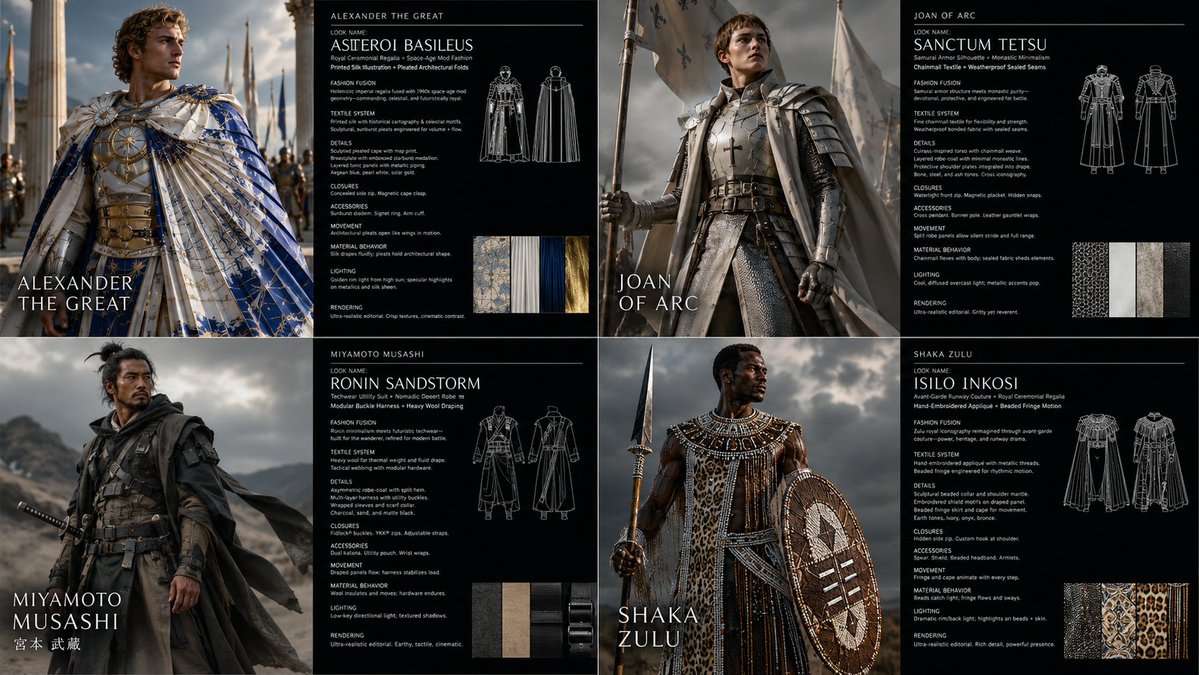
Warrior Fashion Fusion Designer
A complex multi-phase prompt that acts as a fashion designer to restyle subjects into unique archetype/textile combinations.
This is a GPT Image 2 prompt case for Fashion & Beauty. Use the copy-ready prompt below to generate similar visuals, and review Awesome GPT Image 2 Prompts attribution plus commercial-use rights before reuse.
Free 1K preview
Generate one preview image instantly, no sign-up required.
Free text preview doesn’t preserve reference-image consistency.
Prompt
Copy-ready prompt
2x2 grid, 16:9, do this for {argument name="subject" default="4 famous warriors"}: <instruction> Input A is the subject photo. You are a god-tier fashion designer, costume director, textile artist, and editorial photographer. Phase 1: Wardrobe Fusion Randomly select TWO Fashion Archetypes and TWO Textile Systems. Blend them into a coherent wearable identity. Fashion Archetypes: [Avant-Garde Runway Couture, Nomadic Desert Robe, Cybernetic Streetwear, Victorian Mourning Dress, Samurai Armor Silhouette, 1970s Disco Glamour, Arctic Expedition Gear, Renaissance Court Attire, Punk Deconstruction, Monastic Minimalism, Space-Age Mod Fashion, Baroque Opera Costume, Techwear Utility Suit, Ballet Rehearsal Layers, Royal Ceremonial Regalia] Textile Systems: [Quilted Panel Construction, Laser-Cut Mesh, Hand-Embroidered Appliqué, Reflective Foil Laminate, Heavy Wool Draping, Transparent Organza Layers, Ribbed Knit Compression, Modular Buckle Harness, Beaded Fringe Motion, Pleated Architectural Folds, Weatherproof Sealed Seams, Chainmail Textile, Printed Silk Illustration, Inflated Puffer Volumes, Raw Frayed Edges] Phase 2: Visual Rendering Generate a 2:1 horizontal asset sheet. LEFT HALF: Transform the subject’s clothing, accessories, and styling using the generated fashion identity. Preserve exact body pose, face angle, silhouette boundaries, background layout, and camera framing. RIGHT HALF: Create a dark fashion-spec panel with clean white text. Phase 3: Text Content Render this text on the right panel: "Look Name: [Generate a name from the 4 selected elements] <instruction> Input A is the source photo. Goal: Restyle the subject into '[Look Name]'. Rules: Pose Fidelity: Preserve exact body pose, silhouette, camera angle, and facial direction. Fashion Fusion: Combine [Fashion Archetype 1] with [Fashion Archetype 2]. Textile System: Construct garments using [Textile System 1] and [Textile System 2]. Details: Include seams, closures, textile weight, movement, accessories, and styling logic. Lighting: Editorial fashion lighting suited to the materials. Rendering: Photorealistic high-fashion campaign image. Output: ONE image, high-fidelity wardrobe transformation. </instruction>" </instruction>Prompt variables
Editable argument placeholders found in the prompt, with their default values.
Best for
- - Fashion & Beauty visual exploration
- - Image generation and reference-image edits
- - Reusable briefs that keep source attribution visible
Change these parts
- - Subject, product, character, or scene
- - Aspect ratio, camera, lighting, and background
- - Brand, text, color, and output constraints
Recommended model and settings
- - Model: gpt-image-2
- - Input mode: Image to Image
- - Aspect ratio: source
- - Commercial status: review original source
How to use this prompt
- 1. Copy the prompt and preserve its structure for the first test.
- 2. Replace the subject, context, and publishing channel.
- 3. Change one camera, lighting, or style variable per iteration.
- 4. Inspect the output, source, text, and rights before reuse.
Limitations, source, and reuse cautions
- - Generated output is an editable draft, not factual, legal, or rights evidence.
- - Review the linked source, people, brands, logos, text, and third-party media before commercial use.
More cases in this category
Prioritized by category, input mode compatibility, quality, and lower risk.
Reuse and source notes
Use this prompt safely after previewing the case.
- 1.Copy the prompt or open it directly in Dovoo with the generation button.
- 2.Adjust variables, aspect ratio, and reference images for your own use case.
- 3.Before publishing or paid usage, verify source rights, attribution requirements, and brand or likeness risks.
Can I use this prompt commercially?
Commercial-use status is allowed. Review the original source, license, brand constraints, and legal requirements before paid usage.
Where does this case come from?
This case is imported from Awesome GPT Image 2 Prompts; keep attribution visible and check the source URL before reuse.