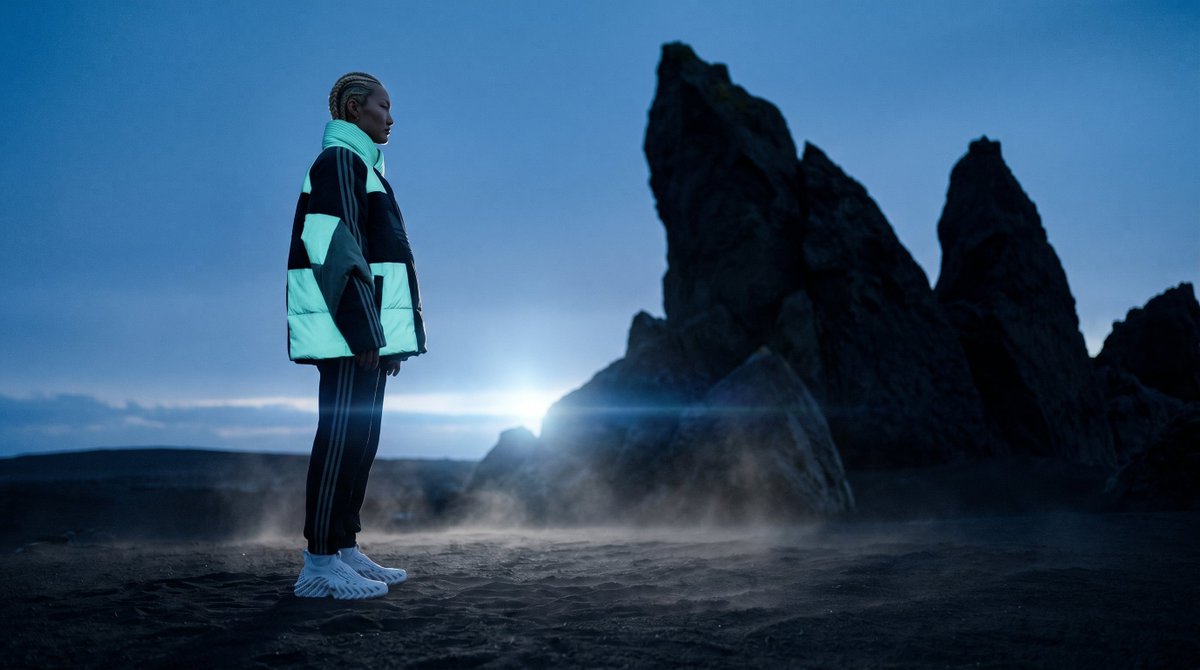
Blue Hour Volcanic Fashion Editorial
A cinematic sportswear fashion scene featuring a lone model on a misty black-sand beach with jagged sea stacks at twilight.
This is a GPT Image 2 prompt case for Fashion & Beauty. Use the copy-ready prompt below to generate similar visuals, and review Awesome GPT Image 2 Prompts attribution plus commercial-use rights before reuse.
Free 1K preview
Generate one preview image instantly, no sign-up required.
Prompt
Copy-ready prompt
Create a cinematic wide-angle fashion editorial photograph of {argument name="subject" default="a young Black man with braided cornrows"} standing in full-body side profile on a dark volcanic black-sand beach at blue hour, facing right toward towering jagged sea stacks. He wears an oversized futuristic puffer jacket with bold black, white, and pale aqua color-block panels, black track pants with three thin white side stripes, and chunky white sculptural sneakers. Add a small semi-transparent square blur censor block over his face while leaving the braids and silhouette visible. The environment is moody and surreal: deep blue twilight sky, wet dark sand, low ground mist drifting around his feet, and a bright cold light flare near the horizon behind him, partially hidden by the rocks. Compose the person on the left third of a 16:9 frame, with three distinct sharp black rock spires dominating the right side and background. Use shallow cinematic depth of field, realistic lens flare, high contrast, cool teal-blue color grading, dramatic backlighting, soft haze, and a premium sportswear campaign aesthetic. No text, no logos, no extra people.Prompt variables
Editable argument placeholders found in the prompt, with their default values.
Best for
- - Fashion & Beauty visual exploration
- - Image generation and reference-image edits
- - Reusable briefs that keep source attribution visible
Change these parts
- - Subject, product, character, or scene
- - Aspect ratio, camera, lighting, and background
- - Brand, text, color, and output constraints
Recommended model and settings
- - Model: gpt-image-2
- - Input mode: Text to Image
- - Aspect ratio: source
- - Commercial status: review original source
How to use this prompt
- 1. Copy the prompt and preserve its structure for the first test.
- 2. Replace the subject, context, and publishing channel.
- 3. Change one camera, lighting, or style variable per iteration.
- 4. Inspect the output, source, text, and rights before reuse.
Limitations, source, and reuse cautions
- - Generated output is an editable draft, not factual, legal, or rights evidence.
- - Review the linked source, people, brands, logos, text, and third-party media before commercial use.
More cases in this category
Prioritized by category, input mode compatibility, quality, and lower risk.
Reuse and source notes
Use this prompt safely after previewing the case.
- 1.Copy the prompt or open it directly in Dovoo with the generation button.
- 2.Adjust variables, aspect ratio, and reference images for your own use case.
- 3.Before publishing or paid usage, verify source rights, attribution requirements, and brand or likeness risks.
Can I use this prompt commercially?
Commercial-use status is allowed. Review the original source, license, brand constraints, and legal requirements before paid usage.
Where does this case come from?
This case is imported from Awesome GPT Image 2 Prompts; keep attribution visible and check the source URL before reuse.