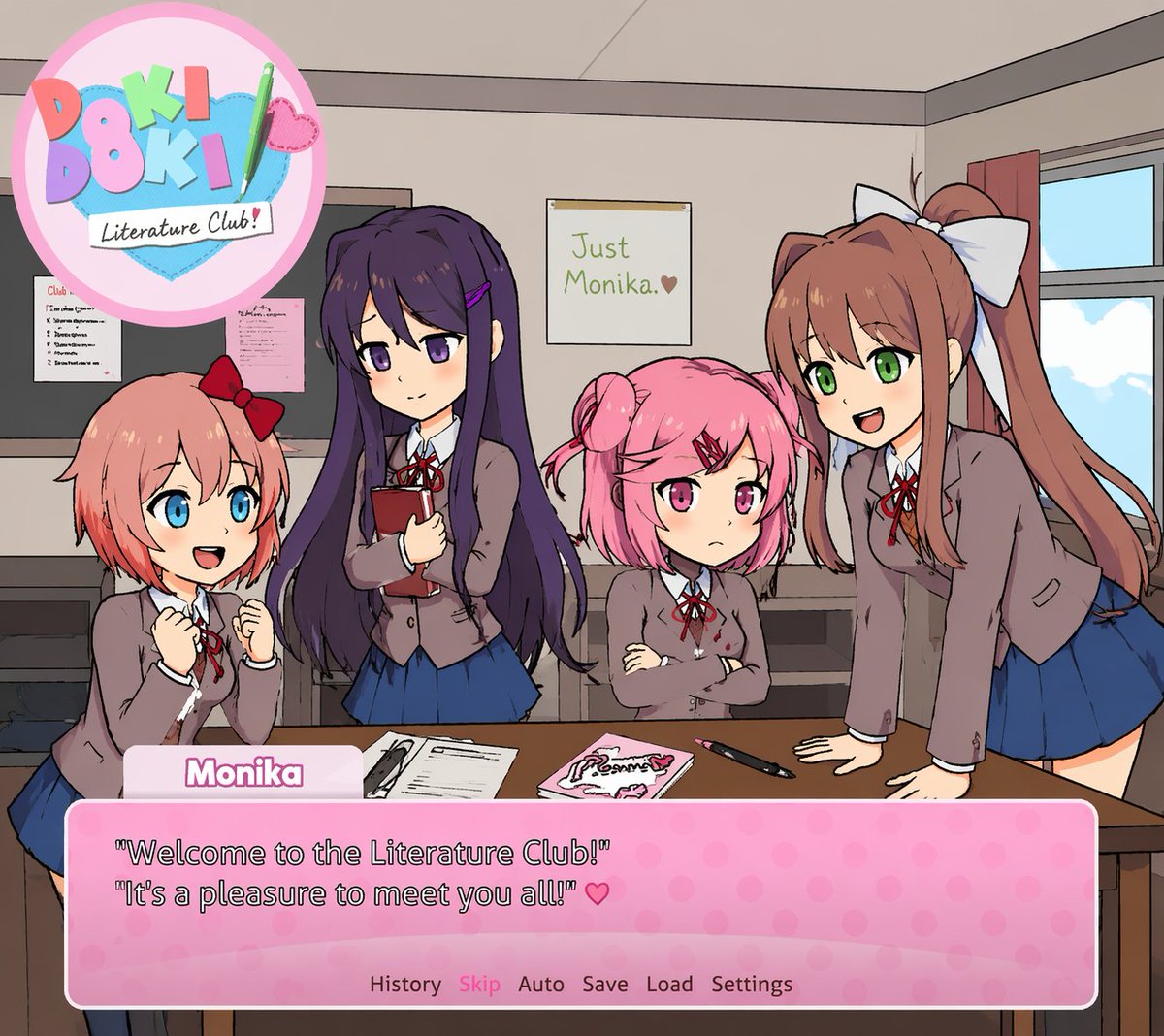
Visual Novel Screenshot Mockup
Generates a fake visual novel screenshot featuring anime characters, a custom logo, and a dialogue box.
This is a GPT Image 2 prompt case for Anime & Game. Use the copy-ready prompt below to generate similar visuals, and review Awesome GPT Image 2 Prompts attribution plus commercial-use rights before reuse.
Free 1K preview
Generate one preview image instantly, no sign-up required.
Prompt
Copy-ready prompt
A visual novel screenshot of an anime-style classroom scene featuring exactly four high school girls in matching uniforms consisting of grey blazers, white shirts, red ribbons, and blue skirts. On the far left, a girl with short coral hair and a red bow looks excited with clenched fists. Next to her, a girl with long dark purple hair holds a red book with a gentle smile. Beside her, a girl with short pink pigtails and a red hairclip stands with crossed arms looking slightly grumpy. On the far right, a girl with long brown hair in a ponytail and a large white bow leans forward on a desk, smiling and talking. The classroom features a window on the right, a bulletin board on the left, and a foreground desk holding exactly three items: a notebook, a pink book, and a pen. On the back wall is a single poster reading {argument name="poster text" default="Just Monika. ♥"}. In the top left corner is a circular pastel logo reading {argument name="game title" default="Doki Doki Literature Club!"} decorated with a green pencil and a pink heart. At the bottom of the screen is a pink polka-dot visual novel dialogue box. The name tag reads {argument name="speaker name" default="Monika"} and the main dialogue text reads {argument name="dialogue text" default="'Welcome to the Literature Club!' 'It's a pleasure to meet you all!' ♥"}. Below the dialogue is a menu row reading 'History Skip Auto Save Load Settings'.Prompt variables
Editable argument placeholders found in the prompt, with their default values.
Best for
- - Anime & Game visual exploration
- - Image generation and reference-image edits
- - Reusable briefs that keep source attribution visible
Change these parts
- - Subject, product, character, or scene
- - Aspect ratio, camera, lighting, and background
- - Brand, text, color, and output constraints
Recommended model and settings
- - Model: gpt-image-2
- - Input mode: Text to Image
- - Aspect ratio: source
- - Commercial status: review original source
How to use this prompt
- 1. Copy the prompt and preserve its structure for the first test.
- 2. Replace the subject, context, and publishing channel.
- 3. Change one camera, lighting, or style variable per iteration.
- 4. Inspect the output, source, text, and rights before reuse.
Limitations, source, and reuse cautions
- - Generated output is an editable draft, not factual, legal, or rights evidence.
- - Review the linked source, people, brands, logos, text, and third-party media before commercial use.
More cases in this category
Prioritized by category, input mode compatibility, quality, and lower risk.
Reuse and source notes
Use this prompt safely after previewing the case.
- 1.Copy the prompt or open it directly in Dovoo with the generation button.
- 2.Adjust variables, aspect ratio, and reference images for your own use case.
- 3.Before publishing or paid usage, verify source rights, attribution requirements, and brand or likeness risks.
Can I use this prompt commercially?
Commercial-use status is allowed. Review the original source, license, brand constraints, and legal requirements before paid usage.
Where does this case come from?
This case is imported from Awesome GPT Image 2 Prompts; keep attribution visible and check the source URL before reuse.