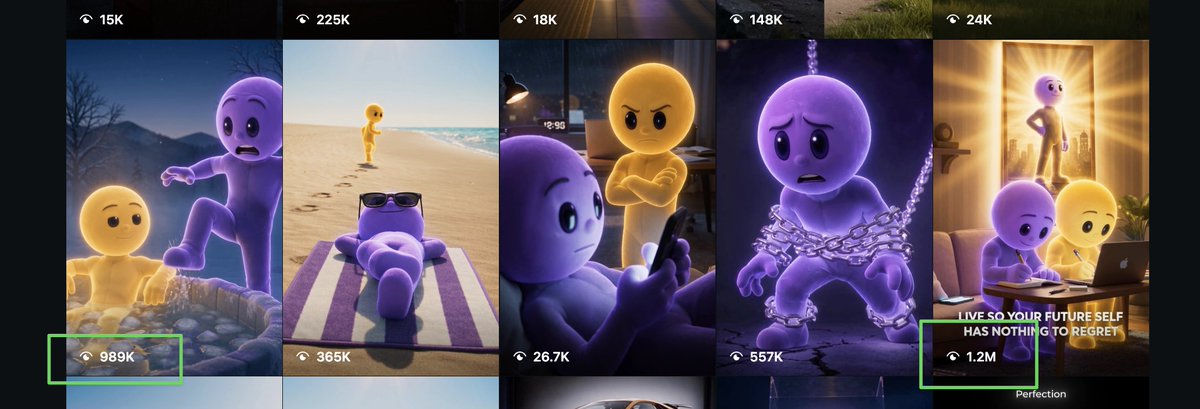
Viral Mascot Reels Grid
Generates a wide social-media thumbnail grid featuring two recurring 3D mascot characters in cinematic viral video scenes with highlighted view counts.
This is a GPT Image 2 prompt case for Graphic & Poster. Use the copy-ready prompt below to generate similar visuals, and review Awesome GPT Image 2 Prompts attribution plus commercial-use rights before reuse.
Free 1K preview
Generate one preview image instantly, no sign-up required.
Prompt
Copy-ready prompt
Goal: Create a wide social-media analytics collage showing a grid of viral vertical video thumbnails featuring two recurring 3D animated mascot characters, one yellow and one purple, in emotional cinematic scenes.

Canvas: Extra-wide landscape screenshot composition, approximately 3:1 aspect ratio, dark app-like background with six tall vertical reel thumbnails cropped side by side. Use a polished Instagram/Reels discovery-page feel, with high-quality animated-film lighting and dramatic storytelling thumbnails.

Layout: Show exactly 6 visible vertical video cards across the canvas, separated by thin dark gutters. Each card has a small white eye/play-style icon with a view count overlay near the top or bottom. Add exactly 2 bright neon-green rectangular highlight boxes around high-performing view-count labels: one around “989K” near the lower left, and one around “1.2M” near the lower right.

Subject details: The recurring heroes are two smooth, rounded, faceless-but-expressive humanoid cartoon characters: {argument name="yellow character" default="a glowing golden-yellow humanoid mascot"} and {argument name="purple character" default="a soft lavender-purple humanoid mascot"}. They have simple black oval eyes, rounded heads, childlike bodies, and Pixar-like expressive poses. No clothing except occasional props.

Six thumbnail scenes, left to right:
1. A nighttime mountain or lake scene where the purple character looks frightened while stepping forward near water or rocks, with the yellow character lower in the frame; overlay view counts “15K” at the top and “989K” at the bottom, with the bottom count highlighted in green.
2. A bright beach scene with the yellow character walking along the shoreline in the distance while the purple character relaxes on a striped towel wearing dark sunglasses; overlay view counts “225K” at the top and “365K” near the bottom.
3. A dim bedroom scene where the purple character sits close to camera holding a phone while the yellow character stands behind with arms crossed and an angry expression; overlay view counts “18K” at the top and “26.7K” near the bottom.
4. A dark dramatic scene where the purple character is wrapped in heavy silver chains, looking sad and trapped; overlay view counts “148K” at the top and “557K” near the bottom.
5. A warm inspirational living-room scene with sunlight streaming through a doorway, showing the yellow character standing confidently in the background while the purple and yellow characters sit at a laptop in the foreground; include the bold white caption {argument name="thumbnail caption" default="LIVE SO YOUR FUTURE SELF HAS NOTHING TO REGRET"} and overlay view count “1.2M” highlighted in green.
6. The far-right edge continues the warm scene crop, showing dark app margins and a small partial label near the bottom reading “Perfection.”

Visual style: High-quality 3D animation, cinematic lighting, glossy soft materials, emotional storytelling, viral motivational short-video thumbnail aesthetic, strong contrast between purple and golden-yellow characters, realistic depth of field, dramatic rim lights, polished social media screenshot realism.

Constraints: Include exactly 6 vertical thumbnails, exactly 10 visible view-count labels total: “15K”, “225K”, “18K”, “148K”, “24K”, “989K”, “365K”, “26.7K”, “557K”, and “1.2M”. Keep all UI text white, use black translucent overlay bars at the top and bottom, and do not add extra characters or extra view counts.
Prompt variables
Editable argument placeholders found in the prompt, with their default values.
Best for
- - Graphic & Poster visual exploration
- - Image generation and reference-image edits
- - Reusable briefs that keep source attribution visible
Change these parts
- - Subject, product, character, or scene
- - Aspect ratio, camera, lighting, and background
- - Brand, text, color, and output constraints
Recommended model and settings
- - Model: gpt-image-2
- - Input mode: Text to Image
- - Aspect ratio: source
- - Commercial status: review original source
How to use this prompt
- 1. Copy the prompt and preserve its structure for the first test.
- 2. Replace the subject, context, and publishing channel.
- 3. Change one camera, lighting, or style variable per iteration.
- 4. Inspect the output, source, text, and rights before reuse.
Limitations, source, and reuse cautions
- - Generated output is an editable draft, not factual, legal, or rights evidence.
- - Review the linked source, people, brands, logos, text, and third-party media before commercial use.
More cases in this category
Prioritized by category, input mode compatibility, quality, and lower risk.




Reuse and source notes
Use this prompt safely after previewing the case.
- 1.Copy the prompt or open it directly in Dovoo with the generation button.
- 2.Adjust variables, aspect ratio, and reference images for your own use case.
- 3.Before publishing or paid usage, verify source rights, attribution requirements, and brand or likeness risks.
Can I use this prompt commercially?
Commercial-use status is allowed. Review the original source, license, brand constraints, and legal requirements before paid usage.
Where does this case come from?
This case is imported from Awesome GPT Image 2 Prompts; keep attribution visible and check the source URL before reuse.