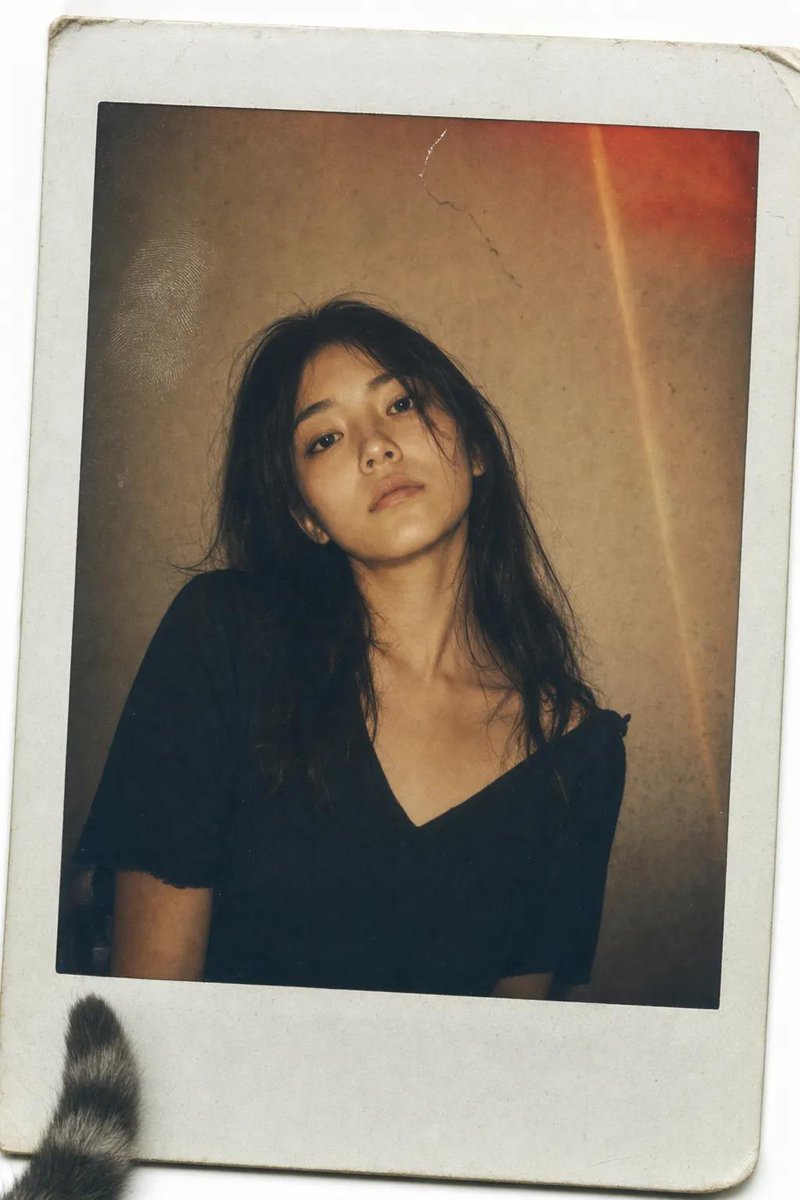
Vintage Polaroid Portrait
A vintage Polaroid-style photograph of a Japanese woman, capturing a raw and unposed moment with nostalgic light leaks and film grain.
This is a GPT Image 2 prompt case for Portrait & Character. Use the copy-ready prompt below to generate similar visuals, and review Awesome GPT Image 2 Prompts attribution plus commercial-use rights before reuse.
Free 1K preview
Generate one preview image instantly, no sign-up required.
Prompt
Copy-ready prompt
A vintage Polaroid instant photograph with a classic thick white border, slightly curled at the edges. The image has been handled roughly—a faint fingerprint visible on the glossy surface, a tiny scratch near the top. A {argument name="subject" default="young Japanese woman"} with {argument name="hair style" default="long, dark, slightly messy hair"} stares directly into the camera. Her expression is not posed—a quiet, tired stillness, her chin slightly raised, her mouth a flat line, as if she was caught between thoughts. She wears a simple {argument name="outfit" default="black V-neck top"}, slightly wrinkled at the shoulder. The lighting is flat and warm, the kind from a cheap living room lamp. The background is a mottled brown-grey wall, unevenly lit, with a small crack near the top. A distinct, reddish-orange light leak bleeds across the upper right corner, and a faint vertical lens flare streaks down the frame—accidents of a dying flash. Soft film grain, slightly desaturated warm sepia tones, muted shadows. The photo feels like it was found in a shoebox, forgotten for twenty years. A stray cat tail peeks from the bottom left corner of the white border.
dutch angle, stray cat tail --ar 9:16
Prompt variables
Editable argument placeholders found in the prompt, with their default values.
Best for
- - Portrait & Character visual exploration
- - Image generation and reference-image edits
- - Reusable briefs that keep source attribution visible
Change these parts
- - Subject, product, character, or scene
- - Aspect ratio, camera, lighting, and background
- - Brand, text, color, and output constraints
Recommended model and settings
- - Model: gpt-image-2
- - Input mode: Text to Image
- - Aspect ratio: source
- - Commercial status: review original source
How to use this prompt
- 1. Copy the prompt and preserve its structure for the first test.
- 2. Replace the subject, context, and publishing channel.
- 3. Change one camera, lighting, or style variable per iteration.
- 4. Inspect the output, source, text, and rights before reuse.
Limitations, source, and reuse cautions
- - Generated output is an editable draft, not factual, legal, or rights evidence.
- - Review the linked source, people, brands, logos, text, and third-party media before commercial use.
More cases in this category
Prioritized by category, input mode compatibility, quality, and lower risk.

Reuse and source notes
Use this prompt safely after previewing the case.
- 1.Copy the prompt or open it directly in Dovoo with the generation button.
- 2.Adjust variables, aspect ratio, and reference images for your own use case.
- 3.Before publishing or paid usage, verify source rights, attribution requirements, and brand or likeness risks.
Can I use this prompt commercially?
Commercial-use status is allowed. Review the original source, license, brand constraints, and legal requirements before paid usage.
Where does this case come from?
This case is imported from Awesome GPT Image 2 Prompts; keep attribution visible and check the source URL before reuse.