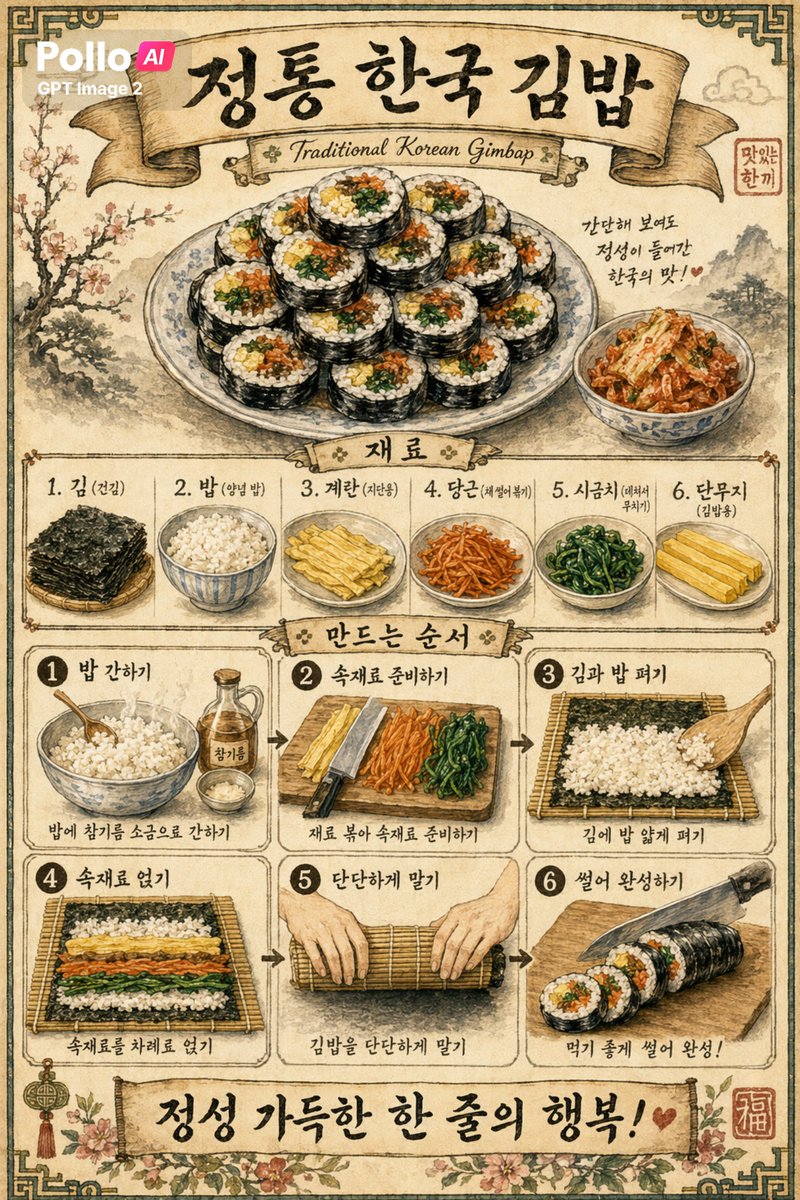
Vintage Korean Gimbap Recipe Poster
This prompt generates a detailed retro-style Korean infographic poster for gimbap, suitable for food marketing, menu art, or culturally themed recipe illustrations.
This is a GPT Image 2 prompt case for Food & Beverage. Use the copy-ready prompt below to generate similar visuals, and review Awesome GPT Image 2 Prompts attribution plus commercial-use rights before reuse.
Free 1K preview
Generate one preview image instantly, no sign-up required.
Prompt
Copy-ready prompt
Create a retro-style Korean food poster with a background of aged beige parchment featuring subtle stains and texture, framed by a dark, decorative border, and employing a traditional hand-painted sumi-e and watercolor illustration style. The poster is a single, vertically arranged infographic, themed around {argument name="dish name" default="정통 한국 김밥"}, topped with elegant, large-scale Korean calligraphy, and featuring a curved ribbon banner with the text {argument name="subtitle text" default="Traditional Korean Gimbap"} at the bottom. At the top center, showcase a beautiful porcelain dish piled high with 12 slices of kimbap, each slice clearly showing the fillings of white rice, yellow egg, orange carrot, green spinach, and dark seaweed. To the right of the dish, place a small bowl of kimchi, accompanied by a short handwritten Korean note: “간단한 보여도 정성이 들어간 한국의 맛! ♥”. Add a small red seal with Korean characters near the upper right corner. In the middle, add an area labeled “재료” (Ingredients) with a ribbon title, arranging 6 ingredient blocks horizontally: 1. 김 (건김) showcasing stacked sheets of dried seaweed, 2. 밥 (양념 밥) showcasing a bowl of seasoned rice, 3. 계란 (지단용) showcasing sliced, cooked egg strips, 4. 당근 (채썰어볶기) showcasing shredded and stir-fried carrots, 5. 시금치 (데쳐서 무치기) showcasing seasoned spinach, and 6. 단무지 (김밥용) showcasing yellow pickled radish strips. Below, add another ribbon title “만드는 순서” (How to Make) and display 6 framed step blocks arranged in two rows of three columns, connected from left to right with arrows. Step 1 is labeled “1 밥 간하기” and shows a bowl of rice with sesame oil and salt, with the caption “밥에 참기름 소금으로 간하기”. Step 2 is labeled “2 속재료 준비하기” and shows a cutting board with eggs, carrots, spinach, and a knife, with the caption “재료 볶아 속재료 준비하기”. Step 3 is labeled “3 김과 밥 펴기” and shows seaweed on a bamboo mat with rice spread on it, with the caption “김에 밥 얇게 펴기”. Step 4 is labeled “4 속재료 얹기” and shows the fillings arranged horizontally on the rice, with the caption “속재료를 차례로 얹기”. Step 5 is labeled “5 단단하게 말기” and shows hands tightly rolling the bamboo mat, with the caption “김밥을 단단하게 말기”. Step 6 is labeled “6 썰어 완성하기” and shows a chef's knife slicing the kimbap roll into pieces, with the caption “먹기 좋게 썰어 완성!”. Add a wide banner at the bottom with prominent Korean calligraphy {argument name="bottom slogan" default="정성 가득한 한 줄의 행복!"} and a small heart. Decorate the lower corners with floral patterns and add a red square seal with the Chinese character “福” in the lower right corner. Use soft shades of dark brown, brown, cream, olive green, and faded red, combined with fine sketch outlines, soft watercolor shading, and authentic print poster composition. Add a small, modern overlay logo in the upper left corner with the text {argument name="brand text" default="Pollo AI GPT Image 2"}.Prompt variables
Editable argument placeholders found in the prompt, with their default values.
Best for
- - Food & Beverage visual exploration
- - Image generation and reference-image edits
- - Reusable briefs that keep source attribution visible
Change these parts
- - Subject, product, character, or scene
- - Aspect ratio, camera, lighting, and background
- - Brand, text, color, and output constraints
Recommended model and settings
- - Model: gpt-image-2
- - Input mode: Text to Image
- - Aspect ratio: source
- - Commercial status: review original source
How to use this prompt
- 1. Copy the prompt and preserve its structure for the first test.
- 2. Replace the subject, context, and publishing channel.
- 3. Change one camera, lighting, or style variable per iteration.
- 4. Inspect the output, source, text, and rights before reuse.
Limitations, source, and reuse cautions
- - Generated output is an editable draft, not factual, legal, or rights evidence.
- - Review the linked source, people, brands, logos, text, and third-party media before commercial use.
More cases in this category
Prioritized by category, input mode compatibility, quality, and lower risk.
Reuse and source notes
Use this prompt safely after previewing the case.
- 1.Copy the prompt or open it directly in Dovoo with the generation button.
- 2.Adjust variables, aspect ratio, and reference images for your own use case.
- 3.Before publishing or paid usage, verify source rights, attribution requirements, and brand or likeness risks.
Can I use this prompt commercially?
Commercial-use status is allowed. Review the original source, license, brand constraints, and legal requirements before paid usage.
Where does this case come from?
This case is imported from Awesome GPT Image 2 Prompts; keep attribution visible and check the source URL before reuse.