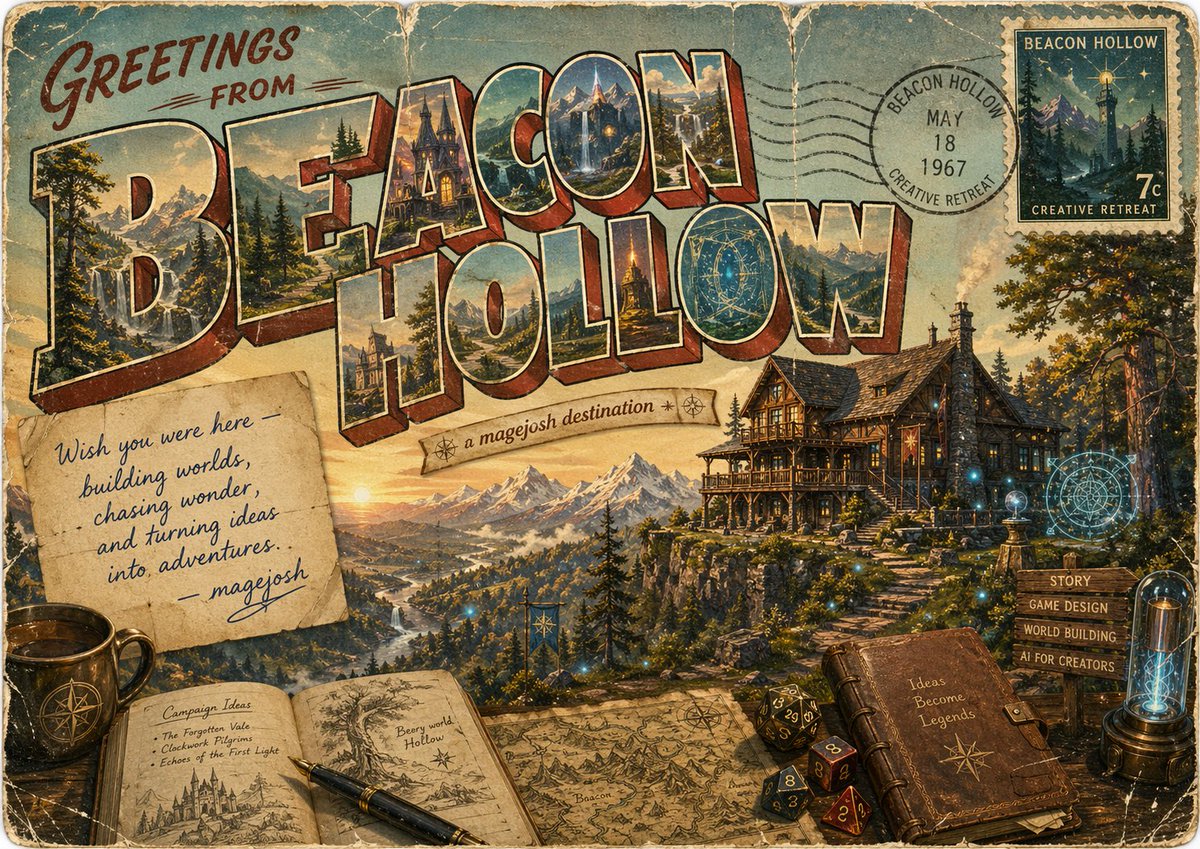
Vintage Fantasy Postcard of Beacon Hollow
This prompt generates a weathered retro travel-postcard illustration for a fantasy destination, ideal for creative worldbuilding promotions, fictional tourism art, or nostalgic branded concept pieces.
This is a GPT Image 2 prompt case for Illustration & Art. Use the copy-ready prompt below to generate similar visuals, and review Awesome GPT Image 2 Prompts attribution plus commercial-use rights before reuse.
Free 1K preview
Generate one preview image instantly, no sign-up required.
Prompt
Copy-ready prompt
Create a vintage fantasy travel postcard poster for {argument name="location name" default="BEACON HOLLOW"}, designed like a large-letter souvenir postcard from the 1950s–1960s. The composition is a single richly detailed horizontal scene with heavily weathered paper texture, rounded postcard corners, faded inks, creases, scratches, foxing, and worn edges. Across the top and center, huge dimensional block letters spell “BEACON HOLLOW” in classic retro postcard style, with warm cream outlines and red-brown extruded shadows; each letter contains miniature painted scenic vignettes of the destination, including alpine peaks, waterfalls, pine forests, a magical manor, glowing towers, and valley landscapes. In the upper left, hand-painted script text reads “GREETINGS FROM” in dark red. In the upper right, include a circular black postal cancellation stamp reading “BEACON HOLLOW / MAY 18 / 1967 / CREATIVE RETREAT,” overlapping a vintage postage stamp labeled “BEACON HOLLOW” and “CREATIVE RETREAT” with “7c,” depicting a moonlit mountain and a lighthouse-like beacon tower. Beneath the title, place a small curved ribbon banner reading {argument name="tagline" default="a magejosh destination"} with tiny compass-star ornaments. The main background should show a majestic golden-hour mountain valley with a winding river, distant snowy peaks, dense evergreen forests, and on the right a large timber-and-stone fantasy lodge perched on a cliff, warmly lit from within, with stairs descending the slope. Scatter subtle magical blue lights and faint arcane circular glyphs around the lodge and foreground for a worldbuilding-meets-magic atmosphere. In the lower left, place exactly 3 foreground desk objects: a dark ceramic mug with a compass emblem, an open sketchbook spread, and a fountain pen resting diagonally across the pages. The left page of the sketchbook is titled “Campaign Ideas” and lists 3 bullets: “The Forgotten Vale,” “Clockwork Pilgrims,” and “Echoes of the First Light,” with a small castle drawing below; the right page shows a tree illustration and the handwritten text “Beery world Hollow.” Across the lower center, add an old illustrated map spread out on the table, showing mountain icons and hand-drawn cartographic details. In the lower right, place exactly 5 more foreground elements: a closed leather journal embossed with a star compass and the phrase “Ideas Become Legends,” a cluster of 4 polyhedral dice, a rustic wooden signpost with 4 directional slats reading “STORY,” “GAME DESIGN,” “WORLD BUILDING,” and “AI FOR CREATORS,” a glowing glass lamp or tube device, and a nearby floating arcane target-like sigil. Add a pinned handwritten note left of center on aged paper reading, “Wish you were here — building worlds, chasing wonder, and turning ideas into adventures. — {argument name="signature name" default="magejosh"}” in blue cursive. Use painterly illustration with high detail, nostalgic Americana postcard design, fantasy concept art sensibility, warm sunset lighting, muted teal sky, sepia aging, and an inviting creative-retreat mood.Prompt variables
Editable argument placeholders found in the prompt, with their default values.
Best for
- - Illustration & Art visual exploration
- - Image generation and reference-image edits
- - Reusable briefs that keep source attribution visible
Change these parts
- - Subject, product, character, or scene
- - Aspect ratio, camera, lighting, and background
- - Brand, text, color, and output constraints
Recommended model and settings
- - Model: gpt-image-2
- - Input mode: Text to Image
- - Aspect ratio: source
- - Commercial status: review original source
How to use this prompt
- 1. Copy the prompt and preserve its structure for the first test.
- 2. Replace the subject, context, and publishing channel.
- 3. Change one camera, lighting, or style variable per iteration.
- 4. Inspect the output, source, text, and rights before reuse.
Limitations, source, and reuse cautions
- - Generated output is an editable draft, not factual, legal, or rights evidence.
- - Review the linked source, people, brands, logos, text, and third-party media before commercial use.
More cases in this category
Prioritized by category, input mode compatibility, quality, and lower risk.



Reuse and source notes
Use this prompt safely after previewing the case.
- 1.Copy the prompt or open it directly in Dovoo with the generation button.
- 2.Adjust variables, aspect ratio, and reference images for your own use case.
- 3.Before publishing or paid usage, verify source rights, attribution requirements, and brand or likeness risks.
Can I use this prompt commercially?
Commercial-use status is allowed. Review the original source, license, brand constraints, and legal requirements before paid usage.
Where does this case come from?
This case is imported from Awesome GPT Image 2 Prompts; keep attribution visible and check the source URL before reuse.