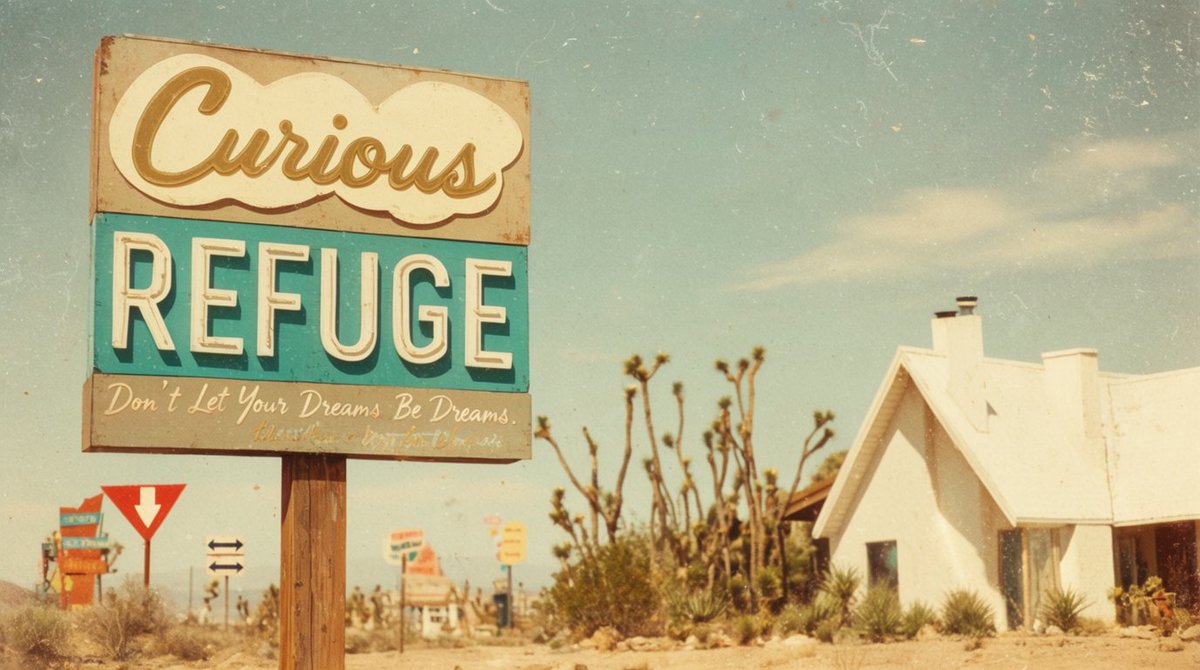
Vintage Desert Refuge Road Sign
A retro cinematic desert roadside scene centered on a weathered custom refuge sign, useful for nostalgic travel, concept art, or poster imagery.
This is a GPT Image 2 prompt case for Landscape & Nature. Use the copy-ready prompt below to generate similar visuals, and review Awesome GPT Image 2 Prompts attribution plus commercial-use rights before reuse.
Free 1K preview
Generate one preview image instantly, no sign-up required.
Prompt
Copy-ready prompt
Create a cinematic vintage roadside photograph in a sun-bleached desert, composed in a wide 16:9 frame with a large weathered motel-style sign dominating the left half of the image and a small white stucco refuge chapel or cabin on the right. The main sign is mounted on two rough wooden posts and has exactly three stacked text panels: a cream cloud-shaped top panel with large cursive script reading {argument name="top sign text" default="Curious"}, a turquoise middle panel with huge off-white block letters reading {argument name="main sign text" default="REFUGE"}, and a faded gray bottom panel with handwritten cursive reading {argument name="bottom slogan" default="Don’t Let Your Dreams Be Dreams."}. Make the sign rusty, chipped, dusty, and slightly faded, with a nostalgic 1960s American desert-road aesthetic. In the background include exactly five smaller roadside signs: one colorful stacked sign far left, one red-and-white yield-style arrow sign, one small black double-arrow direction sign, one blurred orange-and-white sign near the center, and one small yellow sign farther back. Set the scene among dry sand, scrub grass, spiky desert plants, and several Joshua-tree-like branches behind the main sign. The right-side building should be simple, bright white, overexposed by harsh sunlight, with a steep roof, two chimneys, a dark doorway, and desert plants along its base. Use a pale blue sky with wispy clouds, warm golden haze, shallow depth of field, analog film grain, scratches, dust specks, faded colors, slight vignetting, and a dreamy retro travel-postcard look. Avoid modern cars, people, logos, or crisp digital sharpness.Prompt variables
Editable argument placeholders found in the prompt, with their default values.
Best for
- - Landscape & Nature visual exploration
- - Image generation and reference-image edits
- - Reusable briefs that keep source attribution visible
Change these parts
- - Subject, product, character, or scene
- - Aspect ratio, camera, lighting, and background
- - Brand, text, color, and output constraints
Recommended model and settings
- - Model: gpt-image-2
- - Input mode: Text to Image
- - Aspect ratio: source
- - Commercial status: review original source
How to use this prompt
- 1. Copy the prompt and preserve its structure for the first test.
- 2. Replace the subject, context, and publishing channel.
- 3. Change one camera, lighting, or style variable per iteration.
- 4. Inspect the output, source, text, and rights before reuse.
Limitations, source, and reuse cautions
- - Generated output is an editable draft, not factual, legal, or rights evidence.
- - Review the linked source, people, brands, logos, text, and third-party media before commercial use.
More cases in this category
Prioritized by category, input mode compatibility, quality, and lower risk.
Reuse and source notes
Use this prompt safely after previewing the case.
- 1.Copy the prompt or open it directly in Dovoo with the generation button.
- 2.Adjust variables, aspect ratio, and reference images for your own use case.
- 3.Before publishing or paid usage, verify source rights, attribution requirements, and brand or likeness risks.
Can I use this prompt commercially?
Commercial-use status is allowed. Review the original source, license, brand constraints, and legal requirements before paid usage.
Where does this case come from?
This case is imported from Awesome GPT Image 2 Prompts; keep attribution visible and check the source URL before reuse.