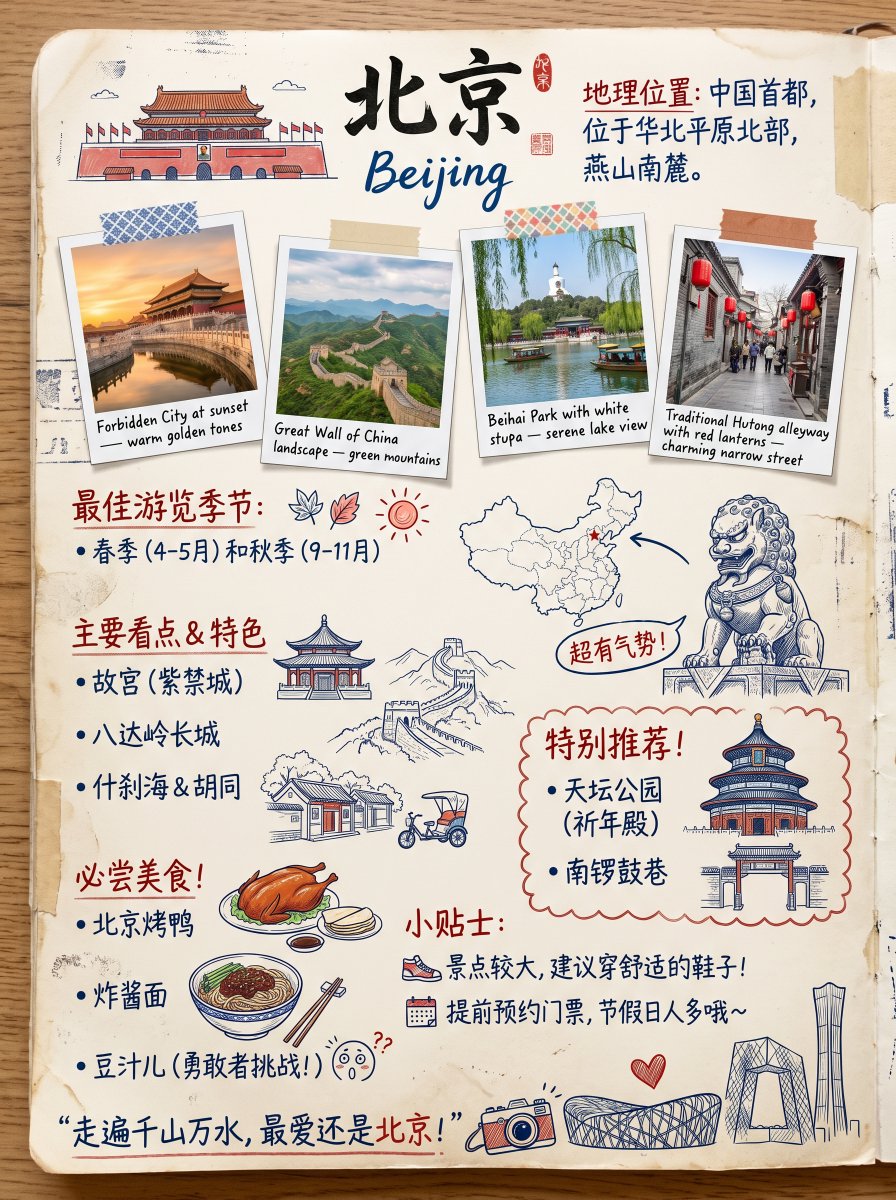
Vintage Beijing Travel Scrapbook Poster
This prompt generates a warm hand-drawn Beijing travel guide poster in a scrapbook infographic style, ideal for tourism artwork, educational city posters, or social media travel visuals.
This is a GPT Image 2 prompt case for Graphic & Poster. Use the copy-ready prompt below to generate similar visuals, and review Awesome GPT Image 2 Prompts attribution plus commercial-use rights before reuse.
Free 1K preview
Generate one preview image instantly, no sign-up required.
Prompt
Copy-ready prompt
Create a charming hand-drawn vintage travel scrapbook poster about {argument name="city name" default="Beijing"}, designed as a Chinese-language illustrated tourist guide page on warm aged paper lying on a wooden tabletop. The composition is a single vertical poster with a slightly worn notebook-page look, soft stains, folded corners, tape marks, stamp-like ink smudges, and a casual collage aesthetic. At the top center, place large bold black Chinese calligraphy for {argument name="city name" default="Beijing"}, with the English word {argument name="english city name" default="Beijing"} underneath in loose blue brush script. Near the title, add a small red seal stamp and a short Chinese text block on the upper right describing the geographic location of the city in dark blue handwritten-style Chinese characters.

Below the title, include 4 taped polaroid-style travel photos arranged in a slightly uneven row, each with a handwritten English caption on the white border. Photo 1: the Forbidden City at sunset with golden reflections and warm orange light, captioned about warm golden tones. Photo 2: the Great Wall winding across green mountains under a bright sky, captioned about Great Wall of China landscape and green mountains. Photo 3: Beihai Park lake with willow branches, boats, and a white stupa in the background, captioned about a serene lake view. Photo 4: a traditional hutong alley with gray brick walls and hanging red lanterns, captioned about red lanterns and a charming narrow street. Use different decorative tape patterns above the photos.

Arrange the lower two-thirds like an illustrated infographic with colorful doodles and handwritten Chinese headings in red and blue. Include 5 main content sections: a geographic description block at the top right; a “best travel season” section on the left with Chinese text recommending spring and autumn, decorated with a leaf doodle and a small sun icon; a “main attractions and features” section on the left-middle listing exactly 3 items in Chinese with bullet points: Forbidden City, Badaling Great Wall, and Shichahai & hutongs, accompanied by line-art sketches of a palace pavilion, the Great Wall, hutong houses, and a small tricycle; a “must-eat foods” section on the lower left listing exactly 3 foods in Chinese with bullet points: Peking duck, zhajiangmian, and douzhi, alongside cute food illustrations of a roast duck platter, a bowl of noodles with chopsticks, and a surprised face doodle; and a “tips” section near the lower middle with exactly 2 advice lines in Chinese, each with a small icon, one about wearing comfortable shoes because attractions are large, and one about booking tickets in advance because holidays are crowded.

Add a small outline map of China near the center-right with Beijing marked by a red star and a curved arrow pointing to it. Place a traditional stone guardian lion illustration on the right side with a comic-style handwritten Chinese callout bubble saying it is super imposing. Add a highlighted recommendation box with a scalloped red outline containing exactly 2 recommended places in Chinese: Temple of Heaven Park with a note about praying for good harvests, and Nanluoguxiang; decorate this box with 2 architectural illustrations, one of the Temple of Heaven and one of a traditional gate building. At the very bottom, include a bold handwritten Chinese quote line in dark blue with red emphasis marks, plus 3 doodles beside it: a retro camera, the Bird’s Nest stadium with a small red heart, and the CCTV Headquarters building.

Overall style: cozy travel journal infographic, hand-drawn pen-and-watercolor look, slightly naive sketch style, scrapbook collage, cream paper texture, muted red and navy blue palette with soft greens and warm browns, playful but informative layout, highly legible mixed typography, clean composition, nostalgic tourism poster feel.
Prompt variables
Editable argument placeholders found in the prompt, with their default values.
Best for
- - Graphic & Poster visual exploration
- - Image generation and reference-image edits
- - Reusable briefs that keep source attribution visible
Change these parts
- - Subject, product, character, or scene
- - Aspect ratio, camera, lighting, and background
- - Brand, text, color, and output constraints
Recommended model and settings
- - Model: gpt-image-2
- - Input mode: Text to Image
- - Aspect ratio: source
- - Commercial status: review original source
How to use this prompt
- 1. Copy the prompt and preserve its structure for the first test.
- 2. Replace the subject, context, and publishing channel.
- 3. Change one camera, lighting, or style variable per iteration.
- 4. Inspect the output, source, text, and rights before reuse.
Limitations, source, and reuse cautions
- - Generated output is an editable draft, not factual, legal, or rights evidence.
- - Review the linked source, people, brands, logos, text, and third-party media before commercial use.
More cases in this category
Prioritized by category, input mode compatibility, quality, and lower risk.






Reuse and source notes
Use this prompt safely after previewing the case.
- 1.Copy the prompt or open it directly in Dovoo with the generation button.
- 2.Adjust variables, aspect ratio, and reference images for your own use case.
- 3.Before publishing or paid usage, verify source rights, attribution requirements, and brand or likeness risks.
Can I use this prompt commercially?
Commercial-use status is allowed. Review the original source, license, brand constraints, and legal requirements before paid usage.
Where does this case come from?
This case is imported from Awesome GPT Image 2 Prompts; keep attribution visible and check the source URL before reuse.