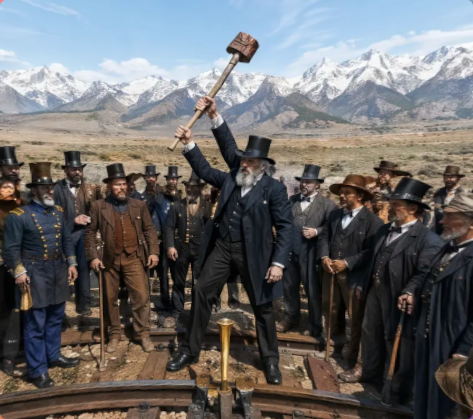
Victorian Railroad Ceremony Scene
Generates a photorealistic 19th-century railroad ceremony with a dramatic central figure, period onlookers, mountains, and a golden spike.
This is a GPT Image 2 prompt case for Portrait & Character. Use the copy-ready prompt below to generate similar visuals, and review Awesome GPT Image 2 Prompts attribution plus commercial-use rights before reuse.
Free 1K preview
Generate one preview image instantly, no sign-up required.
Prompt
Copy-ready prompt
Create a photorealistic historical scene in a wide, cinematic 19th-century style: {argument name="central figure" default="an elderly bearded man in a black frock coat and tall top hat"} stands dramatically at the center on a rough wooden railroad track, legs spread in a triumphant pose, raising {argument name="raised object" default="an oversized sledgehammer"} high above his head with both hands as if about to drive the final railroad spike. Around him are exactly 22 visible onlookers, mostly men in Victorian-era suits, waistcoats, bowler hats, top hats, cowboy hats, and one blue military officer uniform, arranged in a semicircle on both sides of the track; several hold canes or walking sticks, and some faces are partly obscured at the edges. In the foreground, steel rails curve inward toward a bright golden ceremonial spike or coupling fixture positioned between the rails. The setting is an open, arid plain with sparse scrub, backed by a majestic range of snow-covered mountains under a clear pale-blue sky with wispy clouds. Use realistic lighting, crisp documentary detail, slightly humorous surreal scale for the raised hammer, natural earth tones, black and brown period clothing, and a sharp focus on the central pose, resembling a staged commemorative photograph of the transcontinental railroad ceremony in {argument name="historical era" default="the late 1800s"}.Prompt variables
Editable argument placeholders found in the prompt, with their default values.
Best for
- - Portrait & Character visual exploration
- - Image generation and reference-image edits
- - Reusable briefs that keep source attribution visible
Change these parts
- - Subject, product, character, or scene
- - Aspect ratio, camera, lighting, and background
- - Brand, text, color, and output constraints
Recommended model and settings
- - Model: gpt-image-2
- - Input mode: Text to Image
- - Aspect ratio: source
- - Commercial status: review original source
How to use this prompt
- 1. Copy the prompt and preserve its structure for the first test.
- 2. Replace the subject, context, and publishing channel.
- 3. Change one camera, lighting, or style variable per iteration.
- 4. Inspect the output, source, text, and rights before reuse.
Limitations, source, and reuse cautions
- - Generated output is an editable draft, not factual, legal, or rights evidence.
- - Review the linked source, people, brands, logos, text, and third-party media before commercial use.
More cases in this category
Prioritized by category, input mode compatibility, quality, and lower risk.

Reuse and source notes
Use this prompt safely after previewing the case.
- 1.Copy the prompt or open it directly in Dovoo with the generation button.
- 2.Adjust variables, aspect ratio, and reference images for your own use case.
- 3.Before publishing or paid usage, verify source rights, attribution requirements, and brand or likeness risks.
Can I use this prompt commercially?
Commercial-use status is allowed. Review the original source, license, brand constraints, and legal requirements before paid usage.
Where does this case come from?
This case is imported from Awesome GPT Image 2 Prompts; keep attribution visible and check the source URL before reuse.