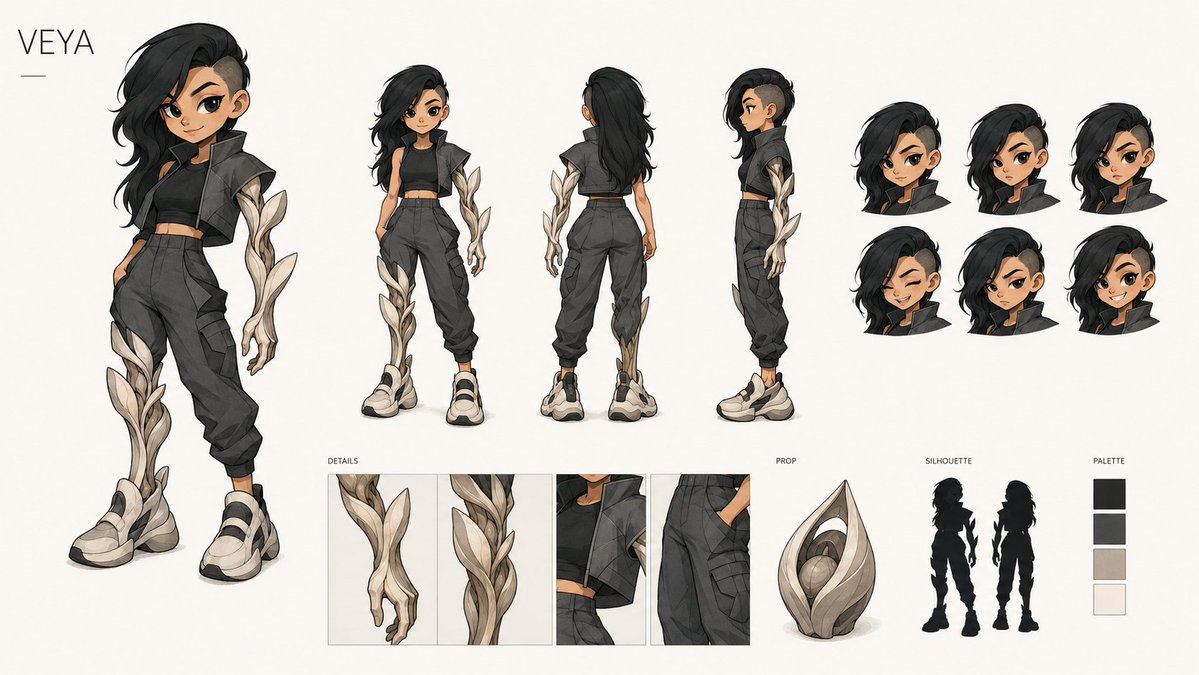
VEYA Character Design Sheet
A wide anime concept art character sheet for a futuristic streetwear heroine with organic ivory armor, multiple views, details, prop, silhouettes, and palette.
This is a GPT Image 2 prompt case for Anime & Game. Use the copy-ready prompt below to generate similar visuals, and review Awesome GPT Image 2 Prompts attribution plus commercial-use rights before reuse.
Free 1K preview
Generate one preview image instantly, no sign-up required.
Prompt
Copy-ready prompt
Goal: Create a polished anime-style character design sheet for {argument name="character name" default="VEYA"}, a futuristic streetwear heroine with organic ivory armor growths.

Canvas: Wide horizontal concept art board, 16:9 aspect ratio, warm off-white background, clean margins, premium game/animation production sheet presentation. Put the name “VEYA” in thin uppercase letters at the top left with a short horizontal line beneath it.

Layout: Show exactly 4 full-body character views across the upper and left area: 1 large dynamic hero pose on the far left, 1 smaller front view, 1 smaller back view, and 1 smaller side view. On the upper right, include exactly 6 cropped head bust studies arranged in a 3-by-2 grid, all showing the same hairstyle from slightly varied angles/expressions. Along the bottom, include exactly 4 labeled detail panels under the label “DETAILS”: close-up of the organic armored hand, close-up of the vine-like leg armor, close-up of the cropped jacket and neck area, and close-up of cargo pants pocket construction. To the lower middle-right, include exactly 1 object under the label “PROP”: a seed-pod-shaped ivory sculptural artifact with layered leaf forms and a glowing round core. To its right, include the label “SILHOUETTE” with exactly 2 black character silhouettes, one front-facing and one back-facing. On the far lower right, include the label “PALETTE” with exactly 4 vertical color swatches: near-black, charcoal gray, warm beige ivory, and off-white.

Subject details: The character is a young adult woman with tan skin, athletic slim build, asymmetrical long {argument name="hair color" default="black"} hair swept dramatically over one side, shaved/undercut on the opposite side, and a confident urban attitude. She wears a cropped black sleeveless top, a short oversized dark cropped jacket or vest with angular shoulders, high-waisted charcoal cargo jogger pants with seams and pockets, a slim belt, and chunky cream-and-black sneakers. Add distinctive organic ivory armor shaped like twisting leaves or branches on one arm and one lower leg, with layered petal-like plates, subtle gray shadows, and elegant botanical curves.

Visual style: High-end 2D concept art, clean ink lines, soft cel shading, subtle watercolor texture, muted charcoal and ivory palette, fashionable sci-fi fantasy streetwear, crisp production-design sheet, no photorealism. Faces should be simplified or softly obscured rather than highly detailed, while clothing, hair, armor, and props remain sharp and readable.

Constraints: Keep the composition uncluttered and balanced; preserve all visible labels in English: “VEYA”, “DETAILS”, “PROP”, “SILHOUETTE”, and “PALETTE”. Use exactly 4 full-body views, 6 head busts, 4 detail panels, 1 prop, 2 silhouettes, and 4 palette swatches. Do not add extra characters, weapons, logos, watermarks, or background scenery.
Prompt variables
Editable argument placeholders found in the prompt, with their default values.
Best for
- - Anime & Game visual exploration
- - Image generation and reference-image edits
- - Reusable briefs that keep source attribution visible
Change these parts
- - Subject, product, character, or scene
- - Aspect ratio, camera, lighting, and background
- - Brand, text, color, and output constraints
Recommended model and settings
- - Model: gpt-image-2
- - Input mode: Text to Image
- - Aspect ratio: source
- - Commercial status: review original source
How to use this prompt
- 1. Copy the prompt and preserve its structure for the first test.
- 2. Replace the subject, context, and publishing channel.
- 3. Change one camera, lighting, or style variable per iteration.
- 4. Inspect the output, source, text, and rights before reuse.
Limitations, source, and reuse cautions
- - Generated output is an editable draft, not factual, legal, or rights evidence.
- - Review the linked source, people, brands, logos, text, and third-party media before commercial use.
More cases in this category
Prioritized by category, input mode compatibility, quality, and lower risk.

Reuse and source notes
Use this prompt safely after previewing the case.
- 1.Copy the prompt or open it directly in Dovoo with the generation button.
- 2.Adjust variables, aspect ratio, and reference images for your own use case.
- 3.Before publishing or paid usage, verify source rights, attribution requirements, and brand or likeness risks.
Can I use this prompt commercially?
Commercial-use status is allowed. Review the original source, license, brand constraints, and legal requirements before paid usage.
Where does this case come from?
This case is imported from Awesome GPT Image 2 Prompts; keep attribution visible and check the source URL before reuse.